Content Creator's OS
Added 2023-09-01 00:37:43 +0000 UTC
Experience the fusion of creativity and data-driven insights. Elevate your YouTube presence with the YouTube creator's OS in Notion and redefine how you conquer the world of online content.
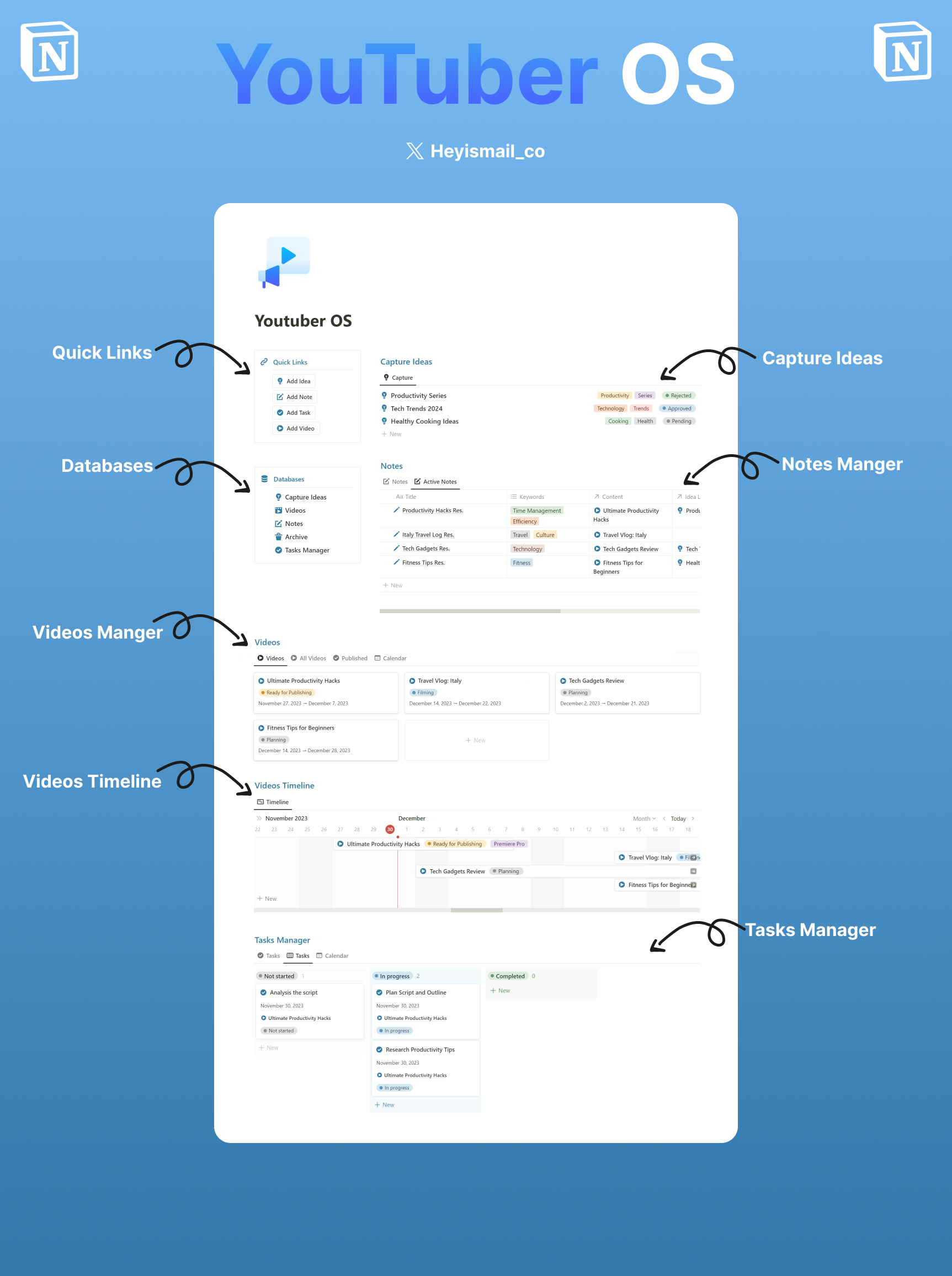
📌 Youtuber OS
-
Ideas Capture Database:
-
Capture Ideas On-the-Go: Quickly log new video ideas with titles, descriptions, and categories.
-
Visual Reference: Include thumbnails for a visual reference to quickly identify and explore potential video concepts.
-
Notes Database:
-
Detailed Insights: Record in-depth notes, research findings, and key details for your video concepts.
-
Link to Ideas: Easily connect notes to the relevant video ideas for a holistic view.
-
Videos Database:
-
Efficient Planning: Schedule filming and editing dates, and set publish dates for seamless video production.
-
Centralized Information: Link videos to associated ideas, notes, and even analytics for comprehensive management.
-
Tasks Database:
-
Task Management: Break down video preparation into tasks with due dates, assigned team members, and progress tracking.
-
Link to Videos: Associate tasks directly with the specific videos they pertain to for clear workflow management.
Revamp your YouTube content creation process with these Notion templates. Streamline idea generation, research, task management, and more. Elevate your efficiency and creativity in every step of your video production journey.
📌 Content Creator Planner Template
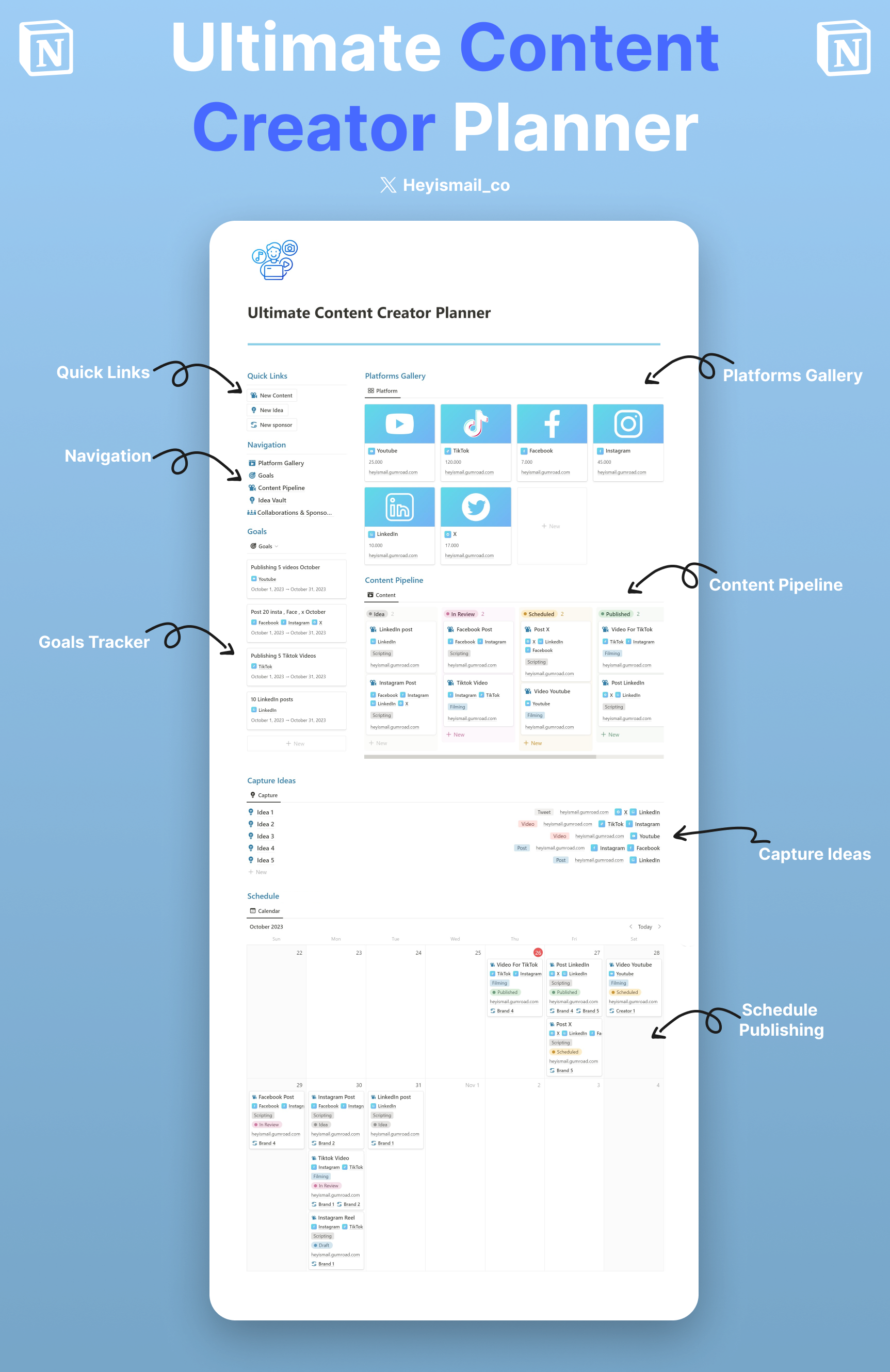
💡 Overview: The Content Creator Planner is a meticulously crafted Notion template designed for influencers, bloggers, vloggers, and every content enthusiast in between. If content is your passion or profession, this planner is your compass.
🚀 Features:
-
Platform Database: Organize and streamline your content across multiple platforms – from Instagram reels to YouTube videos, keep everything in one place.
-
Idea Vault: Never let a content idea slip away again. Whether it's a midnight epiphany or a suggestion from a fan, catalog it instantly.
-
Production & Publishing Workflow: From inception to publication, track the lifecycle of your content. Know what's being edited, what's ready for release, and what's live.
-
Goals & Milestones Tracker: Set monthly goals, track your progress, and celebrate your milestones. Whether it's hitting 10K followers or publishing 30 posts a month, stay on top of it.
-
Collaborations & Analytics: Keep tabs on brand partnerships, monitor content performance, and make data-driven decisions.
✨ Benefits:
-
Clarity: See your content strategy from a bird's-eye view or dive deep into details.
-
Productivity: Say goodbye to scattered tools, apps, and notes. Everything is now in one cohesive space.
-
Flexibility: Tailor the template to your unique workflow. Whether you're a solo creator or manage a team, it adjusts to your needs.
💼 Perfect For:
- Bloggers
- YouTubers
- Podcasters
- Social Media Influencers
- Digital Creators of all types
🔗 Instant Download & Easy Setup: Once purchased, you'll receive a link to access your template. Just import it into Notion, and you're ready to go!