Knowledge Hub
Added 2023-08-30 00:36:11 +0000 UTC
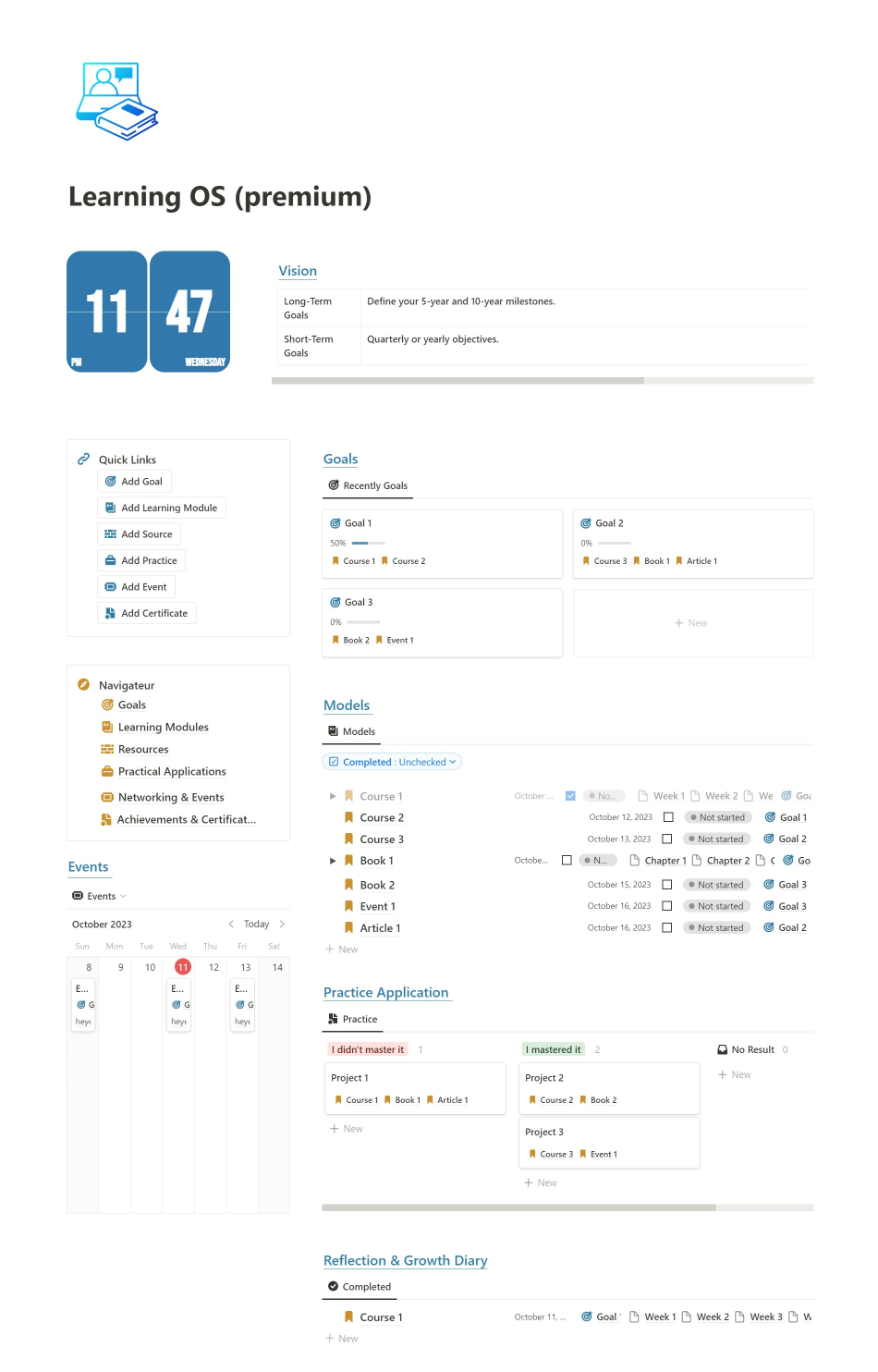
The "Learning OS" Notion template is more than just an organizer—it's a comprehensive system that nurtures active and reflective learning. It assists users in setting clear goals, staying informed, and maintaining momentum, ensuring that every learning opportunity is maximized.
"Learning OS" for Notion:
Overview: The Learning OS is an integrated digital platform aimed at enhancing the user's educational journey. Leveraging the power of databases, this template provides a structured and visual approach to manage, track, and plan various learning endeavors.
Features:
-
Objectives Database: An actionable table recording individual learning goals and objectives. Each entry can specify target completion dates, current status, and progress percentage.
-
Resources & Materials Database: A repository of all learning materials—books, online courses, articles, and more. Users can annotate with notes, track progress, and even link back to specific objectives.
-
Study Schedule Database: An interactive calendar to plan study sessions. It connects to the resources, allowing users to allocate time for specific chapters, modules, or lessons.
-
Notes & Summaries Database: A dedicated space for consolidating insights, summarizing key takeaways, and jotting down queries. It can be linked to specific resources for better context.
-
Reflection & Review Database: Encourages periodic reflection on the learning journey. Users can highlight accomplishments, challenges faced, and plan next steps.
-
Achievements & Rewards Database: A motivational tool, letting users record milestones reached and rewards to look forward to upon reaching certain goals.
-
Contacts & Collaboration Database: If learning is collaborative, this section can have mentor details, group study partners, or anyone else involved in the learning process.
Design & Usability: Visually intuitive with icons, progress bars, and color-coding to provide quick insights. Each database can be viewed in multiple formats, like tables, kanban boards, calendars, or lists based on user preference. The interlinking of databases ensures that information flows seamlessly, and users can jump from one section to another with ease.
Benefits: This Notion template goes beyond just organizing—it seeks to amplify the learning experience. By integrating planning, tracking, reflection, and motivation into one cohesive space, it ensures that learners remain proactive, informed, and inspired throughout their journey.
Thank you so much for purchasing the " Minimalist Knowledge Hub "!
Step 1: Open the template.
Step 2: Duplicate the template.
Click on the duplicate icon on the top right corner to duplicate the template.

If you're on mobile, click on the 3 dots menu to show the duplicate option.
Step 3: Dive into your template.
Start using your template now and see where your creativity takes you.
A Small Favor...
I'm grateful for your purchase and would love to hear your thoughts. If you're happy with the template, please consider leaving a 5-star rating to help others discover it.

Have a Question?
If you need help or have more questions, simply send an email to heyegarouri@gmail.com . Follow me on X ismail
Thank you once again for your trust and happy learning!