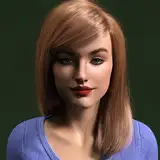
Oh janette, we’ve been through a lot, haven’t we? if you are reading this like wtf is this b1tch talking abt, let me give you some context. Janette was originally a comission but like what happens with almost ALL comissions, the comissioner likes smth i dont. so what do i do in those cases? i just save the first draft so i can look at it while i make the changes in another sim. (tragic, ik) luckily this comissioner gave me permission to upload her sim but i still decided to upload the unedited version just as a matter of respect ♡
i hope you like her as much as i do!
as always, lmk down below what you think!
-1 sim, everyday outfit only, all cc included.
-I added their makeup in every outfit bc i know its so tideous and ily <3
some ground rules:
do not- claim them as your own
do not- upload them anywhere for download
do- (if u end up downloading and using them) @ me so i can see them! (feel free to change wtv you like)
do- lmk if you have ANY problems :)
if cc creators want me to link their cc, pls lmk and i'll do so!
ENJOY!!
-------------------------------
Valeriawhips
2024-03-27 18:01:20 +0000 UTClexi phillips
2024-03-27 15:01:24 +0000 UTC