
RetroArch 1.9.8 has just been released.
Grab it here.
If you’d like to learn more about upcoming releases, please consult our roadmap here. The next version of Lakka (with an updated RetroArch 1.9.8 version) is scheduled to be released a week from today.
Remember that this project exists for the benefit of our users, and that we wouldn’t keep doing this were it not for spreading the love to our users. This project exists because of your support and belief in us to keep going doing great things. If you’d like to show your support, consider donating to us. Check here in order to learn more. In addition to being able to support us on Patreon, there is now also the option to sponsor us on Github Sponsors! You can also help us out by buying some of our merch on our Teespring store!

We added support for OpenDingux before for JZ4770-based handhelds. After this, we added support for RetroMini RS-90 devices.
And now thanks to Poligraf, we have a working build for all the JZ4760-based handheld devices running RetroFW. RetroFW is a Dingoo based firmware runnin on the MIPS 4760 which is around 50% the speed compared to other devices running Opendingux.
Which devices does this cover?
A full listing can be found here.
We have been told these cores all run well on the hardware.
All of these low powered handheld devices help us tremendously in optimizing our cores for the low end spectrum of hardware devices. gpSP, PCSX ReARMed and Picodrive are already starting to reap the benefits of it.
We are going to be making a persistent effort now to enhance RetroArch’s UX and lower the acessibility curve. To that end, we now have also implemented core option categories support.
Up to this point, every core option in a core (Quick Menu -> Options) has all been shown in a a flat alphabetical list. Users can quickly get confused if they have to scroll down a massive list of options.
So, 1.9.8 finally adds core option categories. Options assigned to a category will be displayed in a submenu of the main core options menu on supported frontends. For example – here we assign Gambatte’s mulitplayer options to a Game Boy Link category:
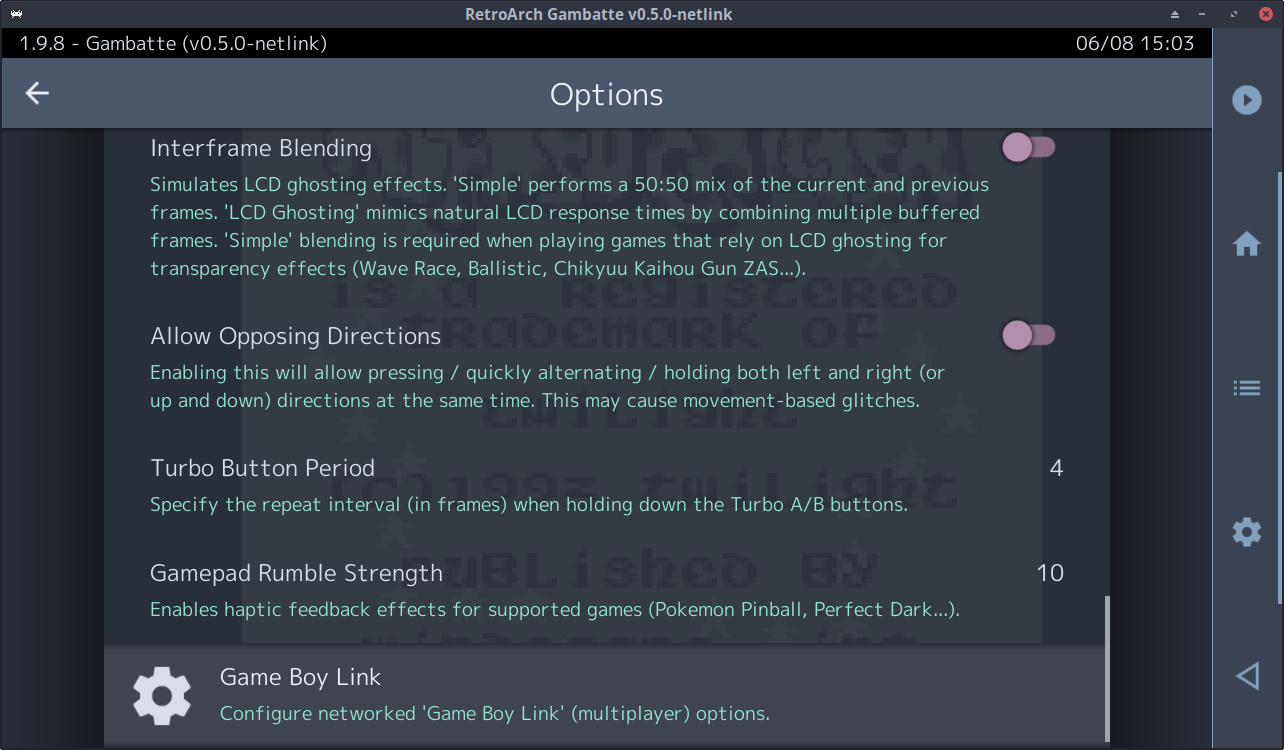
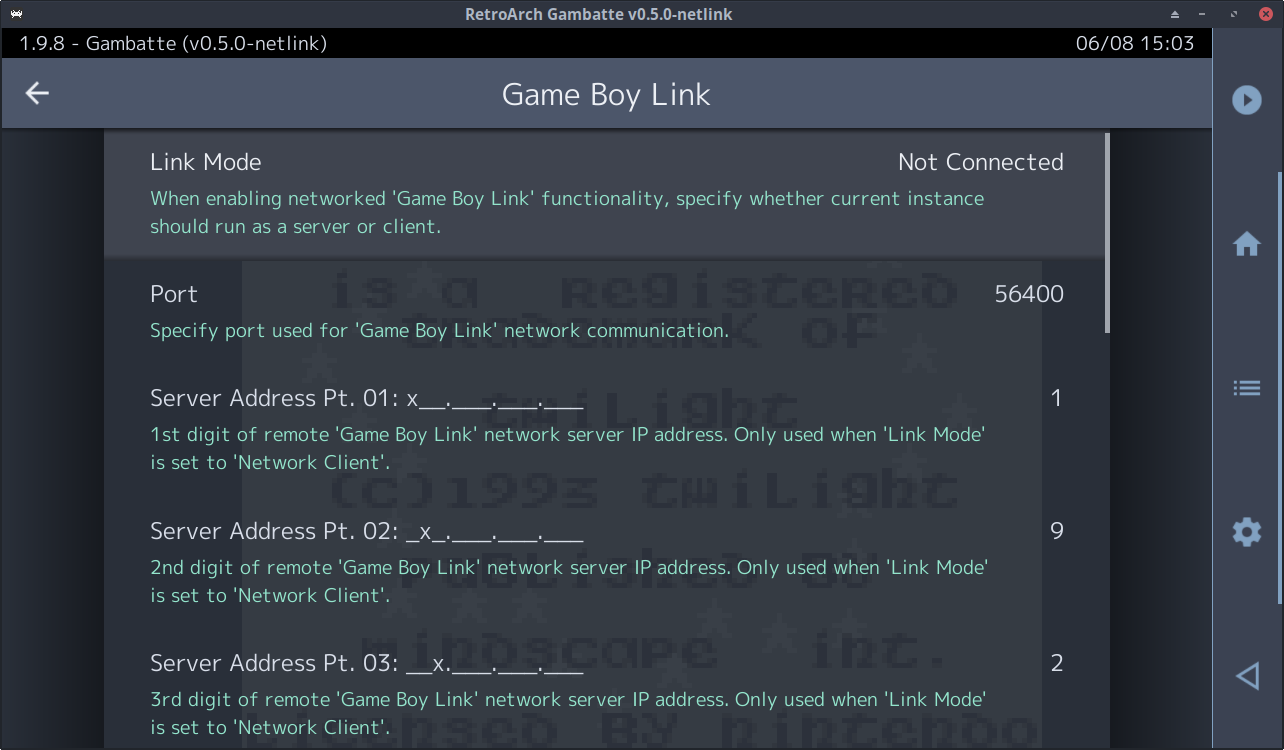
If you do not like this new behavior, there are always options to turn it off. Go to Settings > Core > Core Option Categories setting (enabled by default). When disabled, core option categories are ignored, and core options will effectively be displayed using the old v1 format.
Core option categories have to be specifically added per core. Some of the cores that already support core option categories are as follows:
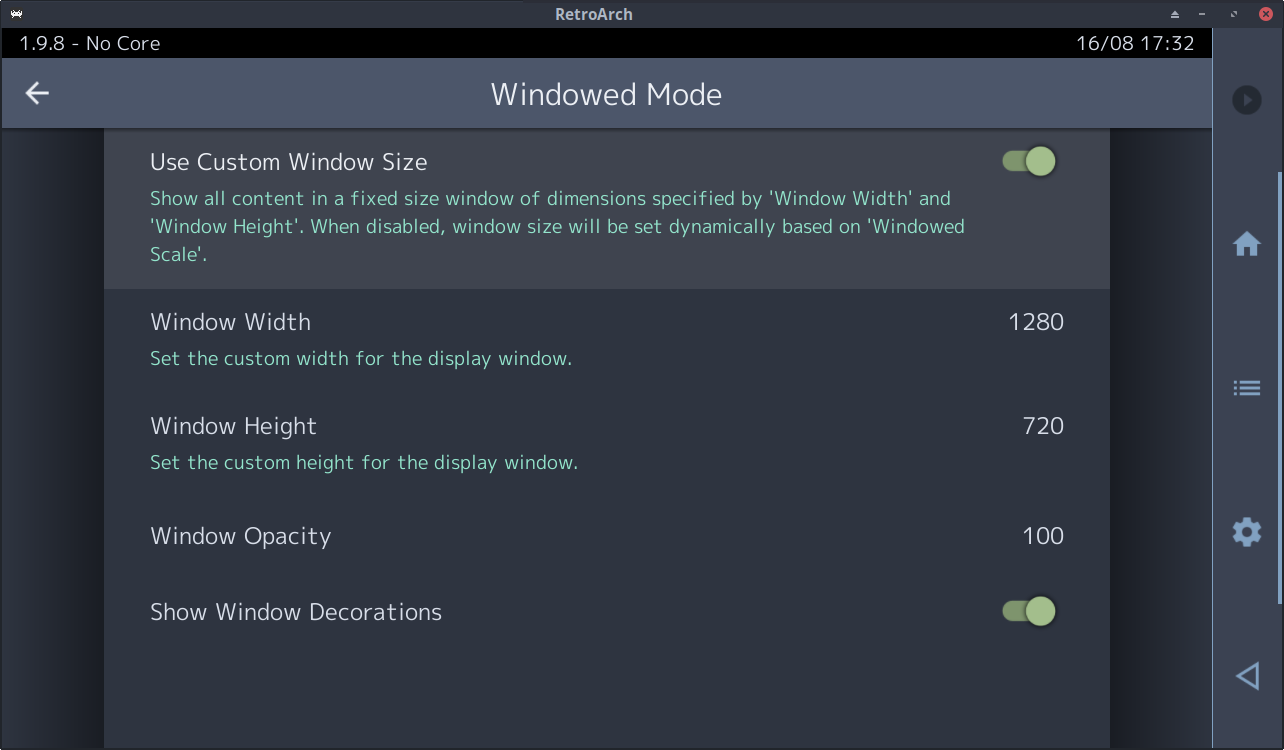
Have you ever noticed RetroArch starting a game in windowed mode and then blowing up the window to ridiculous sizes that exceeds the boundaries of your desktop? Well, we now have a solution for that!
At present, when RetroArch is in windowed mode with Remember Window Position and size disabled, the window size will be equal to the core provided base_width/base_height multiplied by the Windowed Scale. This is potentially ‘catastrophic’: if a core has a very large base_width/base_height (e.g. PPSSPP with a x7 internal scale factor) and Windowed Scale is set to the default x3, then the window size can be enormous – potentially exceeding the capacity of the host GPU and causing RetroArch to crash.
1.9.8 adds two new options:
The PR also cleans up the Settings > Video > Windowed Mode menu, auto-hiding options where required, and re-initing drivers when toggling Remember Window Position and size. Also, since the ‘remember’ part of Remember Window Position and size is only enabled for Windows, an alternate Use Custom Window Size is provided on other platforms.
Cores are able to show or hide their options via the RETRO_ENVIRONMENT_SET_CORE_OPTIONS_DISPLAY callback on supported fontends. A significant shortcoming here is that if a change to one core option (via the frontend) affects the visibility of another option, the frontend cannot update the menu state until the core has run for at least one frame. So with the core options menu open, visibility updates cannot happen in real-time – instead, the user must toggle the quick menu off then on before the menu will change. This is ugly and confusing.
1.9.8 adds a new RETRO_ENVIRONMENT_SET_CORE_OPTIONS_UPDATE_DISPLAY_CALLBACK environment callback which allows the core to register a function that enables the frontend to (a) force a core-side option visibility update and (b) allows the frontend to check whether option visibility has changed. This means all show/hide operations can now generate real-time menu updates.
Plenty of important fixes for Windows users.
If you experienced lockups in the past when disconnecting an audio device while using the WASAPI audio driver, well, rejoice, this will no longer happen.
Simultaneous shift sticky fixes were made to the DirectInput input driver. Dinput would not send WM_KEYUP for both Shifts if they were pressed together and released, resulting in sticky Shifts
= Pinball games ruined in DOSBox.
The following fix was made to the Windows RawInput driver – the Left Alt key could get stuck when Alt-Tabbing. No more. The keyboard can now also be mapped to analog input axes, meaning you can bind the left and right analog stick on the RetroPad to your keyboard keys.
1.9.8 solves the flickering issues that appear in the cores that use the FRAME_SKIP as Snes9x2002 does.
Also, 1.9.8 basically mounts HDD partition if RetroArch actually started from the HDD unit.
In this way, we skip the mount partition if the user just wants to use USB.
Plenty of important fixes for macOS users this time!
There were several serious memory leaks with the Metal video driver. These have now been fixed.
Serious bugs related to the input autodetection subsystem have finally been fixed. Now when you connect a gamepad, it will no longer try to attach the same pad to two controller ports simultaneously. This has been a longstanding bug that we’re glad has finally been consigned to the dustbin of history thanks to the help of a generous contributor who did quite some work to delve deep into this issue. We also made sure everything still works across a wide variety of macOS machines (from a PowerPC Mac running OSX 10.5 to an Intel and ARM Mac running more recent macOS versions).
Lots of improvements have been made once again to the WiiU port.
All the libretro RPX cores are now compressed. Not only do they load faster (leading to faster startup times), but it means you have a lot more space left on your SD card.
L3 and R3 buttons have been fixed on several gamepads, they were previously completely nonfunctional.
Furthermore, promising work is underway for a PlayStation1 emulator core running on RetroArch WiiU. More on that later once more news is forthcoming.
We have been fixing several bugs with the UWP port, many of these affecting in particular RetroArch users on Xbox One/Series.
Microsoft recently released a new Dashboard update that caused some breakage for existing RetroArch installs.
We have managed to fix the startup problem that occurred on the latest dashboard. We also fixed the onscreen keyboard display which was previously completely glitched out.
Note that on the latest Dashboard, some compatibility problems still persist. For instance, it has been reported that several games on PCSX2 no longer work as of the recent update. This will require investigation and it is our guess if anything can be done about this, we will have to determine this after more investigation has occurred. For now, you might experience scaling issues with some of the ANGLE/GL powered cores like Mupen64Plus Next and Flycast because of the Dashboard update. We hope that we will be able to transition from ANGLE to something like GLon12 soon. What this would buy us is full desktop OpenGL support instead of just OpenGLES. This would mean a more complete superset of OpenGL (up to 3.3 from what we can hear), more cores that would work out of the box instead of custom cores made to work with ANGLE, etc. We will see if we succeed in this, but that’s something for a later version.
In the meantime, we have also enabled Translation features. Note that we haven’t been able to implement the Text-to-Speech accessibility feature yet, but all other features should be there now for experimentation.
We have also re-enabled the “Explore” tab on the Main Menu. We haven’t found any issues with this anymore after the recent bugfixes/improvements we made to the underlying database code, but let us know if there are any more issues on that front.
Several cores that used the libretro VFS subsystem and/or CHD loading previously no longer worked. Examples include the Beetle cores. This has been fixed.
Currently the “Screen Resolution” list wrongly alters also video_refresh_rate to the rounded value, as in 59.940 Hz becomes 59.000.
This change makes sure all the 59.94 multiples (59/119 etc) result in the proper float value instead of integer.
Also, previously notifications when setting the refresh rate would repeat itself twice. This has been fixed.
1.9.8
It has been often requeste during our project’s history, but yes, we finally want to do something on the UI/UX front. We have been considering introducing an ‘Easy Mode’ that should aim at making things much less of a maze to navigate for non savvy users.
Mark Balcerak
2021-08-25 16:47:37 +0000 UTCThe Libretro Team
2021-08-23 14:01:47 +0000 UTCMark Balcerak
2021-08-23 13:51:06 +0000 UTC