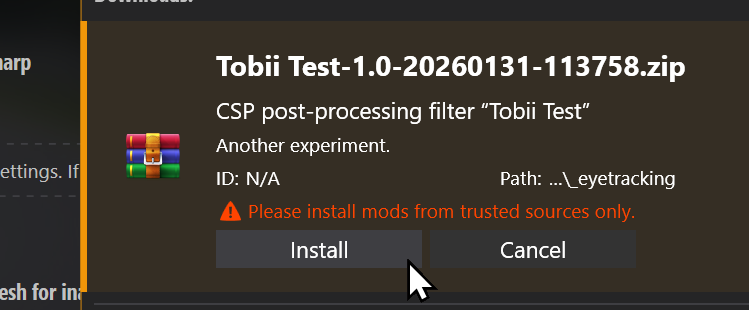
Sadly, it looks like we’re starting to see some bad-faith modders in the community. So, I thought I’d make a small post with a few recommendations, and work on making CSP a bit safer.
First of all, please keep an eye on the type of content you’re installing, and if you’re not using Content Manager to install a mod (or if it’s being installed as a generic mod), glance through the files to see what actually is being added. If it’s something like a new car, or something else contained within the “content” folder, it’s perfectly safe. But if a mod adds anything to “apps”, “extension”, “launcher”, “plugins”, “server” or “system”, or if it includes any DLL (or EXE for you to run), such a mod can, potentially, do anything it wants on your system, so please check those mods thoroughly. Especially if it’s a stolen mod: those are sometimes repacked by third parties, so some of the files might be edited.
With the original Assetto Corsa, there are plenty of ways a mod could add its own logic. Apart from obvious stuff like including its own version of Reshade DLL or adding a new Python app, they could also alter launcher logic, add a new AC plugin, adjust one of JS files loaded by the original launcher, swap Python libraries (either standard or AC ones). And, to be clear, the original Python apps of Assetto Corsa can do anything they want. If anything, they can do a whole lot more compared to Lua apps, but those also have pretty much no limits. And when it comes to this type of thing, if a script can as much as simply save a file somewhere within the Assetto Corsa folder, that’s already more than enough to compromise data files.
Now, Custom Shaders Patch adds a lot of other types of scripts for all sorts of tasks. Ever since adding script support to Content Manager (which allowed us to have much nicer, if static, weather conditions back in the day), I was always fascinated by how much flexibility can be achieved with a simple Lua script. But, the way the whole thing is currently set, those scripts aren’t a weaker alternative to Lua apps. If anything, Lua apps are the weak ones, with delayed loading, and sometimes loading skipped altogether. A specialized script — such as Pure (a great WeatherFX style by Peter Boese) — loads first, and has full access to your file system and other processes! So, all the scripts you’re installing explicitly (with CM warning you about potential dangers), and going to CSP settings to enable explicitly — including post-processing scripts, GamepadFX scripts and more — all can do pretty much anything. That’s how Pure can edit configs and load extensions, how Curved Monitor filter can export settings, it allows for Mobile GamepadFX script to exchange data with the phone, or for Wooting keyboard script to read analog values from those keyboards. It also allows for traffic mode to load missing assets, and more.
There are only three exceptions: car scripts (both regular and physics), track scripts and, of course, online scripts. Those are the scripts you might not be aware of installing, and they are fully sandboxed and can’t really do anything like saving files.
In the next update, I’ll add something for CSP to ask each time before starting a new script with full files access, and something for scripts to opt-out of that access. But even with that addition, I ask you to still be cautious — a malicious mod could always find a way to circumvent some of these protections, like replacing a config of another mod changing its behavior in a potentially threatening way. Using Content Manager to install mods and keeping an eye on its warnings should be enough though.
For extra safety, I’m also going to add some settings for blocking out scripts entirely, and maybe something that would prevent sandboxed scripts from accessing the internet (although, that might break some things like Android Auto or online scripts).
With that out of the way, I’d like to show a thing or two we’ve been working on. If things go according to plan, the next update should be ready in a week or two, but why not hype things up a bit earlier too, if I’m already making a post.
First of all, live car swaps! It’s still far from the final version, and still has a lot of limitations, but it might already be useful for remote cars online, allowing for servers where drivers don’t have to choose an entry slot, but either, any car of the list of allowed. Later, of course, we’ll push this idea further, with loading missing content on demand, and allowing to change cars live while staying connected to the server, but it’s already an interesting start. And here is a small demo video of its current state (note, however, that for this video to work, I had to disable extended physics entirely, as it’s not fully compatible with live reloading yet). And, there are still some limitations, such as rain occlusion not being calculated for newly loaded cars, or occasional performance hiccups during some of loading stages, but I believe most of it will be solved soon (and if we’re talking about live swapping remote cars, we don’t really have to load them in their entirety too, so some performance improvements could be achieved there too).
Another interesting addition is a bunch of extensions to New Mode scripts, allowing them to kind of do their own online sessions. Basically, a script can be set in a way where it adds a few dummy “remote” cars in disconnected state, and then, once in-game, start feeding Assetto Corsa their actual state. There are many possible uses for something like this, like taking a real-life car telemetry and applying it to a virtual car — you could already do something similar with a ghost, but this way you’d have audio, collisions, effects and such — or, for example, to set up an entirely alternative online implementation! As an example of it, I’m working on a new mode with some basic one-on-one driving, connecting clients directly to each other without a server. The whole thing originated when SLX had an idea to use the Steam API for some peer-to-peer racing, so if you’re interested, make sure to check out his Patreon, as he’s working on something a lot more advanced.
Custom physics will see some additions as well, with a new physically-based multilayer finite element tire thermal model under development (correlation example below), hysteretic damping for tires, asymmetrical setup defaults for COSMIC suspension, and many other features in the works.

Thank you for your continuous support, and your patience! The next update is coming soon, and more cool features will be coming shortly after.
Cor
2026-03-02 22:30:35 +0000 UTCAnthony Calabrese
2026-02-28 17:54:33 +0000 UTCzets
2026-02-21 14:17:06 +0000 UTCMikuláš Sedláček
2026-02-21 14:01:03 +0000 UTCpriba_
2026-02-16 01:31:34 +0000 UTCJustin Muntean
2026-02-16 00:23:31 +0000 UTCShay-Marie Smith
2026-02-15 21:36:12 +0000 UTCAlex Spin
2026-02-15 19:53:49 +0000 UTCclem333
2026-02-15 15:16:56 +0000 UTCk
2026-02-15 10:30:44 +0000 UTCTomas Vabalas
2026-02-15 07:42:09 +0000 UTCDagger
2026-02-14 22:05:42 +0000 UTCLightning1980
2026-02-14 20:56:55 +0000 UTCJay Sysum a.k.a Rat Master 3
2026-02-14 16:56:09 +0000 UTCJay Sysum a.k.a Rat Master 3
2026-02-14 16:55:17 +0000 UTCBIG SMOKE
2026-02-14 16:36:50 +0000 UTCAlex Spin
2026-02-14 01:53:38 +0000 UTC