Hello everyone,
A lot of people have mentioned to me that they are still unclear on how to find the FANCARD or the uncompressed password. In this post I will upload a visual guide for everyone to find the FANCARD and the password on it.
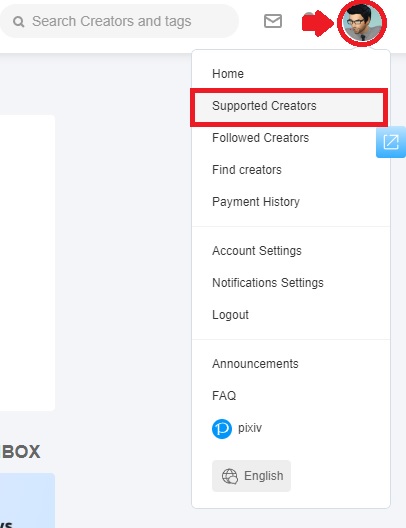
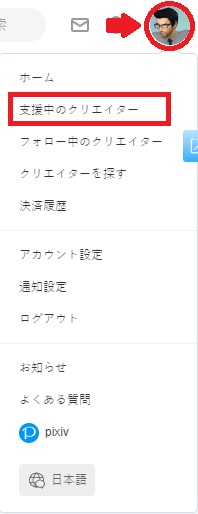
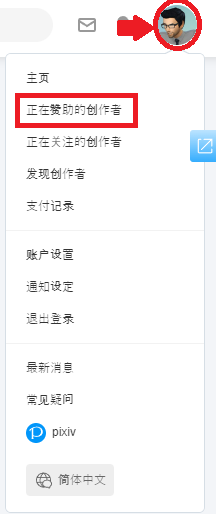
1. Press your icon on the top right corner of the FANBOX web and choose “Supported Creator”
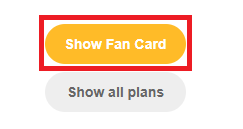
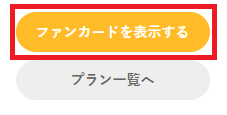
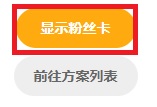
2. In the new page, find my info card and choose “Show Fan Card”
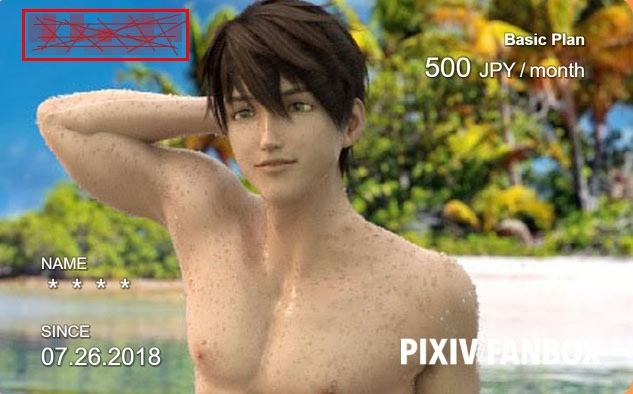
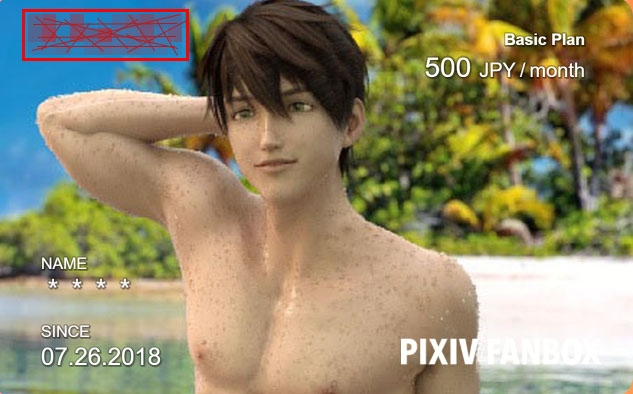
3. Your Fancard for my FANBOX will be shown and on it look for the red words – they are the uncompressed password.
皆さん、こんにちは。
多くの方から、ファンカードや圧縮されていないパスワードの見つけ方がまだ不明であると言われました。この記事では、ファンカードとそのパスワードを見つけるためのビジュアルガイドをアップロードします。
1. FANBOXのウェブ右上にある自分のアイコンを押して、"支援中のクリエイター "を選択する。
2. 新しいページで、私の情報カードを見つけ、"ァンカードを表示する" を選択します。
3. あなたのFANBOXのファンカードが表示されますので、赤い文字を探してください。
大家好。
很多人向我提到,他们仍然不清楚如何找到FANCARD或未压缩的密码。在这篇文章中,我将为大家上传一份直观的指南,以便找到FANCARD和上面的密码。
1. 按FANBOX网页右上角的图标,选择 "正在赞助的创作者"
2. 在新页面中,找到我的信息卡并选择 "显示粉丝卡"
3. 你的我的FANBOX的Fancard将被显示出来,在上面寻找红色的字 - 它们是未压缩的密码。