XaiJu
IanHubert
IanHubert

patreon


Modeling an ol' CRT Television

You guys!! Thank you all so much for your kind words yesterday! They meant a lot. :D

So this is a random asset I've wanted to have more than once, so I finally just made one! I once again apologize that I seem to never be able to remember to turn on keycasting. 

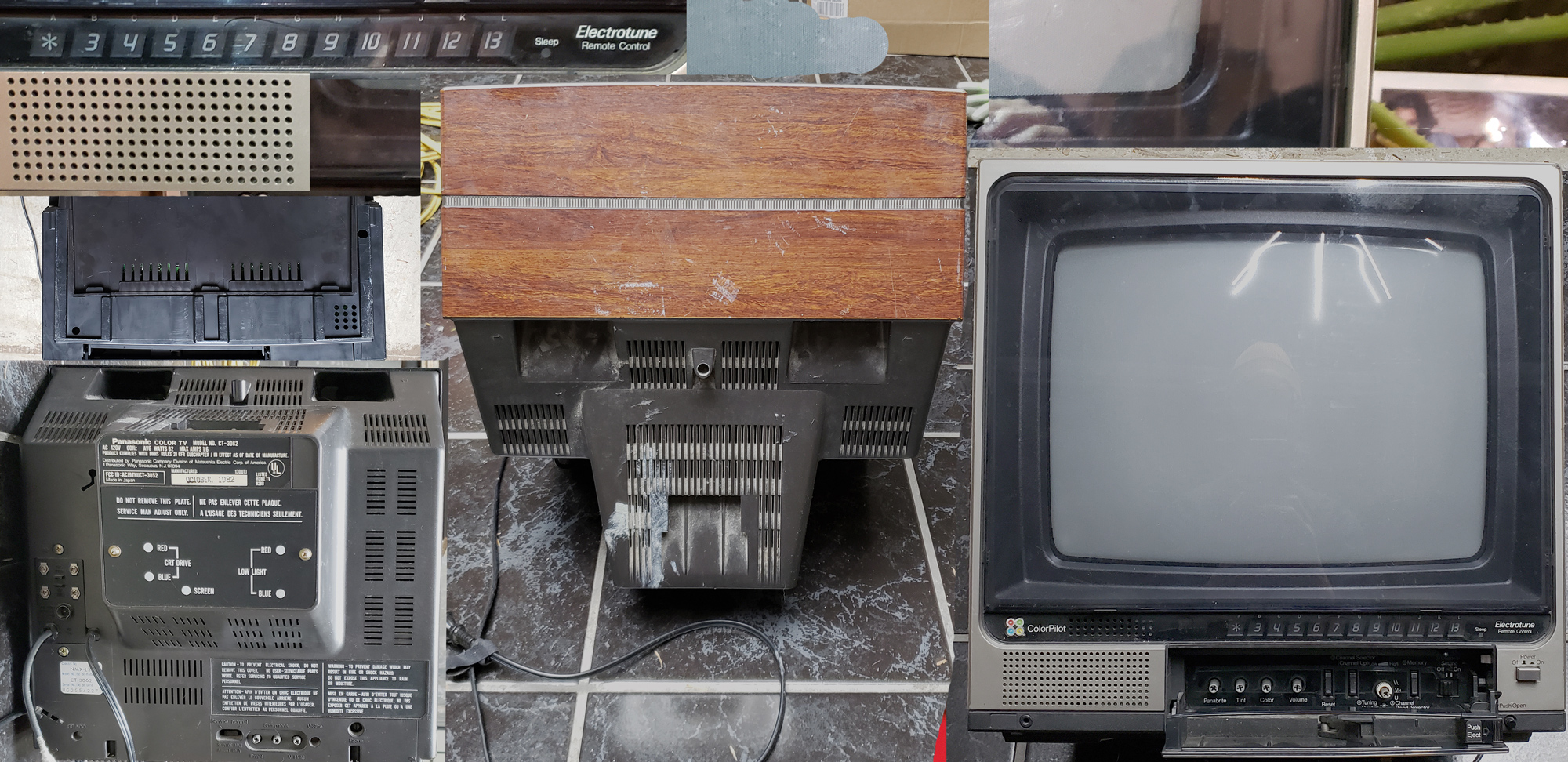
Here's the TV texture, if anyone feels like trying it out for themselves. Honestly some of that random plastic vent stuff could be really useful for mocking up random stuff. 

And this is the scene I ended up making last night. It wasn't really supposed to be this (I was just trying to model a quick interior, the view from which was the scene I posted yesterday), but I really liked the idea of the static outside the window, so I ran with it. 


Modeling an ol' CRT Television

Comments

if you were going to do this today, would you just do the iphone scan like youve been doing a lot recently?

One solution to the inset overshoot issue is to do an extrude instead and let it go and scale it afterwards or just inset it a bit to before where it becomes a jumbled mess and scale it the rest of the way. Anyways, new subscriber going through the backlog and loving every minute of it! :)

Did you make other stuffs (CCTV, Paper towel dispenser) with image texture like you did with TV?

This tutorial really rocks, thanks a lot. Oh, and please, never stop ranting while you work, that's part of what makes your tutorials so amazing and unique ;) And yes, the text behind the speaker is a really rare french-ish dialect of spanish I don't even know (despite being spanish), haha

Mornarion

Thanks Laurie.

in the material settings make sure you have alpha blend on the blend mode :)

Dear Hubert community,i'm strugeling with somthing. My textures appear translucent in EEVEE. in this exercises. No problem in Cycles.I'm using blender 2.83

Great stuff. Suggest using a polarizing filter in front of the lens when taking the reference pictures. Then u can cut the reflections u dont want.

JØRGEN WETAAS BULL

hey I have 1 stupid question how you pack those images and not losing resolution I'm stuck with that for an hour now lol

Ah yeah, that's just a random addon, "AE2Blend". i should probably deactivate it in the workspace when I'm not using it, but I forget sometimes. It's a useful addon, though, if you're ever trying to copy tracking data from after effects to blender!

Ian Hubert

Why Ian got an extra panel under the "T Panel" ? (the panel that it's in the left side of the viewport) is this an addon or something like that? Thank you very much!

Oh! Totally, yeah!

Ian Hubert

It it alright to use the texture for a game I’m working on? I really needed a CRT I’ve made it now and just want to check it’s alright to use?

It’s cool hearing you think it out

Griffin Toal

Thank you! Love it. Very helpful to sort out how to use this technique on smaller items before moving to something like a building facade. I'd love to learn to use edge loops more efficiently like in your post apocalyptic lazy tutorial modeling that building. Thanks again!

Edward Cunningham

Thanks

I've got a GTX1080 and a threadripper CPU and 32 gigs of ram, I think- so it's a hefty machine, but nothing too insane :) If you're working with blender, having a CUDA GPU is great (maybe that's changing soon? I have no idea, actually).

Ian Hubert

You've angered the topology gods

what would you recommend?

what are your PC specs?

Great tutorial Ian, thanks!!!

Phillip Park

Awesome video Ian, thank you! If I may make one suggestion, sometimes key casting isn’t on so it’s hard to follow along or know what buttons you’re pressing. I’m not saying we need a button step by step but either saying what buttons or having key casting on would help a ton!

Man watching these at 2X is an Experience™ :D

Olof Friström

Ah! Very glad to have you here! Yeah! I keep meaning to make a tut (actually, sort of tried today)- although it'd be pretty identical to a lot of the other tuts out there. Meshroom is pretty popular (it's free! And open source, I believe?) but can give great results, but it can also be a bit wonky. I've been really happy with RealityCapture. It's fast, and can get great results from just a few pictures. Their weird "pay-per-image" process, while surprisingly cheap, is a little bit of a pain in the ass (I tried to scan a thing today, and I had to "log in" 3 or 4 different times.)

Ian Hubert

Haha! You are tooooootally right. I always assumed it was to keep as much of the screen equidistant from the cathode ray gun? And honestly a curved piece of glass under a flat piece of plexi is such a cool visual just in itself that I'm kicking myself for not adding it now. If I were to add it, I think the easiest way would probably be to delete the screen as it is, and just model a new one from scratch so there's easier control over edge loops (the knife tool isn't great for keeping edge loops, haha)

Ian Hubert

Excellent stuff Ian, you are always an inspiration! but... you had me yelling at the monitor this time. I'm not going to knock it if it was a stylistic choice, but you if we're going for accuracy you forgot the distinct bulge/curve of the CRT tube. I think all, especially cheap CRT tubes had this shape: https://i.stack.imgur.com/rhtYY.jpg

This type of modeling is so cool and fun. I started to model a bunch of random stuff around the house

Ry Ken

This is funny how Spanish used to look like French back in the time this old tv was built... haha

Managed to find pictures of our first colour TV set: a Bush BC6004A. Nostalgic project ahead, thanks for the inspiration.

Dewi

Ian thankyou for the texture will try to model T.v out] ...

shonal bose

Would love to know the keys you're pressing. But this was fun to watch.

Harry Robins

COOL ONE ! Im new to your patreon ! :DDDD . Love this tuts man ! Im curious that you talk alot of photoscan in your interview ! I would love to see you do one tutorial on how u go about it ! Thanks !!!!

Dannysh Rosli

Wow! Really nice!

Great stuff once again. When I import images as planes, I just turn off alpha blend then I never get any of the transparent faces you were dealing with.

Chipp Walters

Nice! You might want to put the screencast keys in your startup file though, since it always seems to be an issue :) And re:dreams: They're my main source of inspiration, always providing a setting I can flesh out later when more awake. Been dreaming a lot of scifi stuff lately though, that's new.

MrBurd

These are my favourite... like chocolate HobNobs.

Doug Brown

That’s so liberating to watch!

very nice indeed. these tuts are gems! wishing you all the best!

I guess he selected the face Loop with alt+click, duplicated with Shift + D, and re-model it. No need to join back, its in edit mode so still in same object.

Such A nice Tutorial again... Thanks. Actually @ 28:30 the instructions not in Spanish Thats french, but almost same :) Thank a lot

Awesome! This, combined with the diner scene asset (and all your other tutorials and assets) just blows my mind; your way of creating things has been a huge eye-opener for me. Thank you so much!

Mario Taylor

Ian!!! Or anyone please haha... can you explain what you did at 8:52 ish when you selected part of the mesh and duplicated/separated it? How did you do that? And did you join it back together after?

I really enjoyed this. Thanks, Ian.

Mark Miller

Thanks Ian, I love these. So many tips in 30 minutes. Btw It was french, not spanish :D

Nicolas

Now this is a tutorial.. Thank you!

Thanks, Ian! I love those old TVs. I have a couple of them I bought on Ebay that I want to use in a video. They even still work! By the way, I mentioned your tracking video in this quick little breakdown I uploaded today: https://youtu.be/mUpm3x6LWlo?t=101


More Creators