![[ How to use ] 🏆️Anki Leaderboard Plus 2.0 - Leaderboard displayed on top bar and updated in real time during review (Anki Add-on, For Patrons Only)](https://img5.xaiju.com/storage/8/yv/cz/d38796-019e827f-88d9-79ff-ac7f-aff438e86888.png)

This add-on is for real-time synchronization of the Anki Leaderbord during review (prototype). The leaderbord is displayed on the top bar of Anki and updates as you review. User icons, country icons, and rank icons are displayed.
The 2.0 version added enhancements such as tooltips, chase mode, battle mode, review counting, colors, options window, and more.
[ Download page ] 🏆️Anki Leaderboard Plus (Anki Add-on Download Page, For Patrons Only)
When enabled, the users displayed will be you and the user whose rank is one higher than yours. The idea for this feature was inspired by the chase mode in Anki-Kill-Streaks.

The center of the bar shows the difference between the user and your review (or XP):


If you disable the chase mode, it will look like this.

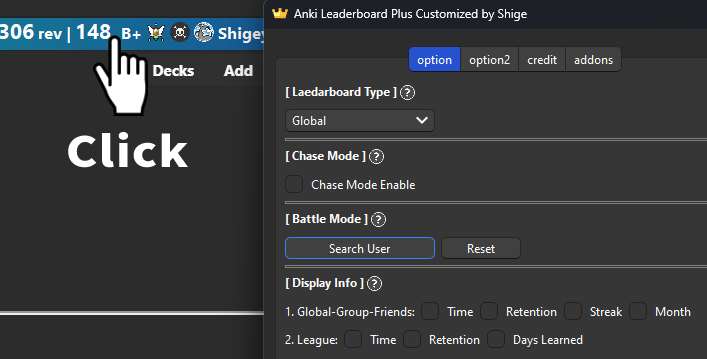
Options are available by clicking on the bar. Double-click to display user info.
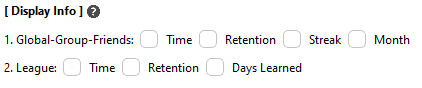
You can customize the info displayed on the bar.

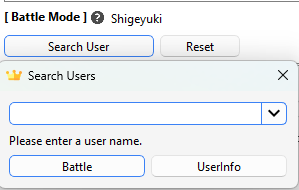
The specified user can be fixedly displayed.
Top:

Bottom:

Please read the Wiki for more detailed instructions on how to use it.
🚨This add-on will not work without the Anki leaderboard. If you don't have it yet, please download it from AnkiWeb and register. (Free)
🚨To use this add-on you need to sync your leaderboard settings to AnkiWeb. Please turn on this new setting in the leaderboard. Leaderboard Config -> Others tab -> Sync multiple devices -> Auto save this devices Config data to AnkiWeb [ ON ]
This add-on is a customized version of the shutdown Anki LeaderBoard, originally created by Thore Tyborski and credit goes to him.
The idea for this feature was inspired by Anki KillStreaks Chase Mode.
Basically the free leaderboard sync with the server only about 10 times per user/day, currently there are about 2,500 active users (2024-10-31).
This Plus add-on sync with every review so the server load increases from hundreds to thousands per one user, it is probably the same as the load increase in the number of users to about 250,000 to 25 million (maybe) so this feature is not sustainable for free for now.
In other words I plan to develop high risk functions with server load on this Plus and functions that are not server load will be developed on the free leaderboard.
[ Download ]
Download the .ankiaddon file and open it with a double-click, or install it from the "Install from file" menu in the Anki add-ons management screen. (Please note that you cannot install the file by dragging and dropping it into Anki) If you encounter any errors, please contact me.
[ Download page ] 🏆️Anki Leaderboard Plus (Anki Add-on Download Page, For Patrons Only)