(AirLink、VirtualDesktop などの無線 VR で、音声のずれをなくたい場合)
1. 音声遅延のない環境で上の動画を見て、流れるバーと音の鳴るタイミングを覚えてください。音はバーが中央から -10ms ~ +10ms の間に鳴っていますが、感覚的には、バーが中央よりすこし左にあるときに鳴っているように見えると思います。あなたの見た感覚でバーがどの位置にあるときに音が鳴っているかを覚えます。
2. 普段使用する無線 VR 設定 (設定によって遅延は変わります) で Beat Saber を起動し、NalulunaAudioLatency の設定画面を開いて、AudioLatency の数字を変化させてみて、さきほど覚えたバーの位置と同じところで音が鳴るよう調整します。
(For wireless VR such as AirLink, VirtualDesktop, etc., to eliminate audio deviation)
1. Watch the video above in an environment with no audio latency and memorize the timing of the flowing bar and the sound. The sound is played between -10ms and +10ms from the center of the bar, but in your eyes, the sound might be played when the bar is slightly to the left of the center of the bar. Memorize where the bar is positioned when the sound is played.
2. Start Beat Saber with the wireless VR setting you usually use (the latency varies depending on the wireless setting). Open the NalulunaAudioLatency setting screen, change the AudioLatency number, and adjust it so that the sound is played at the same position that you memorized earlier.
Beat Saber のオーディオ遅延設定 mod です。無線環境でオーディオ遅延設定を詰めたい、あるいは有線環境でも微妙な感覚のずれを修正したい、という場合に有用です。
Beat Saber の公式設定にもオーディオ遅延設定はありますが、そちらと比較して
- 音を遅らせる方向にも調整可能 (公式は音を早く出す方向のみ)
- タイミング調整がわかりやすい映像と音の表示
- 譜面ごとに別の数値を設定可能
という特徴があります。
内部的には、公式設定が使用するオーディオ遅延設定を読み書きしているので、他 mod との相性問題は起こりにくいと思います。
This is an audio latency setting mod for Beat Saber. This is useful when you want to adjust audio latency in a wireless environment, or even in a wired environment to correct a subtle sense of gap.
Beat Saber already has an audio latency setting, but it is more advanced than the official setting.
- Delayed sound adjustment is possible (official only in the direction of early sound)
- Easy to see the timing adjustment by the image and the sound display
- Different values can be set for each map
Internally, it reads and writes the audio latency setting used by the original Beat Saber, so compatibility problems with other mods are unlikely to occur.
曲のリズムぴったりのタイミングでノーツを切る場合、Audio Latency の数字を小さくするとノーツは近くで切る方向へ、数字を大きくするとノーツを遠くで切る方向へ変化します。なお単位は秒なので、0.001 は 1ms に相当します。
有線の場合は -0.010 ~ 0.010 くらいの範囲でお試しください。それ以上はノーツが切りにくいと思います。無線の場合は、まず設定画面の映像と音で基準値を見つけてから、その前後 0.020 程度の範囲で調整してみてください。
ただ、ビートセイバーのカット音はカットされた瞬間で鳴るのではなく、譜面に置かれた定刻時間通りに鳴っているだけなので、デフォルト状態で音を目安にカットタイミングが合っているかは確認できません。
( 参考 : https://nalulululuna.fanbox.cc/posts/3729369 )
有線の場合で、カット音を目安に設定するには、NalulunaCutTimeBar を導入して Realtime Cut Sound をオンにすることで、カットされた瞬間に音が鳴るようになるので、これで音楽のリズムとカットタイミングが合っているか確認可能になります。
無線の場合は、カットされた瞬間に音を鳴らしても、この音自体が遅延してしまうため、この方法は使用できません。NalulunaCutTimeBar のバー表示を見ることでカットタイミングが早いか遅いかの確認は可能です。
NalulunaCutTimeBar
https://nalulululuna.fanbox.cc/posts/3657481
曲選択画面の左でも、Audio Latency の設定が可能です。上は全譜面に対する設定値、下は現在選択中の譜面だけに対する設定値になります。譜面は曲単位ではなく、難易度単位で別扱いになります。
If you cut the notes at the exact timing of the rhythm of the song, a smaller Audio Latency number will cause the notes to be cut closer, while a larger number will cause the notes to be cut farther. The unit is seconds, so 0.001 corresponds to 1 ms.
If you are using a wired system, try a range of -0.010 to 0.010. If it is more than that, it will be difficult to cut the notes. For a wireless system, first find the base value using the image and sound on the settings screen, and then try adjusting the value within a range of about 0.020 around the base value.
However, a cut sound is not played at the moment of cut, but is only played according to the fixed time placed on the map, so you cannot check if the cut timing is correct by listening to the cut sound.
( Reference : https://nalulululuna.fanbox.cc/posts/3729369 )
To set the exact time, install NalulunaCutTimeBar and turn on "Realtime Cut Sound" so that the sound is played at the moment of cut in the case of a wired system.
In the case of a wireless system, this method cannot be used because the cut sound itself is delayed even if it is played at the moment of cut; it is possible to check whether the cut timing is early or late by looking at the bar display of the NalulunaCutTimeBar.
NalulunaCutTimeBar
https://nalulululuna.fanbox.cc/posts/3657481
Audio Latency can also be set on the left side of the song selection screen. The upper setting is for all maps, and the lower setting is for only the currently selected map. The map is treated separately by difficulty level, not by song.
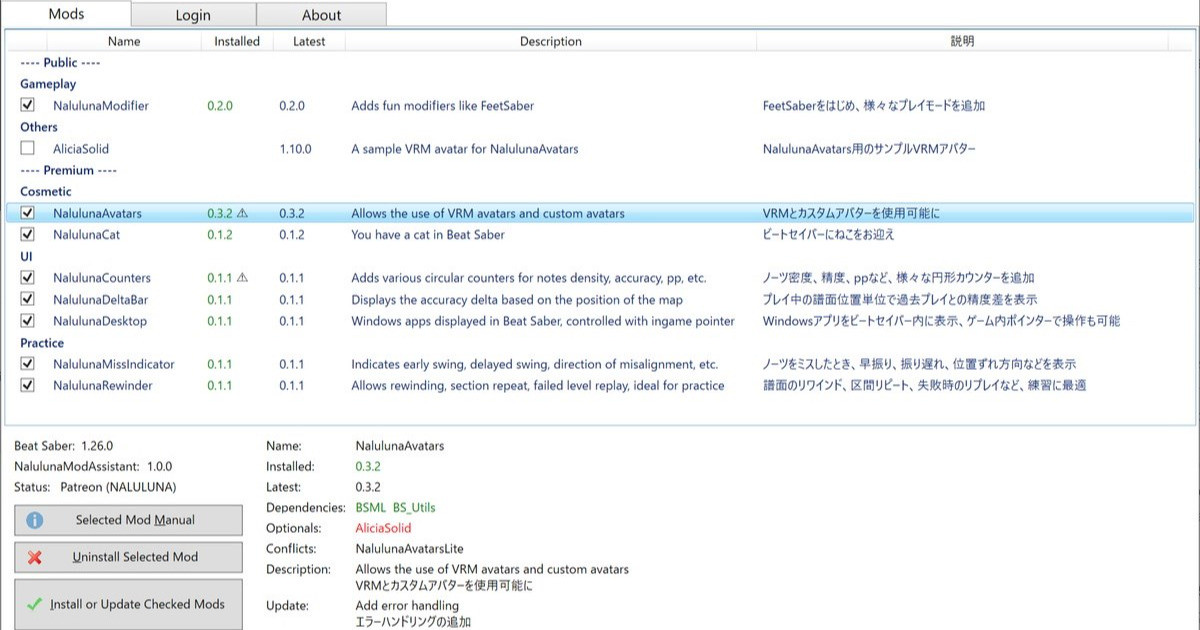
支援者様に公開しているわたしの mod の管理ツールです。mod のインストール、アンインストールや、更新内容の確認が可能です。mod のインストールは、支援中の Fanbox または Patreon アカウントでのログインが必要です。 今後、わたしの mod の配布や更新はこのツールを通して行います。まだわたしの mod 全部が登録さ...
NalulunaAudioLatency 0.1.0 以降は NalulunaModAssistant でインストール可能です。
NalulunaAudioLatency 0.1.0 or later are available with NalulunaModAssistant.
NalulunaAudioLatency 0.0.2 for Beat Saber 1.24.1
(1.25.0 以降には非対応、not work for 1.25.0 or later)
NalulunaAudioLatency-0.0.2-bs1.24.1
より古いバージョンが必要な場合、FANBOX のメッセージ ( https://bit.ly/3XhHhlt ) でご連絡ください。
If you need a older version, contact me via FANBOX message. ( https://bit.ly/3XhHhlt )
なるるるるな / NALULUNA
2022-09-03 15:01:52 +0000 UTCSp00ky_C0de
2022-09-03 14:08:32 +0000 UTC