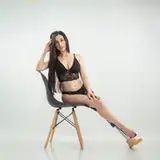
Fallout 4 - Jessie (FF7 Remake)
Added 2025-07-24 09:42:25 +0000 UTC
How to use :
Required: LOOKS MENU and F4SE. Make sure that "esp" is activated.
• Enter the SLM 14 command in the console to enter the looks menu.
• Press R - select "Jessie (FF7 Remake)" preset in the LooksMenu.
To get clothes :
• Craft on a Chem lab in the DRUG section,
• Or enter in the console "Help Jessie 0" - and find ARMO ID
• scroll the text with the mouse wheel (if need it),
• then add the clothes to your inventory - "Player.additem ID 1"
Also :
Now it uses stand alone body and textures (CBBE),
so if you want your own shapes,
then replace "FemaleBody" files in Data\Meshes\Jessie (FF7 Remake).