I bought the world's worst thesaurus yesterday. Not only is it terrible, it's terrible.
_____
April promises to be an interesting month here at Darq Side HQ, and we have some very cool things on the way for you. Almost everything you see here is either finished or in the last stage of testing. And we're experiencing our usual southeastern US spring weather craziness -- I'm finishing up this newsletter on generator power after a five-minute squall just knocked another few hundred pine cones out of my trees and wiped out a lot of my azalea blooms. Even with all the weather, somehow I know the Augusta National will be picture-perfect in a week or so.
Maxed Out
One of the most frequently cited UI gripes is the 30-slot limitation in the Maintained Spells window. The Maintained Spell Monitor [1] [2] [3], is directly affected by this hard cap. If your character is carrying more than 30 Maintained effects, everything above that maximum is invisible to both windows.
Even with generous use of Spell Filtering, it's still very easy to temporarily blow through the maximum of 30 effects, especially during raid and Heroic group gameplay. A simple new visual warning for this condition is in final testing now.

With the option enabled, maxing out the Maintained Effects limit will display an eye-catching border on the Monitor, which warns you that some effects you're monitoring may be temporarily AWOL. When the icon count drops below 30, the warning (solid or flashing) goes away.
With Friends Like These...
One of the most tinkersome parts of the UI is the Friends List, a.k.a. the Community window. Whether it's sharing friend names between alts, ignoring and un-ignoring server trolls, figuring out who that renamed character belongs to, I'm always fiddling with the list in one way or another.
So now we have two more ways to fiddle. But I think you're going to like them. The default game lets us save and load Friends Lists between alts, but if you've ever done it you know the lists are additive. Importing a list won't remove names that are already in the importee's list. So you can end up with an excessively long roster that includes names you didn't want to keep. Removing unwanted names is easy enough with the default UI, but Darq Sider Aequilibrium pointed out that it's more awkward than it needs to be.
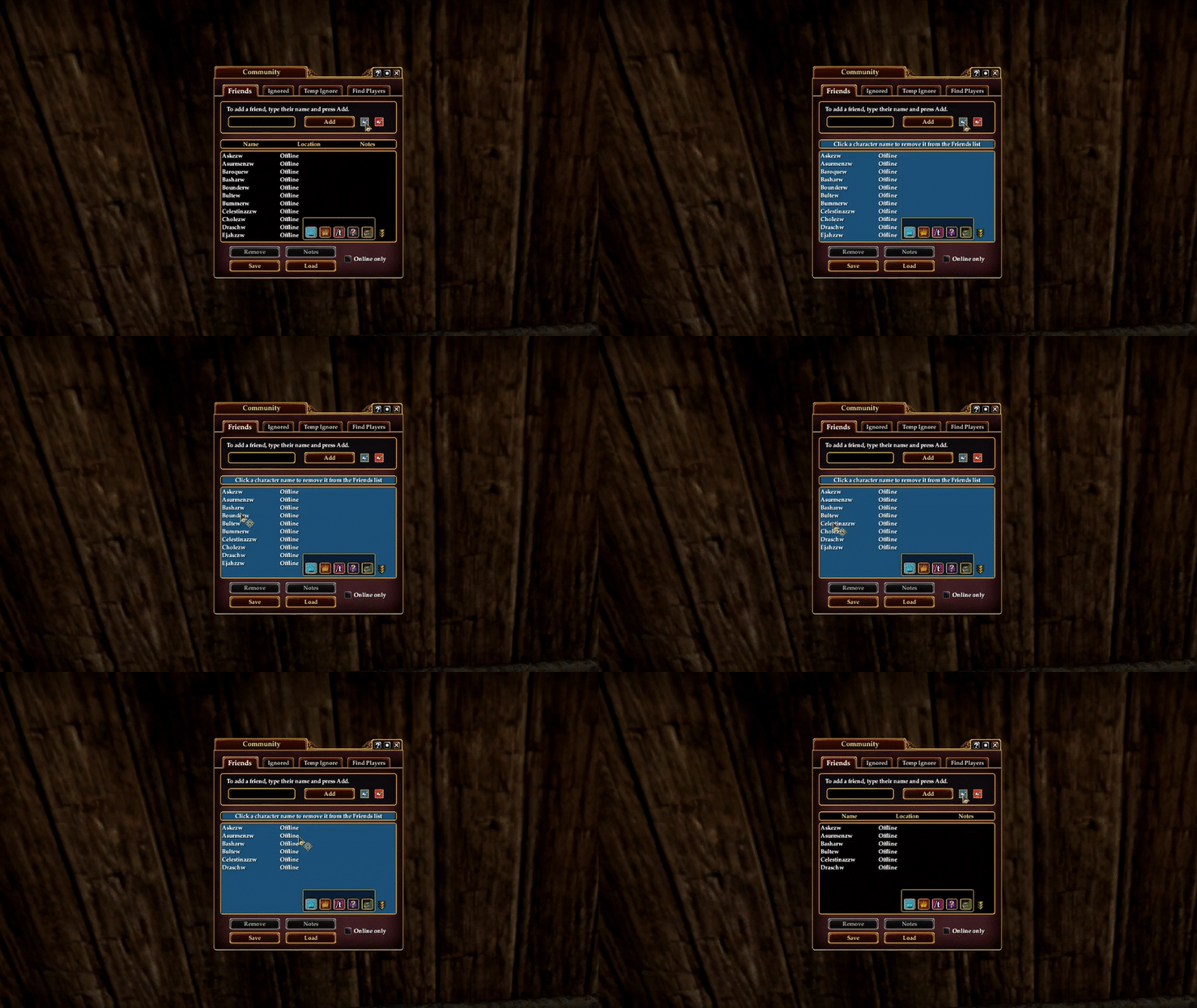
Players have asked over and over in the official forums for a way to build a "master list" of friends that can be imported in its exact form (not additively) to alts. We can't automatically remove character names when importing, but when your list needs a quick pruning you can now enter a sort of "Edit Mode" and clear out individual names with a single click:
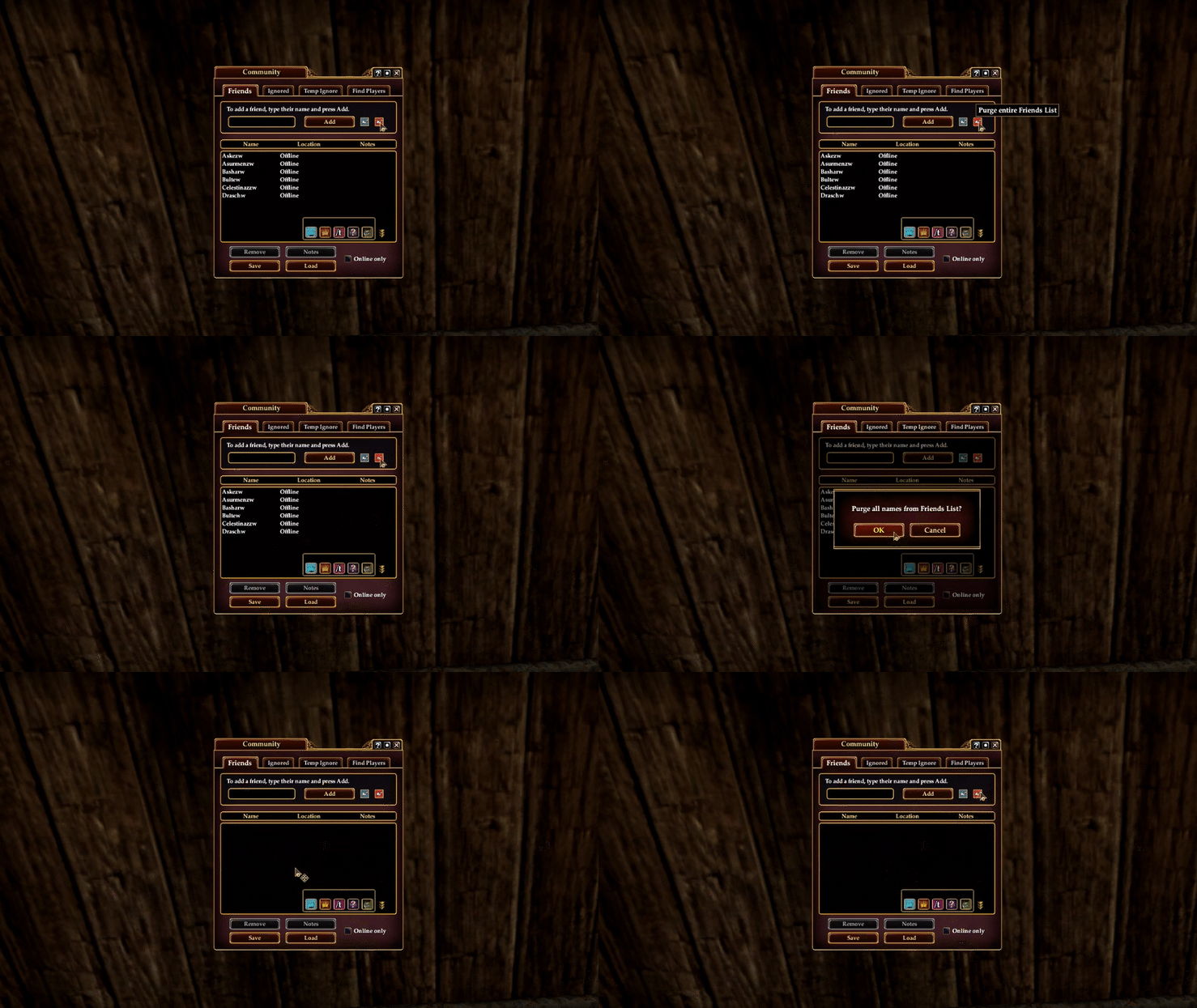
Another frequent request from players has been the ability to completely clear the Friends List and start over. Done!
Ultimately what we're working toward is a sort of macro button that will clear an alt's list, load the "master" friends list, and then follow that up by loading the master's notes, all with a single click. That's still a ways out, but these are the first useful steps toward that goal.
Side note: Even though both of these new controls are focused on removing names, it's now also easier to add names to the Friends and Ignored Lists with the inclusion of the "Enter to Accept" flag on both tabs. Now you can just type a name in the slot and hit [Enter].
A Different Sort
In other news, the next version of the DarqUI utility has been getting some fine tunings...
Darq Sider Phule wondered if there is a way to change the order of spell definitions in the Maintained Spell Monitor. With all the bells and whistles attached to each definition there's a lot more involved than just swapping a couple of spell names. Being able to reorder monitored buffs is particularly useful for players who prefer Fixed Tile and Fixed Icon display modes. Trying to do this with the Window Manager would be a painful exercise, So I didn't even attempt it. But it's a snap for the next utility version:
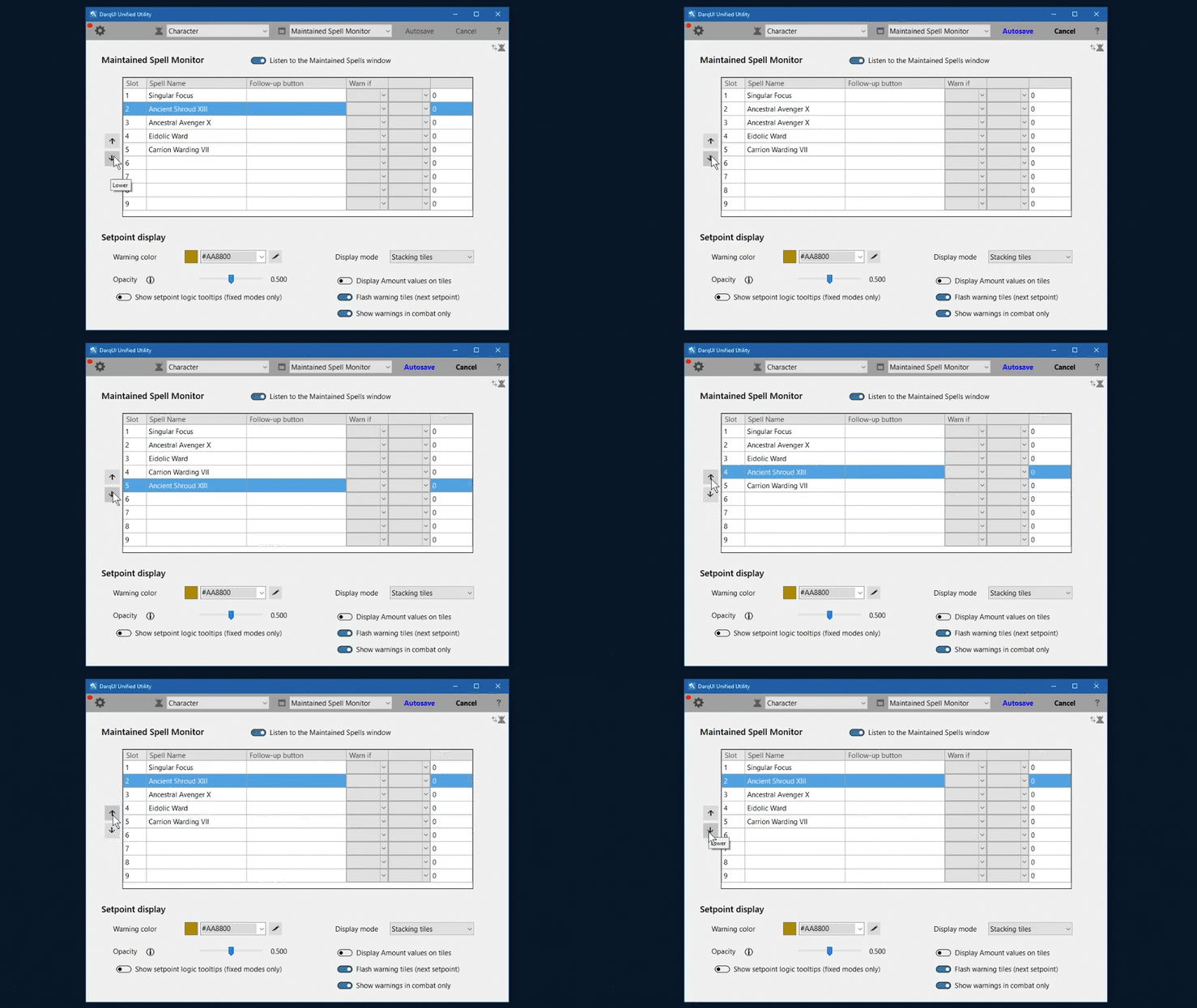
After the sorting code was added, I realized there were two more spots that could benefit: Stat Monitor stats and NPC Spell Monitor Presets. You'll be able to quickly reorder all three of these complex lists in the next utility.

And while we're still on the subject of the Maintained Spell Monitor, a utility bug reported by Anonymous currently affects your selection of display modes. The utility tries to save the mode's name (wrong), while the in-game Window Manager (correctly) saves the mode's ID number. So until the next utility version is published use the Window Manager if you need to change your display mode.
Taking Inventory
The new Shared Tradeskills Bag and the Expendables tab in the Character window are both being added to the searchable Inventory feature. (Related: an "oops" in the inventory definitions file was fixed recently, so your regular quested Harvesting Bag can once again be properly viewed and searched in the utility.)
In Search Of... Search
DarqUI user Azzy pointed to an embarrassing blank spot on the Completed Quests tab in the Journal where a search bar should have been. Fixed. Thanks, Azzy.
Start the Music
Recently Darq Side member Kearniitha and I had a long discussion about custom background music, and the possibility of designing some kind of MP3 player into the UI. It's a neat idea (EverQuest already has its own media player!) but it needs a lot more investigation.
I suggested using a custom timer definition on the premium DarqUI Clock to loop a background music selection from the /playsound list. But Kearniitha rightly pointed out that the Clock and Countdown Timer surfaces had to be visible in order to use the controls, and he doesn't normally display the in-game clock.
So now you have two convenient new commands to start and stop your custom timer definitions from the Icon Bar, a Loadout, or a hotkey -- without raising the Clock window. They are:

show_window MainHUD.Clock.Timer.Start.1 (where 1 is the timer definition, 1 through 5)
show_window MainHUD.Clock.Timer.Stop (stops any currently running timer)
Unshrinkable
Thanks to Darq Side member Forestchild, Large and X-Large Player Housing windows no longer use the dreaded "shrink font to fit" text on the Item Count line. Both windows now show item counts in a readable font size on two lines. Good call, Forestchild!
A Matter of Skill
You may have seen recent posts on the official forums from Anashti Sul tradeskillers, pointing out that the reaction arts mini-hotbar built into the Tradeskills window doesn't automatically update as you level up your tradeskill profession. The developers are aware, and this post by developer Denmum offers a somewhat awkward player-provided solution.
Similar to O.G. spell names, tradeskill reaction arts on Anashti Sul acquire unique names at higher levels. They also vary quite a bit from their Live server counterparts. Looking back, the original Tradeskill UI didn't have the mini-hotbar in the first place. Back in Ye Olde Norrath players had to craft from the Knowledge book or set up reactions on a regular hotbar (right after they acquired the necessary WORTs uphill both ways in the snow barefoot.)
Darq Side member Olgie decided to see what can be done with the UI to fix, or at least reduce, this annoyance. We've come up with a fairly successful improvement in the form of a clickable overlay that appears over the normal six-icon mini-hotbar:
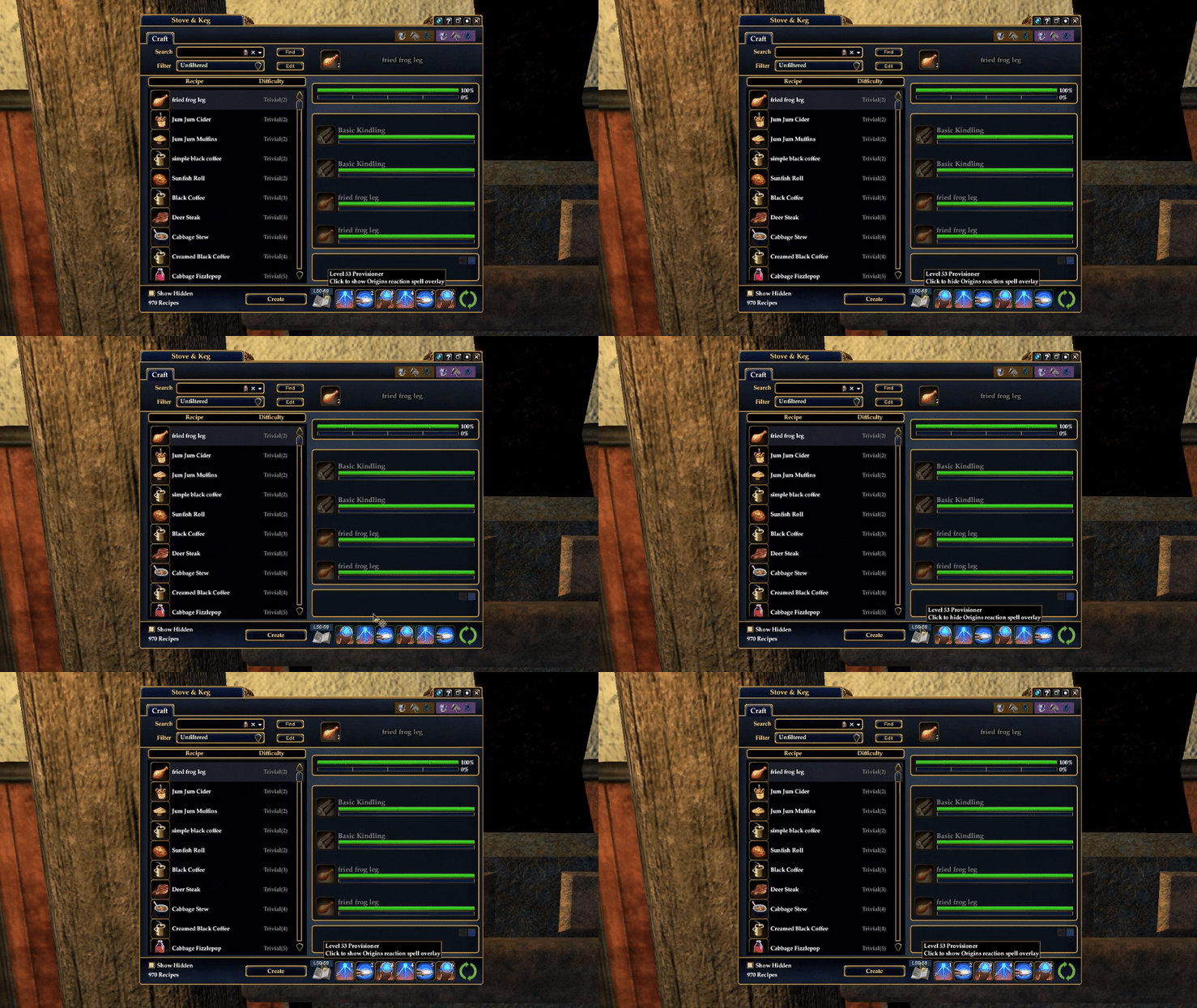
The optional overlay appears after your tradeskiller turns 20 (at the point where the built-in hotbar fails). Three reaction arts are replaced every 10 levels, and a pop-up is provided that makes it easy to swap the icons between slots if you prefer a custom order.
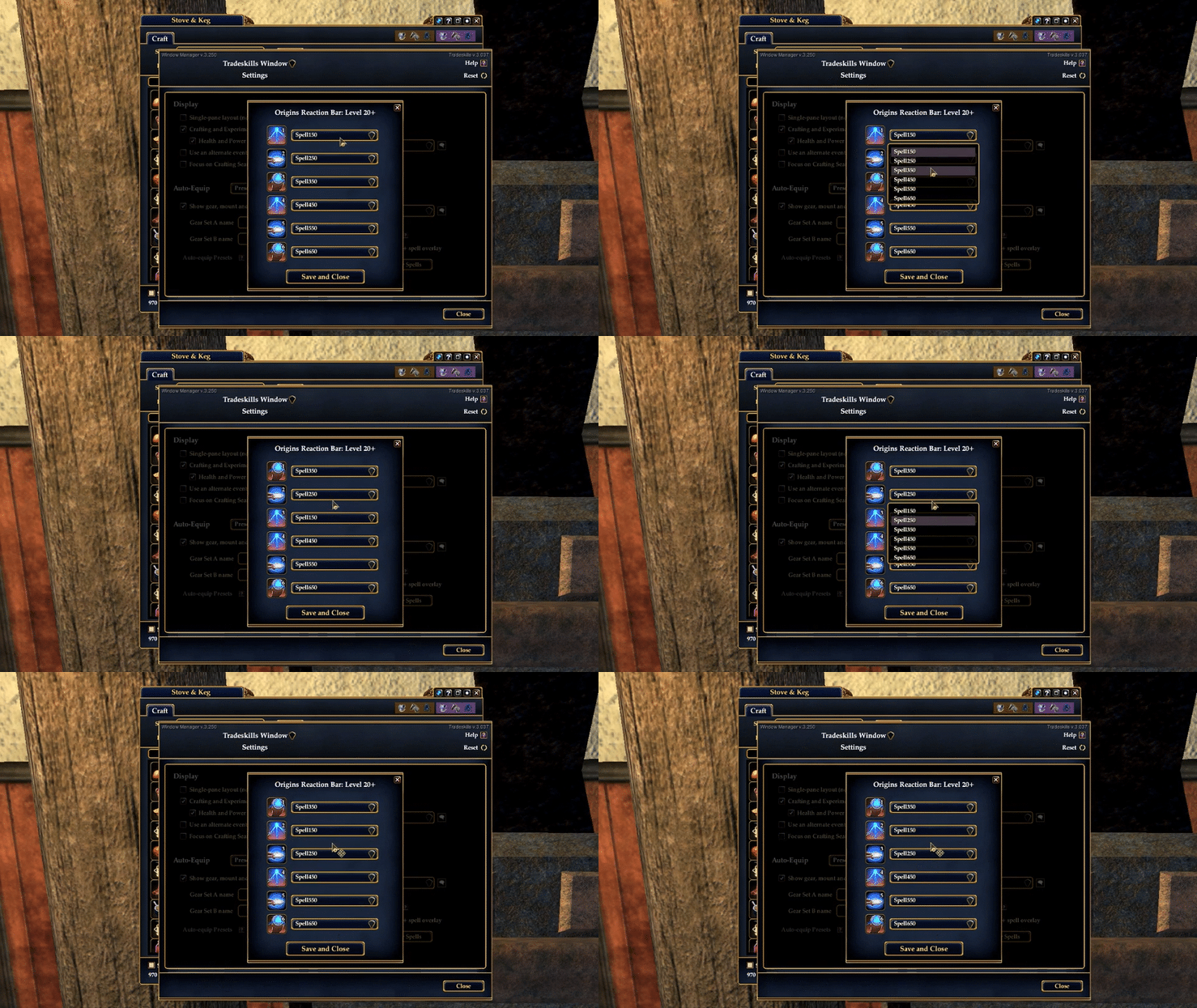
So, why is this cool new QoL feature still on the drawing board? As you know the Origins server doesn't connect to Census, so mining the game for all 100+ unique spell names is limited to paging through the Knowledge books of Origins tradeskillers at all the correct levels.
Olgie has been leveling up a variety of tradeskill professions and screenshotting spell upgrades, but plowing through all 60 levels on all 9 professions is a heavy lift especially on Anashti Sul. We've asked Denmum if there is any sort of cheat sheet that enumerates all the reaction arts, but so far nobody has come up with anything.
So this is where you come in. In April we're going to make a post here asking Origins Tradeskillers to help us get the rest of the reaction art names into the definitions file. Once that's completed we'll be able to very quickly publish the feature for you to use on Anashti Sul. Olgie and I think you'll find it very useful. Watch for that post, and thank you in advance :)