From Design to Production.
Added 2022-04-30 18:16:07 +0000 UTCPrevious instalments in this series:
- - Part 1: A Day in the life of a scene : LINK
- - Part 2: Writer’s Block: LINK
- - Part 3: Setting the Scene Video 1 / Video 2 / Video 3
Part 4: Post work.
An often times overlooked aspect of making Visual Novels is post work. “Post work” simply means work carried out after the image has been rendered. Now, this could be as little as correcting pokethough errors in clothing, or black spots on the skin, to full blown colour correction and LUT’s.
The purists would have you believe that every image *must* be post-worked. And, though they are correct, only up to a point. You do not *need* to post-work every image. However, adding this step to your workflow can help make a good image great.
Of course, you can also make a good image, bad. Understanding the different techniques artists use and learning how to apply them to your own work is, in my option, a lifelong journey. At least, I am willing to admit, I still have much to learn.
So, we’ve written our script, created our environment and made our scene, the image has rendered and we’re happy with how it looks. It’s time now to bring it into photoshop (or GIMP) and make some adjustments.
Every artist and developer will have a different post-work style. Some prefer a light touch; others go heavy into corrective detail. My own personal taste leans more towards a lighter touch.
I start by correcting any poke through, or problematic areas. The spot healing tool is great for doing this, I’ve found great success with clicking to fix small areas, rather than single click and dragging over a wider area. Spot healing has its limits, so if the error is too large it may be time to go back to Daz and consider correcting and spot rendering a fix. This is something I will cover in a later video.
A lot of artists will work to a non-destructive rule. This essentially means that the original image does not get changed, so for each correction or adjustment a new layer is created on top of the initial base image. This allows you to always undo anything without losing the original image.
As such, I duplicate the image and work on adding several glow layers if the image is for outside, this brightens the light sources. Using the screen blend mode you can lighten the entire image, or with overlay you can darken. Adjusting the opacity slider can increase or decrease this effect.
When I am happy with the brightness of the image, I add a sharpen layer, this is done via a high pass. Other artists will prefer a softer image, I however, prefer a sharper more realistic style. The high pass helps to bring out the finer details, especially on skin.
The final step I do is to decide on a colour overlay, this could be a tint to yellow for sunshine, or a darker tint to blue for night. This is usually set at an opacity of 10%.
I have all of the above set as an action inside of Photoshop. At a click of a button each stage is completed for me, I can then decide to turn on or off each section as I see fit. This allows me to lower the post work time for in-game images to just a few seconds for each one.
The exception to this rule is for promotional images. They are always post-worked manually as I generally use a LUT and some colour grading on these.

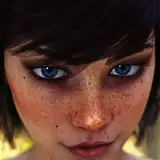
In the above image you can see the benefit of the sharp effect and the glow or bloom effect on the lights in the background. I’ve added a darker contrast that helps bring out more of the skin tone.
Post work can be a scary thought for many people using Daz. It doesn’t have to be, adding some vibrancy to your images can really help make them stand out from the rest. So do not be afraid to try it, what is the worst that can happen?
Cenc
Comments
I can show you the tools, I can even explain what they do. but using them, that comes from you. Your images especially your one-off renders are very very good.
Cenc
2022-04-30 18:43:54 +0000 UTCWhen you taught me the value of doing this, and how to do it, it was an addition to my tool kit as a developer I could not go without at this point. It took my images and how I look at lighting them to a completely new level. I can't imagine not post working my images at this point for any reason. Also he is being modest. He's quite good at post work. But I agree there is always more to learn.
Zoey Raven
2022-04-30 18:28:38 +0000 UTC