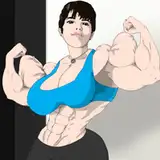
[Multi Base] Athletic Outfit
Added 2024-08-19 18:37:15 +0000 UTC
Rigged, weighted, textured and easy to use asset(s)!
This includes an athletic workout outfit!
Comes fit to:
Includes: blend file, FBX, textures, and Unity materials.
Rules:
- Redistribution Prohibition: You are expressly prohibited from redistributing this model in its original or modified form.
- Restriction on Free Model Usage: You are not authorized to use my assets on a model offered for free.
- Implied Commercial Rights: Commercial rights are implicitly granted, allowing you to resell these assets as part of a complete model.
Streamer/Content Creator Rules:
- You are granted permission to use my assets for your original characters (OCs) during streaming. However, if you incorporate five or more of my assets into your OCs, you are required to provide attribution.
- Attribution may be fulfilled by linking back to the product page upon request or at your discretion when deemed necessary. The method and placement of the link on your page are left to your discretion, provided it remains easily accessible.
- If you wish to apply to become an official affiliate with me & earn a kick-back for what your viewers buy, please apply here: https://flexuh.gumroad.com/affiliates
Don't know how to use PBR textures in Unity? Follow crabmans tutorial!
Here!❤️ Thank you for purchasing!
Thank you for purchasing! Please leave a review!
If you have issues, please join my Discord for assistance!
< Find downloads in the accessible tabs.
📝 How to Install
To install this product via Unity, you will NEED VRCFury.
Drop my provided files into the avatar project of your choosing.
Navigate to the prefab respective to the base your avatar is using.
Assets/_Flexuh Model 2024/
Choose the prefab FOR YOUR BASE and then simply click it and drag and drop ONTO the avatar in your hierarchy.
Done, you're ready to upload!
Different avatars use different shader versions!
To make sure your asset and your avatar are on the same shader version:
Note that you only need to do this step if your shader says /Old Versions/ in the shader type, like shown below.
Unlock the materials that come with the asset.
You can unlock multiple at once by holding down CTRL, selecting all the materials, Right click, go to Thry > Materials > Unlock All
Once unlocked you can now select your materials, navigate to the top of the Inspector window, and change the shader type to Poiyomi Toon.

Now that your shaders are set to whatever version is installed in your project, you're good to go!
⭐Unity Package
This Unity Package contains everything you need to use the asset via Unity. Every other file is for manual installation.
Substance Painter
Flexuh Base
Venus Base
RP Base
VR Base
![[Multi Base] Athletic Outfit](https://img10.xaiju.com/storage/1/zy/qn/d38796-019e86d7-9e7f-728b-8fb9-97891b75d033.gif)