Keyboard support has now been implemented by flyinghead! In this video you see us testing the game Typing Of The Dead, which relies on a keyboard as its primary input device..
In order to play this game, make sure the keyboard is set to Port A of the Dreamcast. You can see us doing this in the video by going to the Quick Menu, selecting ‘Controls’, and setting the first port to ‘Keyboard’. Now restart the core and the game. You should now be able to play the game.
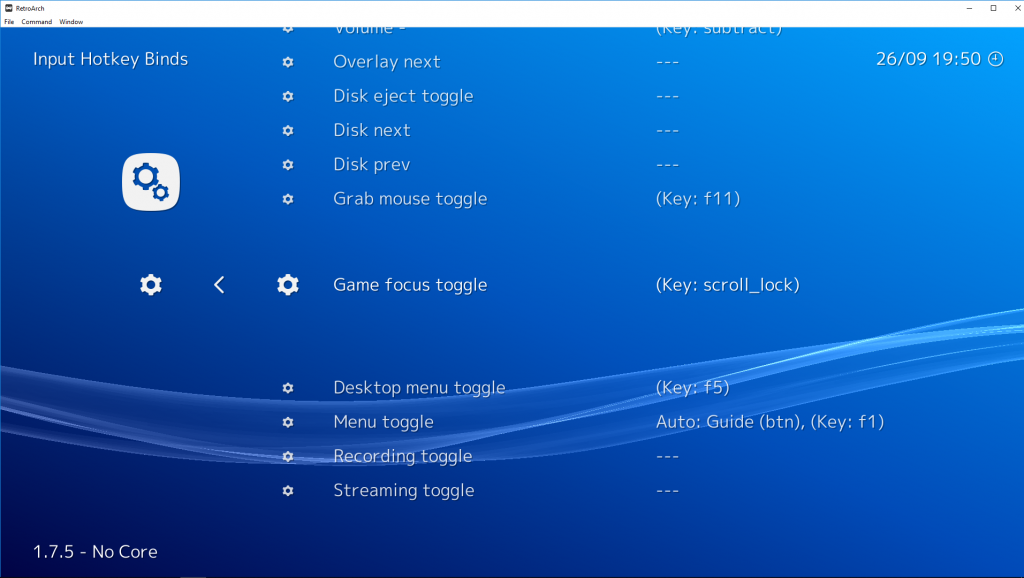
Quick tip: RetroArch by default binds a lot of keyboard keys to hotkeys. In order to be able to use the keyboard in full, try to bind ‘Game focus toggle’ to a key. You can do this by going to Settings – Input Hotkeys, and binding ‘Game focus toggle’ to any key you want.
How this will work is as follows: if you press the game focus toggle, you will be in ‘game focus’ mode. In this mode, none of the hotkeys will work, and you can use every key of the keyboard. When you want to go back to the RetroArch hotkey mode, you press the ‘game focus toggle’ key again in order to deactivate game focus mode.
Read the article here -
chuchuw
2018-09-28 07:59:38 +0000 UTC