There are two parts to this post:
===
If you've used my animations before, skip to the "ANIMATIONS NOT WORKING..." section of this post.
Even if you've used my animations once before and they are not working anymore for some reason please still read this entire post from top-to-bottom just to make sure you've done all you can.
If you have and you still can't find a fix just message me and I'll help you out :)
First things first. If you are $5+ tier patron, only download from $5+ tier patron posts. If you are a $10+ tier patron only download from $10+ tier posts. Unless specified, $10+ tier patrons will always have more animations than the $5+ patrons and the animation pack will automatically include the animations from $5+ patron posts.
For the latest animations, find your latest download post according to your tier here:
All Animation Downloads (All Tiers)
Click this link to find out more:
http://www.carls-sims-4-guide.com/tutorials/mods-cc.php
You should have your Mods folder inside a folder called "Electronic Arts" in your "My Documents" folder on your computer & under that a folder called "Sims 4".
Depending on which Drive you installed it on (it is usually the C: Drive though)
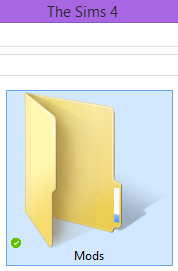
Create a folder called "Mods" inside it. If it already has a folder with that name then you don't need to do anything further,
Next, open up your game.
Find "Game Options", then click "Other" and make sure the check-boxes for "Enable Custom Content and Mods" AND "Script Mods Allowed" are both ticked.
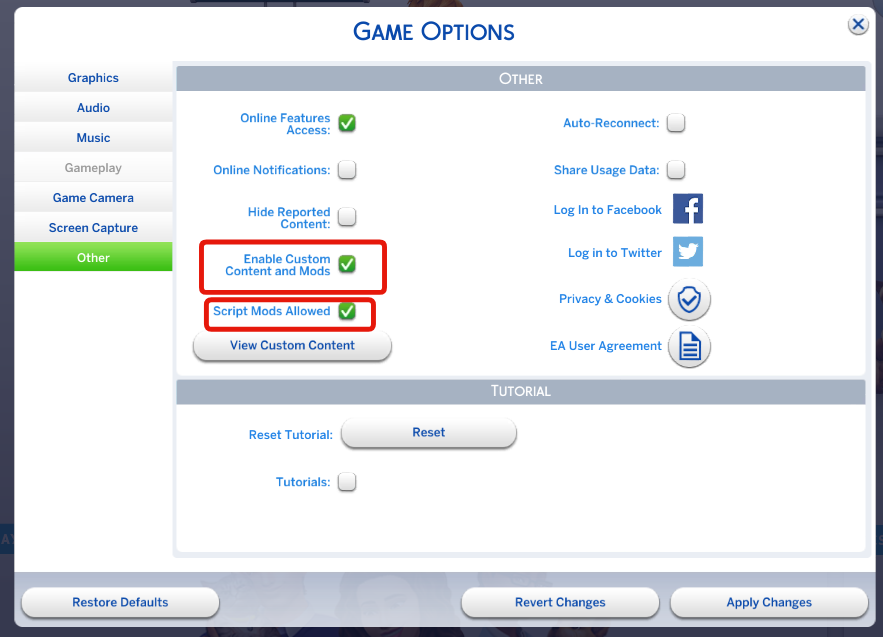
Restart your game, and now you're done with this part.
Go to: https://wickedwhimsmod.com/download.
You should be greeted with the latest version of WickedWhims.
Download and save the mod into your "Mods" folder.
Right-click & "EXTRACT" all the contents of the compressed file into your "Mods" folder.
And you're done with this part.
Navigate to my patreon page:
patreon.com/ooOLalaWorld
Go to this post to get the latest content:
Go to: Latest Animation Releases:
If you want the very latest animation set, click here:
Go to: Latest Animation Set (All Tiers)
Go to the download post and download the attached .package file

Put the '.package' file inside your Mods folder and restart your Sims 4 Game.
Note - Make sure to not accidentally have duplicates of my .packages files in your Mods folder otherwise my animations will not show up (check all your sub-folders).
For example if you have 'OLL Animations (AP).package' & 'OLL Animations (AP) (Copy).package' in your Mods folder my animations will not show up in you game!
So be careful not to do this.
Open up your game and look for a WickedWhims Pop-up when you enter Live Mode:

If you see either "OLL" or "ooOLalaWorld" then you know the game has recognized my animations and you should be ready to use them! ✅
Click the floor or different objects and navigate through the WickedWhims Mod to see which items can have animations performed on them.
And from here on out. You can ask me in a message or on a post for any additional help but be sure to play around with the Mod for a bit :)
===
If this is the first time you are using my animations (or you haven't been able to get my animations to ever work), do not skip the first section of this post or the following information is unlikely to help you.
If you are not part of this category go through this check list before messaging me, if you can:
===
CHECK #0.5: Can't download or extract the file
If you click on the attached document and nothing happens then try a different browser.
If you're new to patreon, you shouldn't be looking for a big download button, attached downloads are usually found in the location indicated by the orange arrow in the image below:
If the attached file has '.zip' instead of '.package' simply right click on the .zip file and find an option like "Extract" and the .package file(s) inside will be extracted.
===
Do you have duplicates of the same file? i.e. "OLL_Animations (AP)" & "OLL Animations (AP) (Copy)" <- If you have duplicates of the same file, it is likely that my animations will NOT work.

PLEASE NOTE: It is OKAY to have downloaded ".packages" directly from me which had different names
- i.e. "WW_ooOLalaWorldAnimations" & "OLL_Animations (AP)".
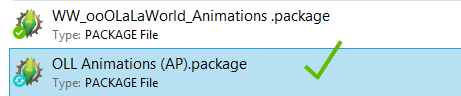
^ It is fine to have packages with different names like you can see in this example because they contain different animation sets.
If I upload a new post and it has the same name as the previous version then you need to overwrite the previous one. Don't worry, you will not lose any old animations.
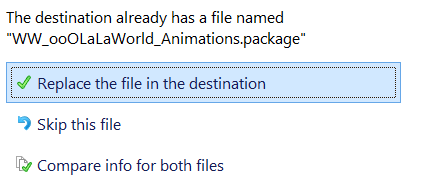 ===
===
When you loaded up your game, was the animation set you downloaded from me listed in the top-right corner? (as a WickedWhims notification):
If it did, go to CHECK #3, if not, message me or comment on that post.
This is a fix I may have to make.
===
Most patrons have this issue when they add a new animation pack. To exclude any issue that may have been caused by me.
Please do the following before messaging me (after which I will help you):
1 - Get two Sims near the object (or area if it plays on the floor or while standing) which that animation refers to.
2 - Open up the WickedWhims "settings" by clicking anywhere on the floor.
3 -Navigate to "Sex Settings"
4 -Find & click "Gender Settings"
5 -Click "Anything Goes"
6 - Close out of all the WickedWhims windows
7 - Test and see if the animation appears under any of the categories.
===
If it does, then you need to ensure that you've got the correct combination of sim genders if you want to use the WickedWhims' default settings.
==
If the animations still don't show up, make sure your Sims are at least "Young Adults" or you'll have to mess around with the WickedWhims settings to enable "Teen Romance" etc.
Let me know the name of the animation which is not showing up and I'll run some checks and get back to you as soon as I can.
----
It's unlikely I wouldn't have seen this but many things could cause this like an update to the game or WickedWhims or version differences between my game and yours, or it could completely have forgotten to attach the animation data to the sims.
In this case, all you probably can do is message me and I'll get to fixing it as soon as possible.
Hope this post helps your solve the issue.
Thank you so much for supporting!
ooOLaLa World
2021-08-02 17:32:47 +0000 UTCLee Thompson
2021-08-02 17:29:47 +0000 UTCooOLaLa World
2018-03-07 14:28:08 +0000 UTCGus Mendoza
2018-03-07 14:09:49 +0000 UTCooOLaLa World
2018-03-07 13:59:12 +0000 UTCGus Mendoza
2018-03-07 13:56:57 +0000 UTCooOLaLa World
2018-03-07 13:55:11 +0000 UTCGus Mendoza
2018-03-07 13:49:12 +0000 UTCooOLaLa World
2018-03-07 13:45:44 +0000 UTCGus Mendoza
2018-03-07 13:43:40 +0000 UTCooOLaLa World
2018-01-27 02:17:01 +0000 UTCNNS
2018-01-27 02:14:53 +0000 UTC