XaiJu
Jinnoaka
Jinnoaka

patreon


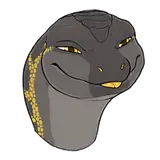
Ziinari Lizardmen Model Release!

It's been a long time coming and I appreciate the patience of all my supporters to help me get this far! The models are finally finished and are at least 99% bug free :D (as far as I know!)

These models will work for Blender only and is recommended you use version 3.6.2 LTS or newer

I should also note that although this image doesn't show it, there are in fact nsfw male and female versions! Also the rig tools add-on is also provided and must be installed, if not already.

I will definitely say that these models have by far my best rigging work thanks in big part to Auto Rig Pro. I've adapted a bunch of my own rigging features into it but without it's intuitive menu and bone layers system I don't think I would have gotten very far.

In fact, now that I'm pretty familiar with how to properly work with the add-on I really want to go back and address my sub-par quality rigs on the Interceptor and Drake models and get them up to the same level as these. And I've actually gotten a head start on that!

Having an anthro model also means that creating future anthro creatures will be much easier since I wont necessarily have to start from scratch each time. I would definitely love to do something with fur or feathers in the future.

I will strive to continue producing the best models that I possibly can for our community.


The downloads are located within their respective model archive folders for Mega and Super Supporters located here:

https://www.patreon.com/posts/model-archive-84752464

and here:

https://www.patreon.com/posts/model-archive-84752875

Ziinari Lizardmen Model Release!

Comments

I didn't want to go too crazy with everything on the first iteration of the rigs to avoid any weird behaviors. This fingers/toes curl scalable controller you mention. I don't see that functionality anywhere in the ARP tool kit. There is a property value that provides such function but unless I'm missing something major I don't see how to implement that other than having a custom solution. I don't see what the issue is that you're referring to about the rotations of the face bones. Those controls aren't really meant to be rotated since the rotation of the underlying bones are controlled by drivers and constraints.

Jinnoaka Keineyo

A few tips for rigging with Auto Rig Pro: - Hands/feet have options to curl fingers/toes by scaling them. This is super useful and should be used. - Many "parent" bones have specific options that can be useful. E. g. the head bone allows to add more mouth bones/controllers. - Rotation of bones determines the pivot point when you rotate it in pose mode. I noticed that some of the face bones were not very idealy placed/rotated, especially in the eye area. You can also scale these bones to have bigger pose controllers. - I think for a head like this it is more intuitive to have the head main bone not point upwards but towards the snout to have the pose controller in front of the face. - Auto Rig Pro contains spline rigs. This is very useful for tails and, uh, "other bits" and makes animating/posing in a natural fashion much easier (without having to edit several bones per pose). - You can add custom bones after "Match to Rig". Auto Rig Pro can handle that even if you edit the rig again. This is also quite useful for some special cases (e. g. appareal bones or body parts that Auto Rig Pro hasn't build in). This even works if you run scripts on a custom bone chain to create a specific solution, Auto Rig Pro will keep those as long as it is added after Match to Rig.

Hans Petersen

Jinn over here making a factory of quality-made models and content! Thankyou for your time, effort, and service, dude!

TehAngryXeno


More Creators