XaiJu
yiffalicious
yiffalicious

patreon


FurryVNE Build 2024-08-15

Hi all,

New build for you!

This one brings the much anticipated cloud component for interactions!

Release notes

>>> CLICK HERE TO READ THE RELEASE NOTES <<<

>>> CLICK HERE TO DOWNLOAD <<< (for patrons)

Download instructions

The app comes in a self-extracting archive. You can either run the exe to let it extract itself, or extract it with 7-zip if that makes you feel better.

Windows doesn't seem to like unknown EXEs, so it may block you from running the self-extractor. To unblock it, simply follow these instructions:
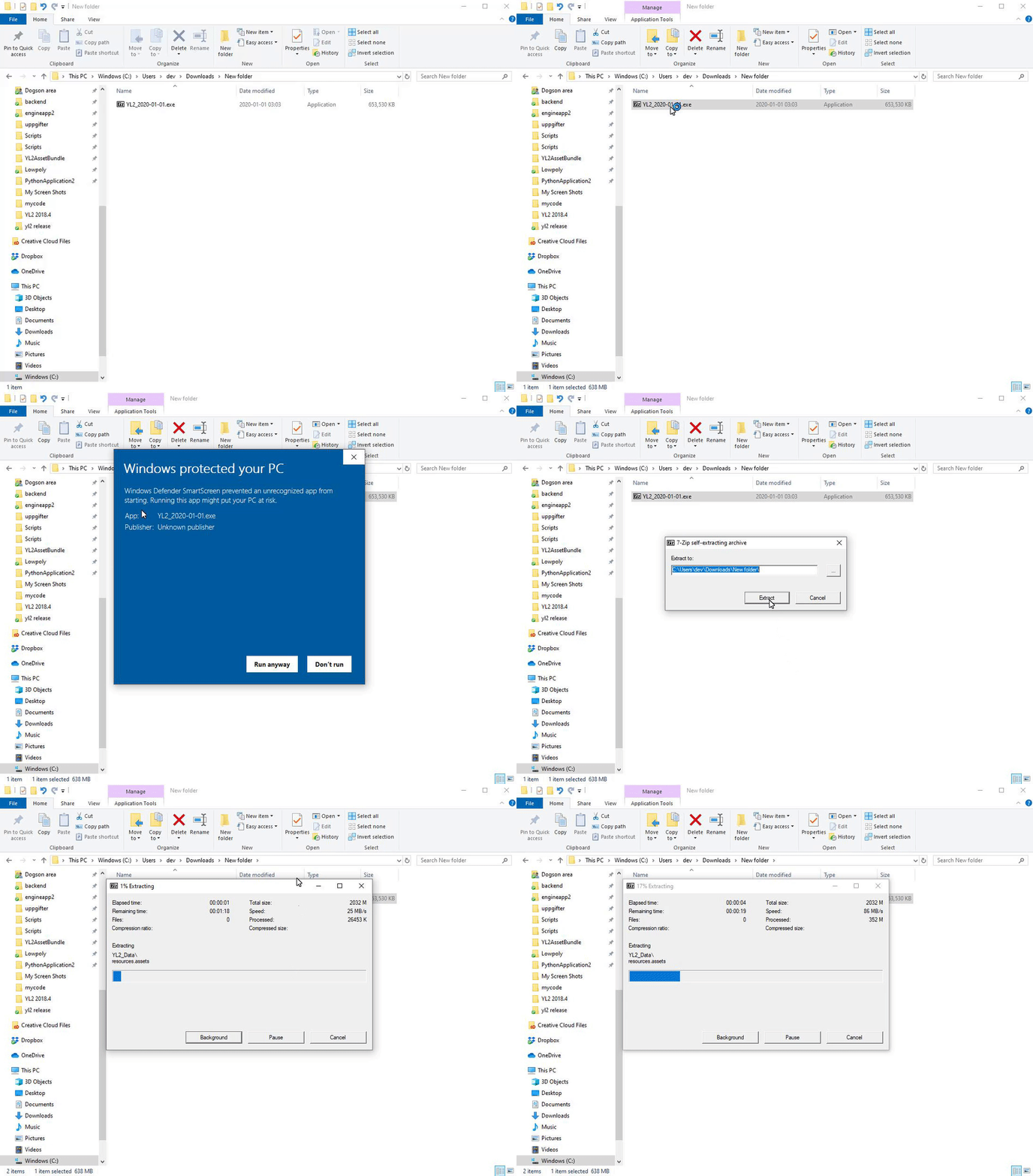
All the best.

- FurryVNE Team

FurryVNE Build 2024-08-15 FurryVNE Build 2024-08-15 FurryVNE Build 2024-08-15 FurryVNE Build 2024-08-15 FurryVNE Build 2024-08-15

Comments

One last thing you could try is updating the firmware on your motherboard or CPU drivers. Apparently Intel has been publishing attempts at fixes since their whole 13 and 14 Gen CPUs are essentially defective. It has been huge in the news.

FurryVNE Team

This processor is infamous for causing crashes. Either way, we have exhausted the amount of help we are able to give. If you want a refund, let us know and we'll help you out.

FurryVNE Team

Blew up the old registry keys, still have the same issue. This is an Acer Predator Helios 16 gaming laptop, Intel i7-13700HX CPU.

Blumenkraft

Last ditch effort - nuke the entire FurryVNE regedit folder: Press WinKey + R, type "regedit". Then goto "Computer\HKEY_CURRENT_USER\SOFTWARE\FurryVNE Team\FurryVNE" and delete the entire folder. Also, out of curiosity, what CPU do you have?

FurryVNE Team

Updated my shit, still crashes. Not proud to add to your Gordian knot, but it's there.

Blumenkraft

Thank you. My only suggestion left is to update drivers. The ones you are using are very old. https://www.nvidia.com/en-us/drivers/

FurryVNE Team

https://pastebin.com/N47QVqWr

Blumenkraft

Pastebin is currently in read-only mode but I will check back later to see if I can upload a player log to it. I cleared my cache and ZFBrowser folders and got the same result. Additionally tried running FurryVNE with reduced graphical settings to see if that would make a difference, which it did not.

Blumenkraft

Thanks for the report. I took the liberty to remove it, so it doesn't cover so much space (I still have the message on email). Unfortunately, nothing of value could be discerned from it. It may be that Patreon puts an aritifical limit on how long a message can be, and thus parts of the report was left out. That's why it's better to use: https://pastebin.com Did you try clearing the cache and ZFBrowser folders?

FurryVNE Team

Can you share your player log after causing the crash? Log can be retrieved by pressing WinKey + R and then paste the string "%USERPROFILE%\AppData\LocalLow\FurryVNE Team\FurryVNE\Player.log". Copy the contents of the log and paste at https://pastebin.com, then send us the link! Also, something you can try is delete the folders "%appdata%/FurryVNE/cache" and "%appdata%/FurryVNE/ZFBrowser". All the best. - odes

FurryVNE Team

Crashes whenever I try to load an interaction from the cloud.

Blumenkraft

I see! general/mature yield nothing so far. it has to be set on adult or adult+

Tyler Z.

Look into your user preferences! https://yl2-cloud.appspot.com/user_preferences

FurryVNE Team

Strange, I dont see any interactions at all in the interactions tab...

Tyler Z.

Will definitely be implemented. Some QoL will follow in the next release. As for POV - it will be implemented along with VR sometime after URP migration and custom level support.

FurryVNE Team

Looking forward to POV cam update with hide UI options please. <3

CptBanzai

Ahora, esto es épico!

Josue Zuñiga

Holy horny Hallelujah, it's here. IT'S HERE AT LAST!!

Zexiara ✨


More Creators