XaiJu
yiffalicious

yiffalicious

patreon


yiffalicious posts

New Feature! Procedural Masks (Character Creator)

Hey everyone, Blacky here!

We’re happy to present one of our new upcoming features for the Character Creator: a brand-new mask which we call "Procedural", designed to make your life as a creator much easier!

For example, you’re already familiar with the old premade eyeliner masks, but those didn’t offer any options for customization.

This new mask system comes with a variety of options for different body areas that you can easily select from a menu—such as eyeliner, hand or footpads, countershaders for hands, feet and more!

All of them work in the same way: you can adjust the inner and outer range of the mask with two sliders, giving you much more control over specific areas of the body.

We’re also working on adding this mask system to all ear parts, so you’ll no longer need to manually paint inner ear masks yourself.

The idea behind it was to save you time during character creation while also offering more customization options without having to rely on third-party tools for painting textures.

Best of all, these procedural masks work seamlessly right out of the box on every ear, hand, foot, or head model.

We hope you enjoy this one!

Have a great time, and till very soon,

-Blacky

View Post

FurryVNE build 2025-09-10

Hi all!

New build, fixing some issues.

Changes

  • Incremented character compile version number.

    • (Fixes in previous patch required this for them to be fixed in interactions on cloud as well.)

Bug fixes

  • Fixed an issue where item selector (tongue etc) did not work in a ton of instances.

  • Fixed an issue where surface snapping nodes to belly in physical/interaction mode would cause the node to disappear.

  • Fixed an issue where mirror command did not work in physical/interaction mode if node was snapped to surface.

  • Fixed an issue where undoing or redoing a surface snapping in physical/interaction mode would not reset gizmo.

--------

You can read the previous release notes here. (We had to unpublish that build because of newly introduced issues.)

New download policy

We're changing things up! From now on, you'll find builds right here on Patreon, attached to our release posts.

You will need 7-zip or equivalent software in order to unpack the build.

If you prefer, you can still use our old download page by clicking here.

Enjoy!

- FurryVNE Team

View Post

About last release

Hi all!

While the last release fixed several issues, it introduced a few new ones that weren't caught during testing. Therefore we have decided to remove that build. We will fix the issues and post a new build within a few days.

You can find the previous release here:

https://www.patreon.com/posts/furryvne-1-0-08-137148992

All the best.

- odes

View Post

Template Showcase - Canines & new Ears!

Hey everyone, Blacky here!

1.0 is out, and with so many new users joining, we want to give you all a very warm welcome!

Without further ado, let me introduce our upcoming new templates.

Since we’ve been a bit thin on the canine side, it was definitely time to change that. Right after the 1.0 release, I jumped straight to the concept board and came up with this lovely couple!

A big shoutout to our longtime supporter, content creator, and true master of all classes -Thirteeenth- who sponsored us his latest version of those floppy canine ears.

With the next content release, our good boy and girl will be available alongside the new Canine3 ears.

And for the near future, we’ve got plenty more exciting things to announce as soon as they take shape—so stay tuned!

All the best, and till soon,

–Blacky

View Post

FurryVNE 1.0 Patch build (2025-08-22)

Another release fixing minor issues.

Hi all!

Pardon the surge or releases as of late. We really wanna iron out any issues before continuing on with major new systems!

Release notes

Bug fixes

  • Fixed an issue where stock eyelashes had poor texture quality.

  • Fixed an issue where default fur noise texture was incorrect.

New download policy

We're changing things up! From now on, you won't find downloads on our website - instead, all builds will be right here, attached to our release posts on Patreon.

You will need 7-zip or equivalent software in order to unpack the build.

Enjoy!

- FurryVNE Team

View Post

FurryVNE 1.0 Patch build (2025-08-19)

Further fixing some minor issues with 1.0.

Hi all!

Further fixing some minor issues with 1.0.

Release notes

Changes

  • Updated file dialog (3rd party library) to newest version.

  • Each import file dialog now remembers its own last used path.

Cloud changes since last build

  • The initial page on cloud will no longer have grayed out load buttons (if version is compatible).

    • (This was an issue due to the initial load having incorrect version set.)

Bug fixes

  • Fixed an issue where timeline event wouldn't fire if exclusive and wait action was used and if interaction was stopped during wait execution.

  • Fixed an issue where eyelashes would have no texture set in interactions unless custom or default texture was used.

New download policy

We're changing things up! From now on, you won't find downloads on our website - instead, all builds will be right here, attached to our release posts on Patreon.

You will need 7-zip or equivalent software in order to unpack the build.

Enjoy!

- FurryVNE Team

View Post

FurryVNE 1.0 Patch build (2025-08-11)

Hi all! Small edge case issue managed to get its way into the 1.0 build, so we're releasing a fix.

Hi all!

Small edge case issue managed to get its way into the 1.0 build, so we're releasing a fix.

Release notes

Changes

  • Character export will now remember last used path.

Bug fixes

  • Fixed an issue where clothing bound to a shape (e.g., a body type) would not apply correctly if that shape wasn't used in main character object.

New download policy

We're changing things up! From now on, you won't find downloads on our website - instead, all builds will be right here, attached to our release posts on Patreon.

You will need 7-zip or equivalent software in order to unpack the build.

Enjoy!

- FurryVNE Team

View Post

FurryVNE 1.0 is out!

We're thrilled to announce a huge milestone - FurryVNE 1.0! If you ever considered pledging, now's the time!

This marks the transition from development to a fully stable release - the culmination of years of dedication, countless late nights, and steady improvements. Every step we've taken has led to this moment, and now it's finally here.

You can read the release notes here.

But that's not all - we've been busy giving everything around the project a makeover:

New Website

We finally have a real website and landing page for FurryVNE!

Check it out here

New Banner

Widget (the official FVNE mascot) takes center stage for this new banner! Widget was designed by the legendary FVNE character creator Craket, and later refined by Blacky.

Tier Images

Every Patreon tier now has its own unique, eye-catching image, featuring Widget. Drawn by Craket.

Widget redesign

Our beloved mascot has a fresh new style, ready to lead us into the next chapter.

THANK YOU!

None of this would be possible without you. Your support, feedback, and encouragement have kept this project alive and growing. From the bottom of our hearts - Thank you. Here's to many more builds, updates, and adventures together!

Sincerely,

FurryVNE Team

View Post

FurryVNE Build 1.0 (2025-08-08)

We're excited to announce the official release of build 1.0.

We're excited to announce the official release of build 1.0. This milestone marks the transition from development to a fully stable release, packed with all the features, polish, and performance improvements we've been working hard on. It's ready for you to explore - dive in and enjoy!

>>> CLICK HERE TO READ RELEASE NOTES <<<

New download policy

We're changing things up! From now on, you won't find downloads on our website - instead, all builds will be right here, attached to our release posts on Patreon.

You will need 7-zip or equivalent software in order to unpack the build.

Enjoy!

- FurryVNE Team

P.S:

Attached build is outdated. Please find the latest build here:

https://www.patreon.com/c/furryvne/posts?filters%5Btag%5D=download

View Post

Template Showcase - The Cute Female Squirrel!

Hey everyone, Blacky here for the final time before release!

Can’t make a squirrel tail without a model to show it off, right?

A little while ago my dear college Fiasco introduced this nearly perfect model internally for fun, and I was immediately convinced—this lady has big potential!

After a quick chat, I jumped on board the project, so have a big "thank you!!!" from me for having me in!

Together, we developed her into the character you see now—and we’re even taking it a step further: an entire original character based on her is already in the works for the release after 1.0!

Since the stylized heads haven’t had any templates yet, this was the perfect opportunity to bring some stylization into our roster. And in her current state, she does that job perfectly.

We hope you like her just as much as we do!

With that said, I’d like to wish you a wonderful week—we’re getting really close to the biggest release in FVNE history as I type these words, so stay tuned for the curtain drop.

All the best,

– Blacky

View Post

Official character creation tutorial series!

Hi all!

Fiasco here, and I'm excited to announce the release of the FurryVNE character creator tutorials! I've been collaborating with master character designer Blacky to put together a series of videos that will show you everything you need to do to bring your characters to life.

We worked hard to ensure that every creator finds something of value in these videos, whether you're just learning your way around, an intermediate eager to understand the potential of all of the tools, or a veteran charactersmith looking for some new tips and tricks.

In each video, you'll get a thorough explanation of the topic's building blocks, tools, and techniques, but it's not all theory: you'll also get to see how Blacky used those same components to create a top-tier character. You'll watch Clementine, our newest official character, evolve from a blank starter character to a vivacious, vibrant, voluptuous vixen! We think you'll be surprised and inspired by how simple it can be to build a world-class character.

Today is the debut of the first six videos in the series, and they're focused purely on what you can do within FurryVNE. However, we're already hard at work on some advanced tutorials that will show you how to take your characters even further using Blender and other third-party applications. We'll cover topics like custom offsets (character sculpting and expressions), hair, and clothing, so stay tuned.

>>> Click here to see the new tutorial series <<<

We can't wait to see what you make!

-Fiasco

View Post

Template Showcase - Sharks!

Hey everyone, it's Blacky once more!

With the Scalie1 head now finished, I wanted to show you what it's capable of—so I decided to create some shark templates using it!

Our existing female template got a little glow-up with the updated head and some piercings from the stock set I introduced last time.

The male template, however, is built completely from scratch and is entirely new.

I hope you like him and that you're ready to send some sharks up to the cloud to crash a few pool parties this summer!

😉

Have a great week and till very soon!

-Blacky

View Post

New Tail - Squirrel!

Hey everyone, Blacky here!

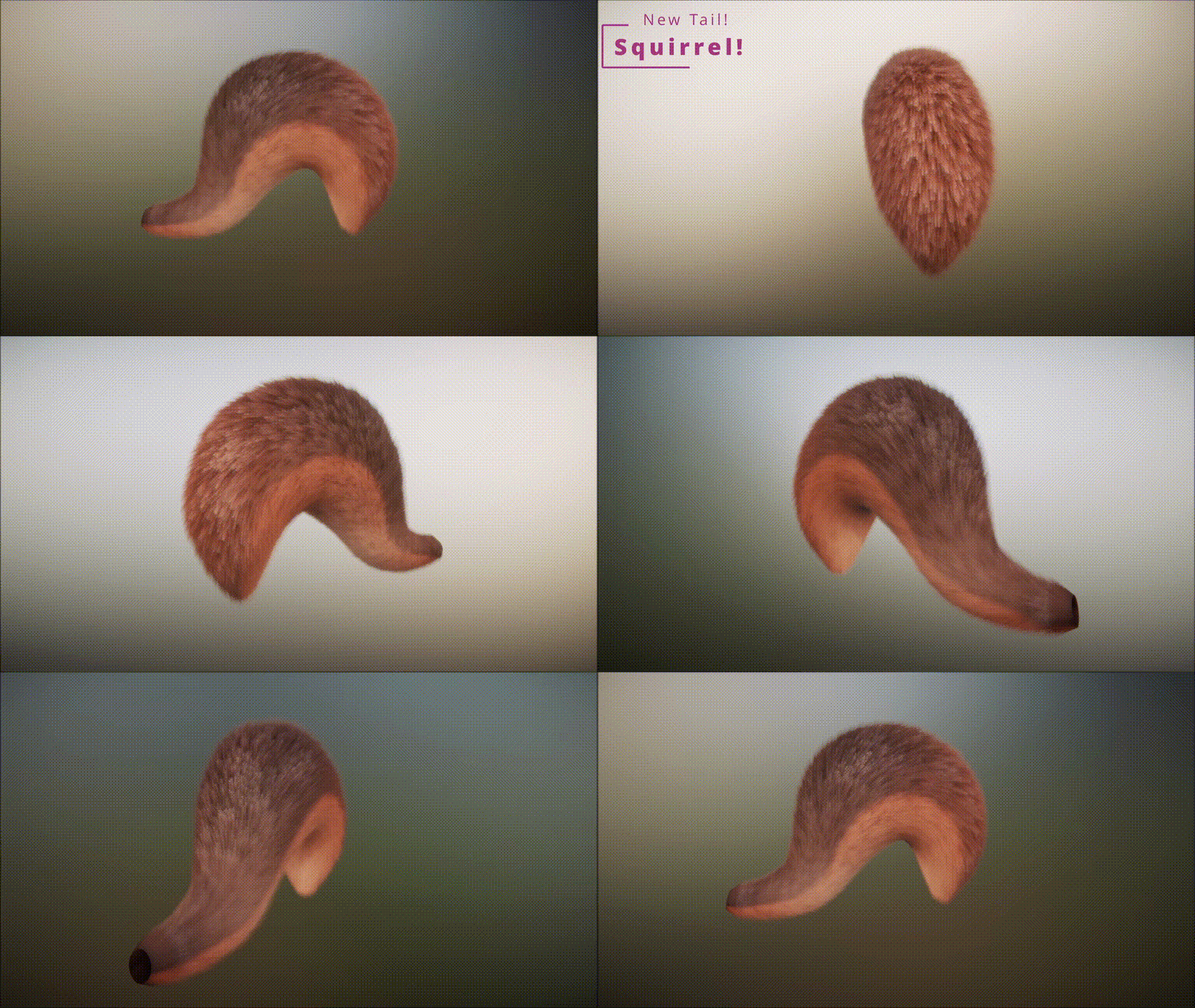
Since squirrels have a very distinct tail shape, I figured that creating one would definitely help you all out to make some squirrels and add to the character diversity.

So, here’s a little preview of the squirrel tail that will be available in the upcoming release!
Have a good one and till soon!

-Blacky

View Post

Sneak peek - Upcoming coupling improvements!

Hi all!

As we near completion of the upcoming FurryVNE 1.0 build, we’d like to share a preview of our brand-new, reworked coupling system, which now allows transmitting kinetic energy from one character to the other.

In the Forces section of the Coupling menu, you’ll find three new sliders:

  • Energy Transmission – Controls how much motion/force is passed from one partner to the other (from none to full). (Defaults to 1 for new interactions, defaults to 0 for previous interactions.)

  • Spring Frequency – How strongly the receiving partner tries to return to position after being pushed.

  • Spring Damping – How quickly and smoothly the motion settles (lower = bouncier, higher = more controlled).

(High framerate gif, may take time to load. Gif doesn't really do it justice. Video link below is recommended.)

Click here for video (recommended!)

(High framerate gif, may take time to load.)

Click here for video (recommended!)

This new system allows for more realistic interaction scenarios and greatly expands how you can shape the feel of your couplings. We hope you enjoy this upgrade for the interaction mode!

Have a great time and till very soon!

-FurryVNE-Team!

View Post

Scalie Long Neck Variant - Snake!

Hey everyone, Blacky here!

Continuing our plan to incorporate multiple species into a single head—just like with the "regular" version of the upcoming Scalie1 head—I'm proud to introduce the additional species option for the long-necked Scalie head: the snake face type!

Since our original snake head has aged quite a bit, this felt like the perfect opportunity to offer a fresh alternative using the new head model. And because we were also missing a proper snake template, I went ahead and created these two for the upcoming build!

Without further ado, here they are—I hope you enjoy them!

Have a great weekend, and see you soon!

-Blacky

View Post

New Appendage Set - Piercings!

Hey everyone, Blacky here!

With the new option to add appendages literally anywhere, I thought—why not start creating some body jewelry?

Before I knew it, I had made not just one or two assets, but a whole set of piercings!

So, in the upcoming build, you’ll find a new folder in the Appendages section called “Piercings,” containing all the jewelry you see here.

I’m looking forward to seeing your decorated characters and wish you a great weekend!

Till soon,

-Blacky

View Post

Additional Scalie Support - New Tail and Templates!

Hey everyone, Blacky here!

Today, I’ve got a little WIP surprise for you!

Since the new Scalie head is on its way, I figured it wouldn’t hurt to have a matching new tail as well—for those who might be interested in, let’s say, creating chameleons?

So here’s a quick demo of the upcoming Scalie4 Tail, which will be included in the next release!

I'm also excited to show you the brand-new male and female Scalie templates, already featuring the chameleon tail on the male template, while the female version was more inspired by some gecko species.

That said, I hope you like what’s coming, and I’m really looking forward to seeing what you all create using the new Scalie gear!

Have a great one, and see you soon!

-Blacky

View Post

Finally - Camera Nodes!

We are very proud and excited to showcase a massive key feature for Furry-VNE with the upcoming release—one that will significantly enhance the possibilities of your animations and basically changes everything: the Camera Node!

As soon as a Camera is present on your scene, it will always play from that cameras perspective.
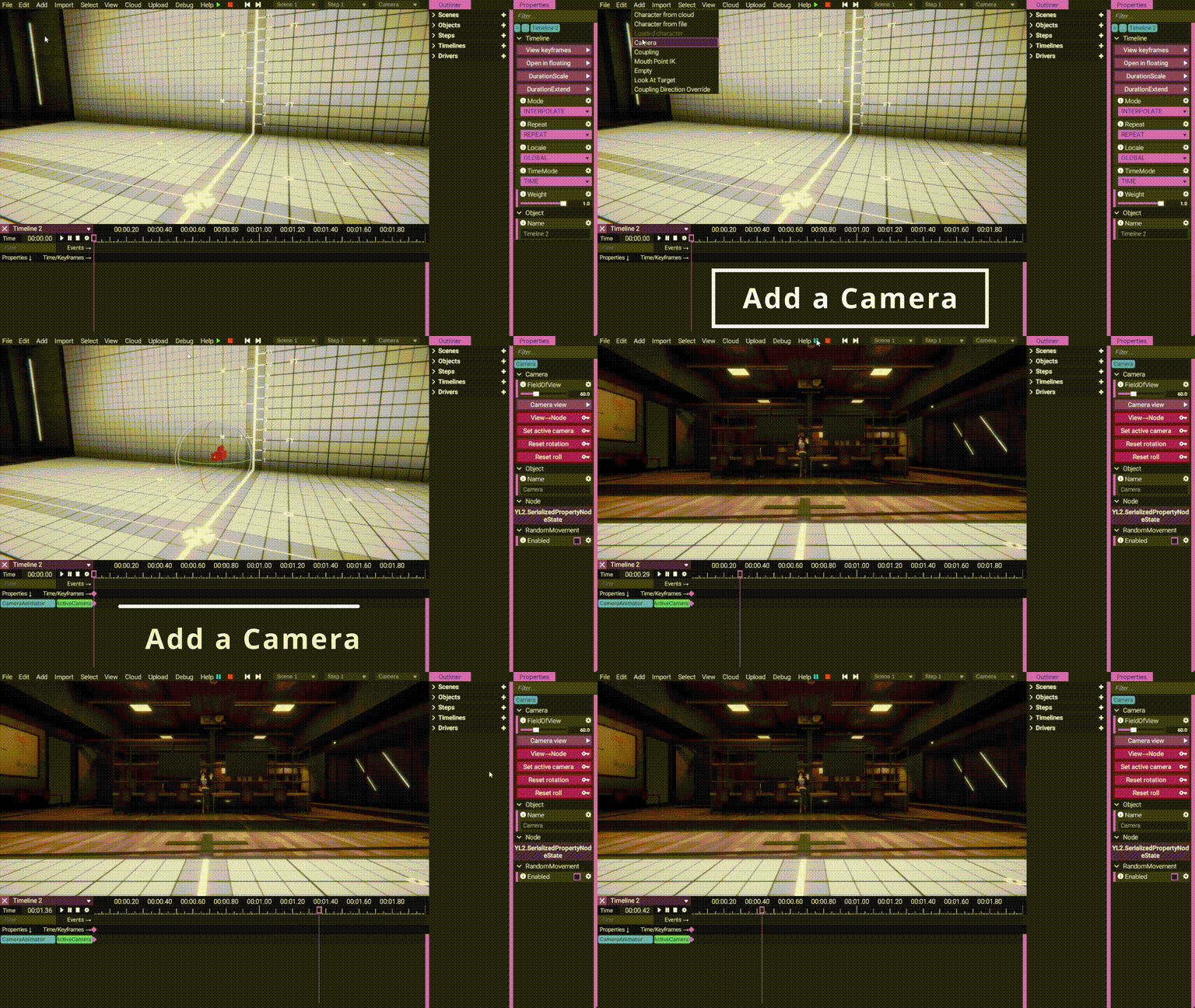
Just like any other node in FVNE, it can be snapped to surfaces, parented to other nodes, or freely moved and rotated using the familiar gizmos.

Additionally, by clicking the “View → Node” button, you can instantly place the camera to match your current view, making it incredibly easy to position it exactly how you want. This action (like all others marked with the key symbol) will create a keyframe—meaning you can fully animate your camera(s) using Timelines and Keyframes, just like any other element in FVNE.

You can jump into the camera’s perspective at any time by clicking the corresponding button and exit it again simply by rotating your view.

By clicking the “Set Active Camera” button, you define which camera will be live from that moment on—until you choose another.

The Random Movement checkbox works just like you're used to, allowing you to simulate shaky cam effects, perfect for scenes that mimic excited smartphone filming.

And since you can place the camera literally anywhere, things get really creative from here on!

Attach it to a custom made camera prop held by your character and suddenly he becomes your literal cameraman!

Or maybe you want a bit of POV action and need to be right in the middle of the scene? No problem—just parent the camera to someone’s head and you're good to go! Combine this with a LookAtTarget node and you’ll soon be crafting scenes like never before.

We truly hope you’re as excited about this feature as we are. Stay tuned for more updates leading up to the next release (June/July).

Until then, have a great time—and see you soon!

View Post

Scalie1 Head - More than just "another head"!

Dogson and I had a little brainstorming session, and we came up with something that has a lot of potential:

What if we could give you a single head that easily morphs into multiple species?

Introducing a new era of heads—we're very proud of this one!

The new Scalie1 head features two additional sliders in the tweakable section, allowing you to morph it into either a crocodile or a shark! And by combining the mouth spikes and beak slider, this head also makes for some wonderfully cute dragons.

As always, you can apply both male and female face types to the head—but this time, we’ve also added species-specific face types that sit on top of the respective tweakable sliders to further enhance each look.

The Scalie1 head also comes with built-in teeth, just like all of our modern heads, making it a clear improvement over the older scalie, shark and dragon models. It offers a broader range of expression and a more cartoony, stylized approach.

So, with the upcoming release, you're effectively getting three new heads in one, offering more variety and customization than ever before.

I’m also working on updating and expanding our template selection. What you see here is a sneak peek at the upcoming gecko-inspired female template for the Scalie1 head. And since this new head produces better sharks than the older model, I'm updating the female shark template and creating a new male version from it as well!

We hope this gets you just as excited as we are.

Have a wonderful weekend, and stay tuned—there’s more coming your way very soon!

-Dogson & Blacky

View Post

Custom shafts

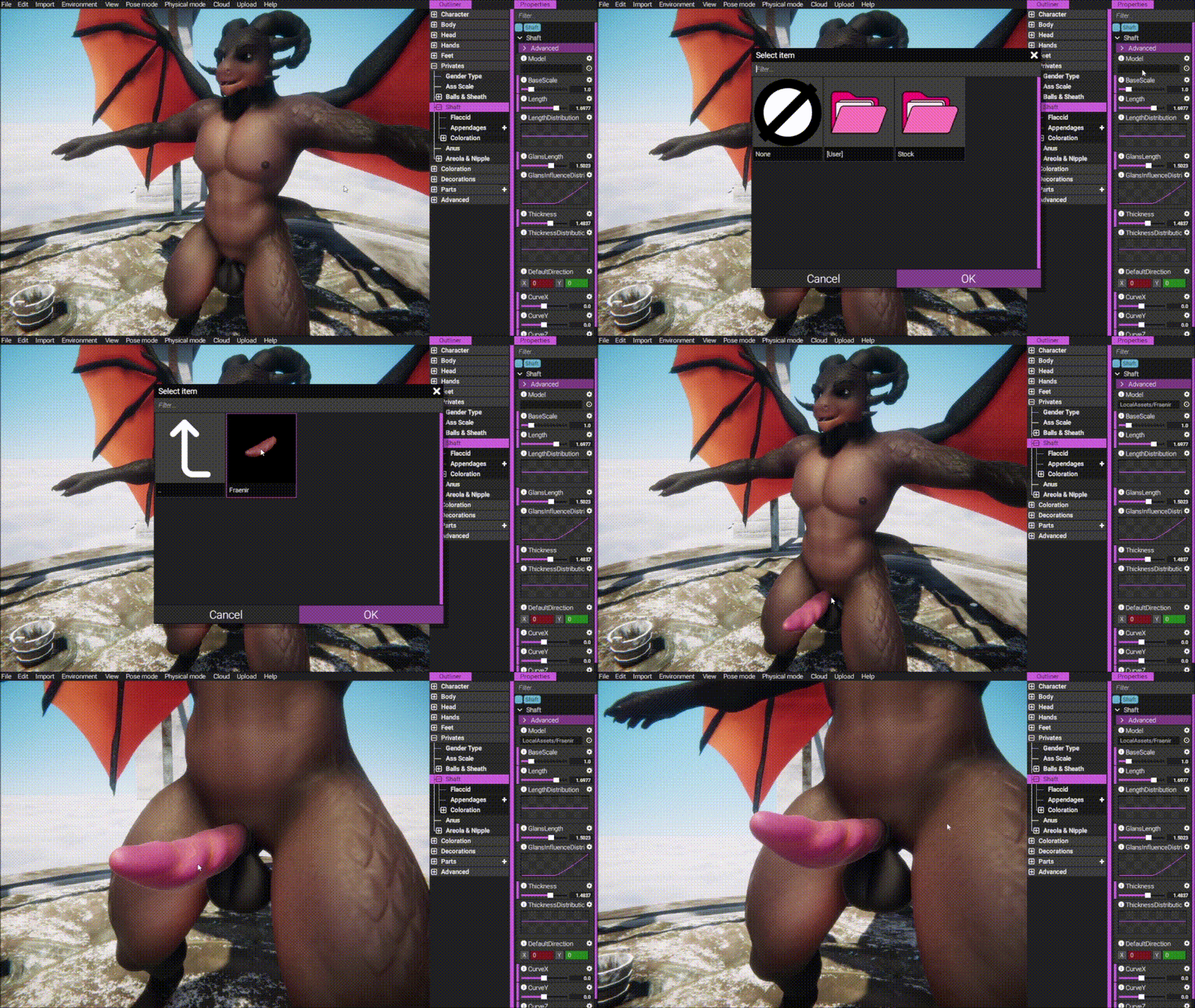
We’re very happy and proud to announce that with the upcoming release, you’ll be able to add almost any fantastical shaft design you can imagine from glb import!

Inside FVNE, these custom shafts work exactly like the stock ones you’re already familiar with—using the same menus, the same physics, and of course, generating their own individual collision hitboxes for use in the interaction creator.
But that’s not all:

We’re also introducing support for appendages on all shafts. This means you can now customize them even further with any mesh-based part you can think of. Whether it’s piercings, barbs, or something completely out of the box—almost anything is possible now.

We’re really looking forward to seeing all the amazing shapes and ideas you’ll create by combining these new tools!

We hope you enjoy this update—have a great week, and see you very soon!

-FVNE-Team

View Post

New Character - Tristan Cole!

Hey everyone, this is Blacky talkin’!

I’m super excited to introduce our future addition to the male roster: Tristan!

He’s a pretty mellow guy to hang out with at bars, but definitely prefers a good ol’ “Netflix and chill” over anything too energetic. Right now, he’s in what you might call a relationship—though he’s not entirely sure if he wants to make it official just yet.

This handsome tiger, now in his late twenties, lives a bit of a Rock ’n’ Roll lifestyle. He sees himself more as a heartbreaker than someone settling into long-term commitments… let alone thinking about marriage! But hey, time will tell if someone finally managed to conquer his heart this time.

Tristan will be ready on your couch for the upcoming release!

Have a wonderful week and see you soon!

-Blacky

View Post

Major improvements incoming!

The next release of FurryVNE will bring some major improvements to character loading and body editing while also reducing memory footprint and size on disk (exports). See the images for comparisons:
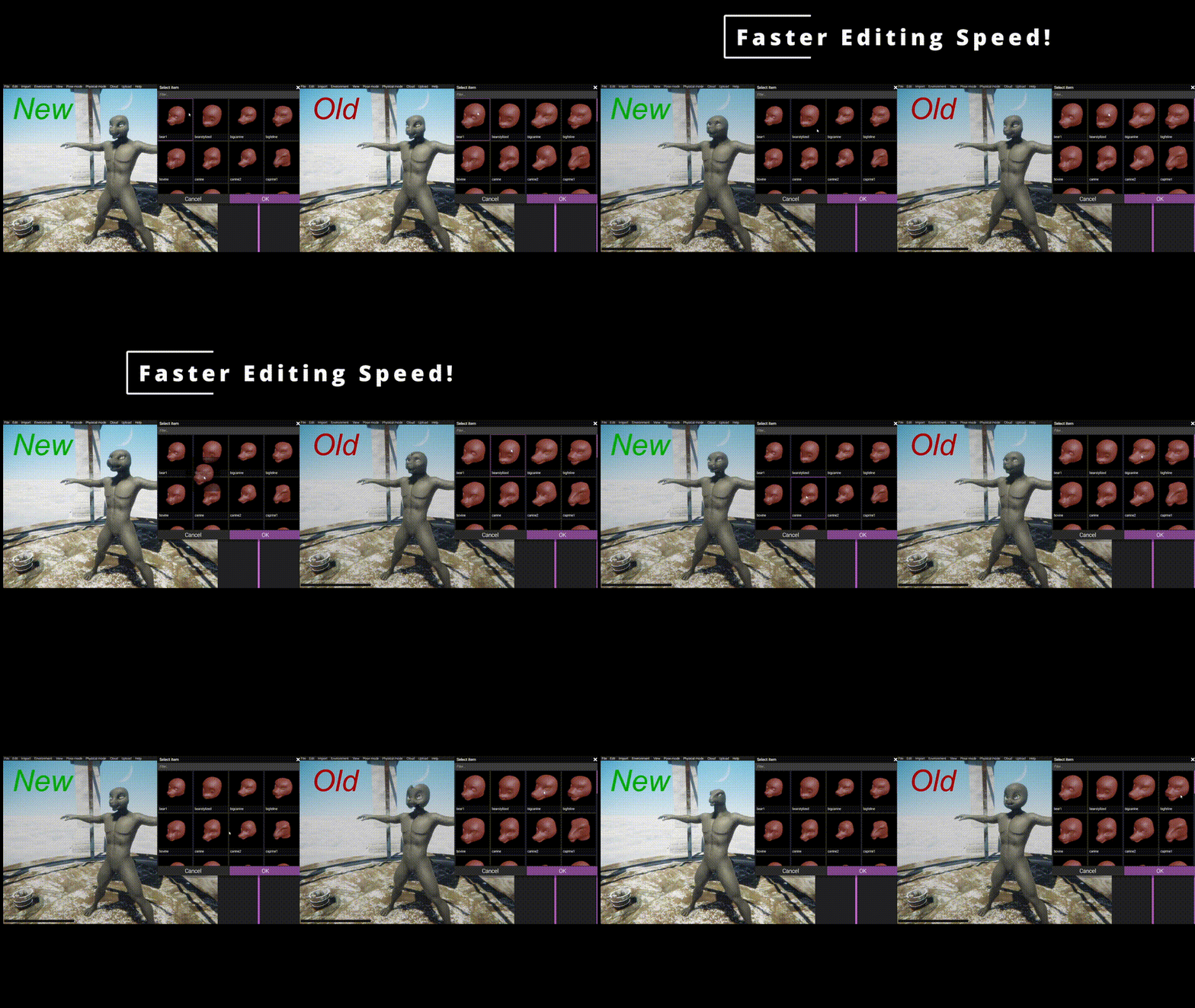
(Editing is about 3-4 times faster compared to before. Here's the same thing but in video form instead.)

(Video file here.)

(Newer export takes less space.)

Special thanks to Blacky for providing these comparison videos and data.

How?

When assembling the main character mesh we are essentially combining several separate meshes (body, head, hand, feet, sheath) into a single one. All these meshes have several hundreds of blend shapes that need to be combined when added to the newly combined mesh. Previously, we have been using Unity APIs for doing this (both retrieving and setting blend shapes). As it turns out, these APIs are not very performant. Just adding all these blend shapes accounted for more than 60% of the processing time when loading a character, and about 90% of the time when editing a character (for example swapping head model to something else). Perhaps this was acceptable before, as we did not have that many shape keys (blend shapes) that needed to be combined and added as we do now. But as the number of blend shapes have kept on increasing, these times have also increased to the point where the editor feels very slow and frustrating to use.

Now, we've made several changes to make this a much better experience for the user:

Custom blend shape system & reduced Unity API usage

We now only use the Unity APIs for retrieving mesh data and blend shapes, but we don't use it to add any blend shapes to unity mesh object itself as that is very slow. Instead, we use our own blend shape system for applying blend shapes at runtime.

Deferred blend shape processing

Instead of retrieving and combining all these blend shapes and adding them to the new mesh up front during the mesh combining phase, we simply just only combine the mesh data (vertices, triangles etc, no blend shapes).

Then, when we are in need of using a blend shape (for example when applying a body type), this blend shape is created on the fly by querying each individual mesh (body, head, hand, feet) and then combined and cached and added to our own blend shape system. This means only the shapes that are actually used will be retrieved and then cached for quick usage.

If this shape needs to be retrieved in the future, it is already cached in our system so we can circumvent using the Unity APIs.

This also happens for exports, meaning instead of having to put all the potentially used shapes into the export file (for creation of mesh upon load), we can simply omit all that data and create it on the fly when requested.

This makes exports smaller.

Final words

These changes will provide a significant improvement for FVNE fans and will go live in the next build, which we internally are calling "1.0.0". This is the final build before we start working on migrating our project to a different version of Unity and a more modern rendering pipeline which will open up doors for all sorts of new features, including (but not limited to) custom levels and VR.

Stay tuned for more news! In addition to these improvements, we have several new exciting features coming for "1.0.0"!

All the best.

- odes

View Post

Scalie1LongNeck WIP

Mesh is work in progress. Mesh is still subject to change.

Dogson here again with a long neck version of Scalie1. It's basically just the new Scalie1 head but with a longer neck that we hope will lend it self well to various dinosaur, dragon and perhaps even snake designs.

It will be released at the same time as Scalie1 goes in to a live build also.

All the best.

~ Dogson.

View Post

Scalie1 WIP

Mesh is work in progress. Mesh is still subject to change.

Hello all, Dogson here with a sneak peak on Scalie1 head, the head that will act as a upgraded version and replacement for our old Scalie head that has been in the software from the earliest start.

Once Scalie1 is offcially in a released version, Scalie will have its support ended for any future body type or tech implemented. Of course all characters created with the old head will stay functional and it will be users choice if they wish to switch over to new Scalie1 or not.

Been working at making this new head lend it self well to various reptile and dragon designs and I think it has a nice balance. I think it can be pushed further in various directions with custom offsets too of course!

All the best!

~ Dogson.

View Post

New Character - Clementine Wildehart

Hey everyone, Blacky here!

It’s finally time for the next showcase—meet our sassy vacation vixen Clementine!

This independent businesswoman loves chasing the sun and spending long days at beaches around the world, taking breaks from her otherwise stressful life whenever she can. She’s not too concerned with long-term relationships, and settling down with just one partner isn’t really her thing—or maybe the right one just hasn’t come along yet.

While she secretly admires (and sometimes even envies) Casey for his own successful career, the two often end up arguing over trivial things and don’t always get along. So she really never misses a chance to remind her little brother who’s not only the older but also the taller one.

Clementine will be available for the upcoming release and will serve as our demonstration character for the new character creator tutorial series where we’ll walk you through her entire creation process to help inspire your own FurryVNE characters!

Hope you’re having a great week and till very soon!

-Blacky

View Post

FurryVNE Build 2025-05-10

Hi all!

New build for you!

Fixes some issues that were present in previous build. Check release notes!

>>> CLICK HERE TO READ THE RELEASE NOTES <<<

>>> CLICK HERE TO DOWNLOAD <<< (for patrons)

Download instructions

The app comes in a self-extracting archive. You can either run the exe to let it extract itself, or extract it with 7-zip if that makes you feel better.

Windows doesn't seem to like unknown EXEs, so it may block you from running the self-extractor. To unblock it, simply follow these instructions:

An archive version is also available on the site, if you prefer downloading that instead.

All the best.

- FurryVNE Team

View Post

Fixes coming

Hi all!

It has come to our attention that some interactions broke with the 2025-05-01 release, namely expressions wouldn't load properly and timeline events wouldn't fire. We will fix these issues and post a patched build within a few days.

All the best.

- odes

View Post

FurryVNE Build 2025-05-01

Hi all!

New build for you!

This build brings a bunch of requested workflow improvements, along with several new features, new content and loads of bug fixes.

>>> CLICK HERE TO READ THE RELEASE NOTES <<<

>>> CLICK HERE TO DOWNLOAD <<< (for patrons)

Download instructions

The app comes in a self-extracting archive. You can either run the exe to let it extract itself, or extract it with 7-zip if that makes you feel better.

Windows doesn't seem to like unknown EXEs, so it may block you from running the self-extractor. To unblock it, simply follow these instructions:

An archive version is also available on the site, if you prefer downloading that instead.

All the best.

- FurryVNE Team

View Post

New hot sorting!

Hey everyone!

This is MobiusScarf. Long-time pledger, first-time volunteer code monkey for FurryVNE.

If you're a regular user of FurryVNE like I am, you've probably noticed something odd about the "Hot" page that greets you when you browse the Cloud for a Character or Interaction. Specifically, that it's pretty much no different from the "New" page.

Now, don't get me wrong, I love the "New" page. Sometimes I just want to see the newest things you guys are cooking up. But I don't need two "New" pages. And now that we have a lot more creators producing a lot more content, it's getting harder and harder to stumble upon hidden gems that maybe were uploaded when I was busy with something else. So why not make the "Hot" page more of a showcase for those hidden gems? Surely, that's what it was meant to be to begin with!

Since I know odes can only be working on so many aspects of the system at once, and since I have some technical experience from my day-job, I volunteered to take a look under the hood to see if I could figure out what was wrong with the "Hotness" rankings.

After messing around with my own wacky ideas for a few days, we ultimately concluded that the problem wasn't really with the original algorithmic approach, but with the function weighing the scores in the algorithm. It was kind of working, but it was weighted as though we expected dozens (if not hundreds) of posts with hundreds (if not thousands) of votes on those posts every day.

Long story short: We'll ultimately just need to change four lines of code in one function and update the rankings throughout the system, and then the "Hot" page will function more like it ought to.

Which, of course, begs the question:

How Exactly Will It Function?

Posts prioritized by the reworked Hotness algorithm will follow these general guidelines:

  • Generally added less than a month or two earlier.

  • Must score a minimum of 5 to rank.

  • Higher scoring posts stick around higher in the rankings longer, but scores reach a point of diminishing returns after around 3 months to keep things fresh

This means that the Hot page will begin to show a mix of new and old posts from the last few weeks with a range of scores between them.

And just to be clear, the New and Top pages will still be there, and they will still behave the same for when you just want to see the newest stuff or the highest ranking stuff. This change will only affect the ranking for the Hot page.

TL;DR - The Hot page ranking in the Cloud was broken, but we fixed it. Hope you like it!

View Post

New Add-On for Blender: FurryVNE Expression Manager is on the way!

Hey everyone, Blacky here!

I've been working on a little helper tool for blender which will manage your shape keys and get you started with creating expressions for your characters.

Video demo here.

So, without further ado, I proudly present the FurryVNE Expression Manager to you:

You can find it on the right side of your outliner and it's divided in four sections.

"Add Presets"

This one let's you add various presets via buttons to your character (or all of them).

Please note, that those come without a value though.

They are meant to save you time typing down all those keys or to give you inspiration for what kinds of emotes you could create.

"Smart Operators"

This section contains the core functions:

The two "Split" operators automatically create left and right shape keys out of either all your present "ue_" keys or just the selected one, depending on which button you use. The new keys will automatically be named based on your initial key plus the L or R respectively.

The "Create R/L Counterparts" operator searches your entire outliner for shape keys with either L or R in it and creates the missing counterpart.

The "Combine R & L to Main Key" operator then can be used to automatically create the unified version from two matching pairs of R and L keys, naming it based on the initial shapes.

That means, if your character is not symmetrical or struggles with blenders mirror functions, you can simply create shape keys for one side and let those two operations handle the rest for you. You're only two clicks away from a full set of emotes!

Finally, the "Combine Selected Keys" operation opens up a menu from where you can choose any of your present shape keys. By selecting their boxes, pick a name for your new shape key and pressing the OK button, it combines all those selected shapes into a new key.

“Utilities”

The “Sort Shape Keys” function sorts your entire outliner so that all the presets land in a predetermined order. The main key always comes first, then the R version, then the L version.

If you add your own keys, those will also be sorted in their respective section as long as you keep the spelling consistent. Otherwise it will simply sort alphabetically.

The other two buttons are adding either the R” or “L” to your present keys. Those are coming in handy if you, like mentioned earlier, struggle with blenders mirror function and rather want to go for the one-sided approach.

Mirror Shape Key (vertex)

Finally, the last section is dedicated to mirroring the current shape key you are currently working on.

You can either choose to mirror all deformations from (your POV's) right side to the left or the other way around.

Again, this is meant to be the silver bullet against all faces and body types which don't work with blenders mirror functions well. Please beware that this function is running on vertex basis and is taking blenders X-Axis as middle point. That means, if your e.g. are having teeth models on your characters head that are technically on the right hand side but reach over to the left and across the X-Axis, those vertices will get mushed together while mirroring, giving wrong mirror results.

I hope you all like this and it will help you out getting started with creating emotes for your characters.

This add-on will be included on the next upcoming release in April.

Till then, have a good week!

-Blacky

View Post