Asset: HyperBole Racers
Added 2021-05-13 05:57:48 +0000 UTC
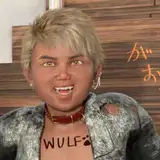
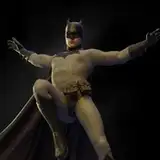
HyperBole Racers!
Took a while uploading these because I kept feeling like they weren't optimized/practical enough, but the stuff I'd like to do would take more work than making them in the first place, so here we go! They evolved and grew along with the HyperBole idea, and their final form reflects that (in that, y'know, some of them are a bit of a mess).
THAT SAID, I've spent the past day trying to clean stuff up (HUGE thanks to Nathan Vegdahl for working some python magic to redirect a bunch of redundant image textures), so it shouldn't be too wild.
Download (RIGHT CLICK, SAVE LINK)
Hyperbole Assets.blend
(200mb)
[also, I've tried to optimize this file as much as I could, but if anyone has any tricks, I'd love to hear them]
Usability-wise, a few tips!
-Typically the engine object itself is the root/parent/thing you want to select when moving the racer around. Unless if you can't see the engine, in which case it's usually something obvious.
-Some of the riders have IK rigs parenting their hands to the bike handles, so you can just animate the handle bars and the rest follows- but most of them don't. If you want to figure out how to set up that sort of thing, check out the "Making Mocap Data Flexible" link below :D
Anyways yes! Use them how you want!
For a more nitty-gritty breakdown (or some more straight-up hyperboley assets):
Cockpit Controls (I used these a lot in the bikes here)
Modeling Little Tech Greebles from Images
Hardware Assets (all of which are also in the Hyperbole Racers asset file, but more organized)
HyperBole Engine Crash (how to simulate an engine crashing all pod-racey)
Making Mocap Data Flexible (this one sounds boring but I think it's actually the most useful!)
Comments
Did you try right clicking, and saving the link that way?
Ian Hubert
2023-07-26 08:59:54 +0000 UTCCannot download, plis help
2023-07-25 14:29:35 +0000 UTCI am asking myself if there is a way to replace the scanned people sitting on the hyperbole with a person filmed on a green screen . But how to put the hyperbole between the legs in order that everything fits and looks ok....
Fransoa
2022-07-28 16:56:35 +0000 UTCYou just have to right click and "save link"- it's a little old school (I've started hosting recent files on google drive cause it seems to confuse less people)
Ian Hubert
2022-06-05 01:41:28 +0000 UTCIt has no download link
2022-06-03 23:33:26 +0000 UTCThere will be a little upward pointing arrow next to it, click on that then press keep.
2022-04-26 11:49:05 +0000 UTCI got same problem,so how to fix it:(
2022-04-09 08:57:52 +0000 UTCThere will be a little upward pointing arrow next to it, click on that then press keep. (:
2021-08-25 00:48:38 +0000 UTCIf you select display mode "Blender file" in the Outliner and unfold images you can see and remap duplicated images. The file I just downloaded have lots of duplicated images (.001, .002 and so on). A pythonscript to remap them would be awesome because it's cumbersome to do it manually. Don't forget to flip display mode to "Orphan data" and click purge when you're done.
Daniel defdac Larsson
2021-07-26 14:17:15 +0000 UTCI'm having trouble downloading this link. Chrome gives me a message that it couldn't be downloaded securely Do you have an alternate link?
2021-07-20 00:47:53 +0000 UTCIan what license do you consider your assets to be released under?
Lukas Sprehn
2021-05-25 11:28:18 +0000 UTCIn Blender, use the displacement node in the compositor. To render it out, enable the Mist pass in render layers, enable the mist under the camera's viewport (so you can see a line representing the mist) and then tweak the mist distance in the world settings. It will render a black-to-white gradient as one of the render layers where depth corresponds to brightness.
Zachary Macintyre
2021-05-19 10:02:50 +0000 UTCnot bad for your first attempt, looks really good
2021-05-16 16:37:22 +0000 UTCId looove if you talked to Nathan about that! I cant wrap my head around the first thing about python.. Even followed the tut you linked to a while ago - i just.. I can't! :D
Nickolai bauer
2021-05-16 10:15:16 +0000 UTCI'll tell you if I get around to it!
2021-05-16 06:33:15 +0000 UTCQuick Answer: to pack textures into the file you go File> External Data> "Automatically Pack into .blend" Longer answer: I'm going to make a video soon about cleaning up blend files and packing up texture data, hopefully that answers it a bit better.
Ian Hubert
2021-05-16 03:17:51 +0000 UTCOh man that's rad!! I love the smoke sim! I wanted to do that for the HyperBole scene but I chickened out, hahaha And totally don't mind- I think it's super cool! Yeah you can use these assets in basically whatever you want :)
Ian Hubert
2021-05-16 03:14:35 +0000 UTCI THINK it's actually still there in the file (if you go to the text panel with the Textures.com disclaimer, you can find it in the pulldown)- but it's fairly specific to this situation. THAT SAID, it's reverse engineerable (you can see it basically searches through every material for texture nodes containing the missing image files (which we got from the system console), and replaces them with whatever texture we specified. THAT said, I'll talk to Nathan and see if we can make a few more one-size-fits-all options. I really want to make packing/cleaning texture files easier, so maybe we can develop some easy tools for that :D
Ian Hubert
2021-05-16 03:12:21 +0000 UTCOh man if you can get a good print of these things I'd LOVE to see it!!
Ian Hubert
2021-05-16 03:06:12 +0000 UTCWow these are so cool. I am going to have to start making my own. Hope you don't mind but I made a very short YouTube clip using the model to show my first attempt at smoke/fire simulation in Blender. https://youtu.be/nr71DdPcats
Grant Abbott
2021-05-16 01:54:11 +0000 UTCHey Ian, could you please make a proper video about animating environments with depth maps? I've see the short one on youtube but I don't know how to use a depth map
2021-05-15 13:18:04 +0000 UTCYo I just realised if this can be 3D printed we can make little action figures...cause why not 😂
2021-05-14 21:18:12 +0000 UTC10,000!
Zach Hoy
2021-05-14 07:36:22 +0000 UTCwhat! Wow outdoing yourself on this one
Zach Hoy
2021-05-14 07:35:51 +0000 UTCIs that python used to clean up the image textures something we could get our hands on? That sounds kinda essential 💪
Nickolai bauer
2021-05-14 07:24:45 +0000 UTCI have a question. I’m so curious, How to make "texture Pack" ? On shader Editor, I can see "Unpack Item of Image Texture". (Sorry to poor English. From South Korea.)
2021-05-14 07:13:27 +0000 UTCWould love it if Nathan Vegdahl would do a Python Youtube tutorial! YT is lacking in the Blender Python space for sure. Great work from both of you!
2021-05-14 01:30:23 +0000 UTCSeeing Popcorn Bot in this collection made me very happy
Mel
2021-05-13 20:04:21 +0000 UTCThat’s amazing. That mean I can kitbash with them in a personal project? Or is it just for learning and study purposes? Just like to be sure. Anyway, thank you:)
2021-05-13 17:04:06 +0000 UTCMay you live a thousand years.
Joel Bass
2021-05-13 16:40:19 +0000 UTCThis is amazing, thanks for sharing Ian, you know I actually learn more from playing with your files, lighting render, and just back engineering. Tuts definitely help but it's good to have to asset to use while we learn. Anyways I have a lot of catching up to do still in the early 2000 lessons. I'm Excited to see what's to come.
I Like it Hardcore Tv
2021-05-13 13:58:43 +0000 UTCAwesome, Ian! Thanks! (For the cockpit assets, too!!) I wonder how much of a PITA it'll be to optimize the racers for 3D printing... 🤔 They'd look rad on a shelf! 😁
Bakamoichigei
2021-05-13 12:57:22 +0000 UTCthis is AMAZING!! im having so much fun just exploring these assets, thankyouuu!!
2021-05-13 08:28:38 +0000 UTCThanks so much for this Ian, absolutely and amazing and very generous of you to share such a huge slice of your efforts.
Nigel Hillyer
2021-05-13 08:09:07 +0000 UTCfor cleaning up 3d scans you can look into using instant meshes (automatic retopo software) and then baking the diffuse map. I did that with one of the old character assets and I reduced the poly count from 50k to 5k with no noticeable change in quality.
2021-05-13 07:11:54 +0000 UTCNo way~ It's sick
2021-05-13 06:35:42 +0000 UTC😲 wow thanks bro
Patrick Lever
2021-05-13 06:23:42 +0000 UTCThanks Ian O: !!
Davide Gualmini
2021-05-13 06:17:56 +0000 UTCDude, cant believe you shared all this stuff! You should crowdsource new shots for a new episode from all your patrons, :-)
Jason
2021-05-13 06:17:44 +0000 UTCDang that's so cool thank you so much !
MrLinvalT
2021-05-13 06:09:49 +0000 UTCThank you Ian
iain
2021-05-13 06:09:40 +0000 UTC*Makes punk metal hand gestures* YUSSSSSSSSSSSSS. Thank you so much Ian!!! Now we too can have bowls of hyper-o’s.
Blake Rizzo
2021-05-13 06:00:13 +0000 UTC