![[Hezeh]Node FHair #17_V1 & V2](https://img5.xaiju.com/storage/3/or/it/d38796-019e809a-2e32-79a2-af71-64196d0e0fb6.png)
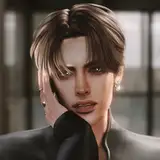
[ V1 ]

[ V2 ]

For Blender only. Not for game use. (Blender 4.2+)
Do not edit, reupload, or resell.
Do not share direct download links.
Violations will be addressed through the DMCA process.
💡 If the download does not work, please try again with a different browser. (Chrome/Edge recommended)
💡 다운로드가 안 될 경우, 브라우저를 바꿔 다시 시도해 주세요. (크롬/엣지 권장)
🎯 Read Me :
When adjusting the hair to match your sim's pose and the curls or braids get distorted,
try the following method instead of brushing with the Comb tool :
1. In Object Mode, select the hair layer you want to move, then enter Edit Mode (Tab).
2. In Edit Mode, activate Proportional Editing (shortcut: O) and make sure the "Connected Only" option is checked.
3. Press Numpad 1 to switch to Vertex Select Mode, then drag to select the vertices you want to move.
4. Scroll your mouse wheel upward to adjust the size of the circular influence area.
5. Once the size looks good, press G or use your mouse to gently move the selected hair strands.
💡 Extra tip: Before making adjustments, set Modifier > Duplicate Hair Curves > Viewport Amount to 0.1 to reduce lag.
Node Hair doesn't include rigging, so the original shape won't stay perfectly intact when posing. But, using this method helps you minimize the deformation of curls or braids and adjust them more naturally.
Once you get used to it, it’s actually much quicker and easier than using the Comb brush :)
If you find this explanation hard to follow,
I’d be happy to add images to the Node Hair guide in the future.
Try it out, and feel free to leave a comment or DM me if you have any questions.
Thank you!
Hezeh
2025-10-02 09:05:55 +0000 UTC펭며들어따
2025-10-02 06:47:32 +0000 UTC