(English translation is at the lower part of the page)
ビートセイバーに、アニメーションするアバターを表示する mod です。アバターやアニメーションは、自分で好きなものを追加することも可能。ゲームクリアや失敗でアバターの演出が楽しめます。
VRM、CustomAvatar のアバターが使用可能です。ファイルはそれぞれ下記の場所に配置すると認識されます。
VRM: (Beat Saber Dir)\NalulunaAvatars
CustomAvatar: (Beat Saber Dir)\CustomAvatars
Unity の Human 用 anim ファイル (非 Human 用は対応しません)、BVH ファイル (BVH は再生速度やトランジション時間の設定には非対応) が使用可能です。ファイルは下記の場所に配置すると認識されます。
(Beat Saber Dir)\NalulunaAnimator\Animations
anim ファイルは BOOTH や Unity Asset Store などで入手可能です。unitypackage 形式で配布されている場合もありますが、この場合は、一度 Unity にインポートして中身を取り出すか、unitypackage を直接展開できるツールを使用してください。
Unity 上でアニメーションが fbx として配布されている場合は、fbx 内のアニメーションを選択した状態で Ctrl + D キーを押すと、anim ファイルが出力されます。
設定のうち条件に一致して Enabled になっているものが表示されます。複数条件に一致する場合、より右にあるタブが優先です。
たとえば、
All: Enabled: on
Menu: Enabled: on
Cleared: Enabled: on
Failed: Enabled: off
Game: Enabled: off
となっている場合、ゲームクリア画面では、Cleared タブの設定が使用されます。ゲーム失敗画面と、メニュー画面では Menu タブ、ゲーム (曲プレイ) 中は All タブの設定が使用されます。
Order は、Anim1 - Anim6 に複数アニメーションを指定したときの再生制御です。
Order: 複数アニメーションがあるとき、1 から順にすべて再生
Shuffle: 複数アニメーションがあるとき、ランダムに並び替えた順ですべて再生
Random1: 複数アニメーションのうち、ランダムに 1 つ再生 (ループする場合、同アニメーションが連続しないよう制御)
Random2: 複数アニメーションのうち、ランダムに 1 つ再生 (ループする場合、ランダムで同アニメーションが連続する場合もある)
StopEnd、HideEnd: アニメーション再生が終わったときに、停止したままにするか、アバターを非表示にするか
Normal、Loop Last: ノーマルは最後まで再生したら最初に戻る通常のループ再生、Loop Last は複数アニメーションのループ再生時、最初に戻らず最後のアニメーションのみをループ
Trans: あるアニメーションから別のアニメーションへ遷移するときのトランジションさせる時間 (同アニメーションループの場合は無視)
Pose: 静止アニメーション (ポーズ) の場合に維持する秒数
NalulunaModAssistant でダウンロード可能です。
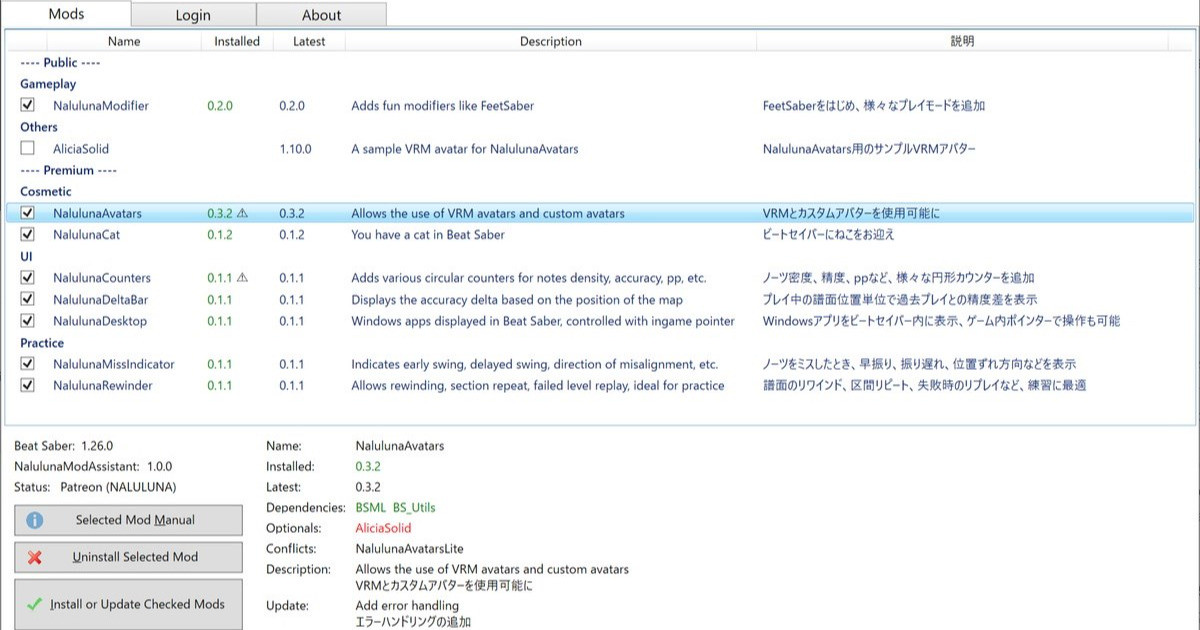
支援者様に公開しているわたしの mod の管理ツールです。mod のインストール、アンインストールや、更新内容の確認が可能です。mod のインストールは、支援中の Fanbox または Patreon アカウントでのログインが必要です。 今後、わたしの mod の配布や更新はこのツールを通して行います。まだわたしの mod 全部が登録さ...
----
This is a mod that will display animated avatars on the beat saver. You can add your own avatar and animations as you like. You can enjoy the avatar's performance by clearing the game or failing.
VRM and CustomAvatar avatars can be used. The files are recognized when placed in the following locations respectively.
VRM: (Beat Saber Dir)\NalulunaAvatars
CustomAvatar: (Beat Saber Dir)\CustomAvatars
Unity's anim files for Human (non-human files are not supported) and BVH files (BVH does not support playback speed and transition time) can be used. The files are recognized by placing them in the following locations.
(Beat Saber Dir)\NalulunaAnimator\Animations
You can find anim from BOOTH, Unity Asset Store, etc. In some cases, they are distributed in unitypackage format, and in that case, import them into Unity and extract the contents, or use a tool that can extract the unitypackage directly.
If the animation is distributed as an fbx, open fbx in Unity, select the animation in fbx and press Ctrl + D to output the anim file.
The settings that match the conditions and Enabled will be displayed. If more than one condition is matched, the tab to the right has priority.
For example,
All: Enabled: on
Menu: Enabled: on
Cleared: Enabled: on
Failed: Enabled: off
Game: Enabled: off
In this case, the settings on the Cleared tab are used in the game clear screen. The settings on the Menu tab are used for the game failure screen and the menu screen, and the settings on the All tab are used during the game (song play).
Order controls playback when multiple animations are specified for Anim1 - Anim6.
Order: When there are multiple animations, all animations are played in order.
Shuffle: If there are multiple animations, they will all be played in random order.
Random1: Play one animation at random among multiple animations (in case of looping, control the animation not to play the same animation in succession)
Random2: Play one animation at random among multiple animations (in case of looping, the same animation may be played in succession at random)
StopEnd, HideEnd: When an animation finishes playing, it may remain stopped or hide the avatar.
Normal, Loop Last: Normal is for normal looping; Loop Last is for looping only the last animation when multiple animations are looping
Trans: Transition time from one animation to another (ignored when looping the same animation)
Pose: Number of seconds to keep the still animation (pause).
Available via NalulunaModAssistant.
支援者様に公開しているわたしの mod の管理ツールです。mod のインストール、アンインストールや、更新内容の確認が可能です。mod のインストールは、支援中の Fanbox または Patreon アカウントでのログインが必要です。 今後、わたしの mod の配布や更新はこのツールを通して行います。まだわたしの mod 全部が登録さ...
なるるるるな / NALULUNA
2023-05-06 09:18:14 +0000 UTCNeko-Hangten
2023-05-06 07:42:32 +0000 UTCなるるるるな / NALULUNA
2023-04-30 16:38:06 +0000 UTCなるるるるな / NALULUNA
2023-04-30 15:02:13 +0000 UTC