現在対応しているビートセイバーバージョン:
Beat Saber versions currently supported:
1.29.1, 1.34.2, 1.37.1, 1.39.1, 1.40.8
1.42.0 (一部対応、現在対応作業中 Partially supported. Work in progress)
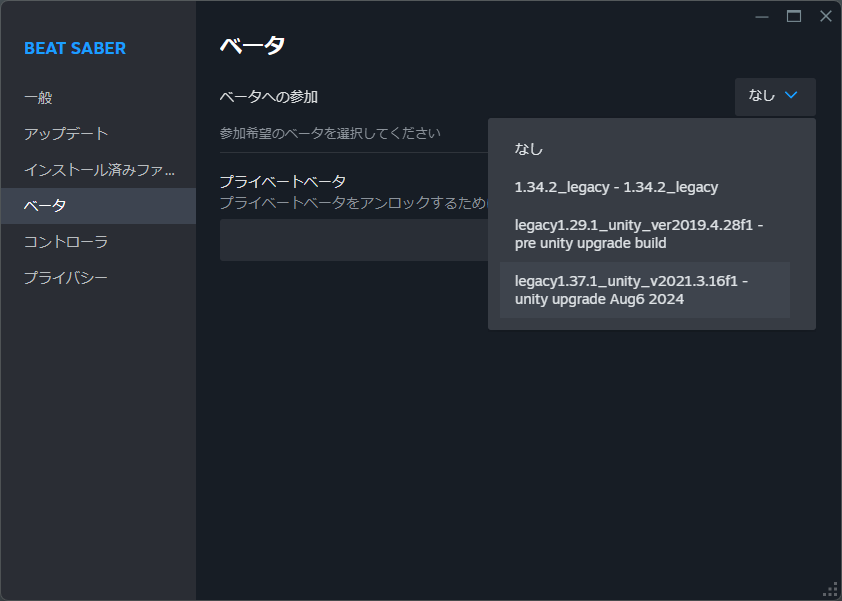
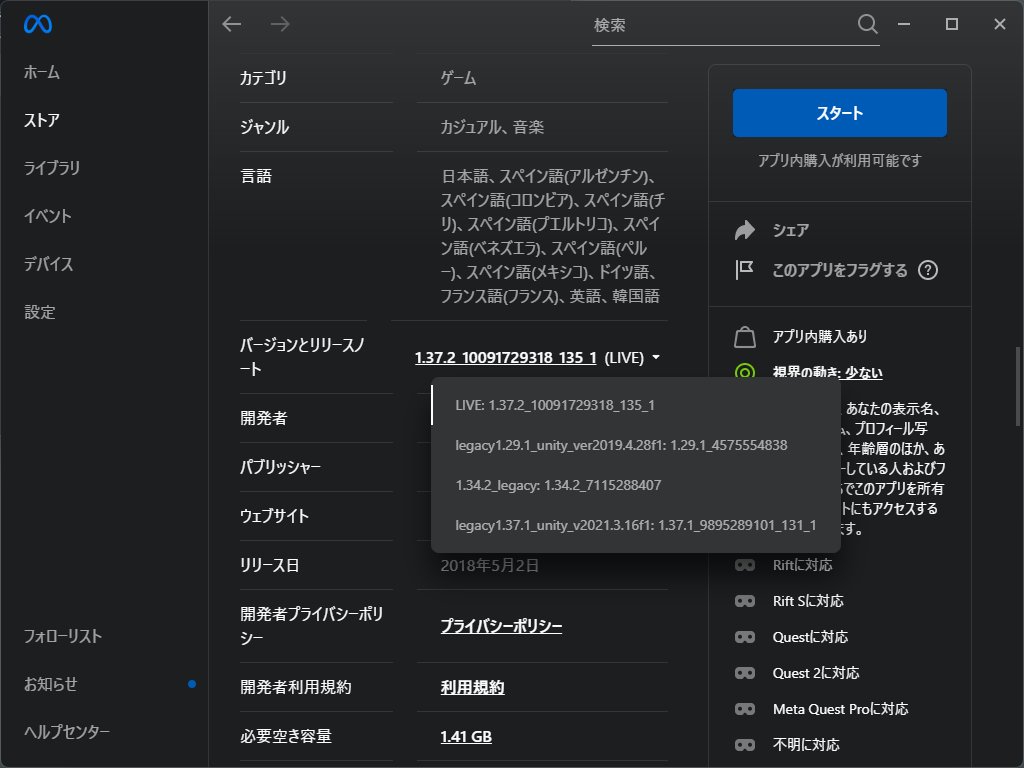
1.29.1, 1.34.2, 1.37.1 は、ストアの機能で選択可能です。最新版への対応も行いますが、mod の数が多いため、ユーザーが多そうなものから順次行ってまいります。
1.29.1, 1.34.2, 1.37.1 can be selected in the Store feature. I will support latest version, but since there are so many, I'll start with the ones that seem to have the most users.
----
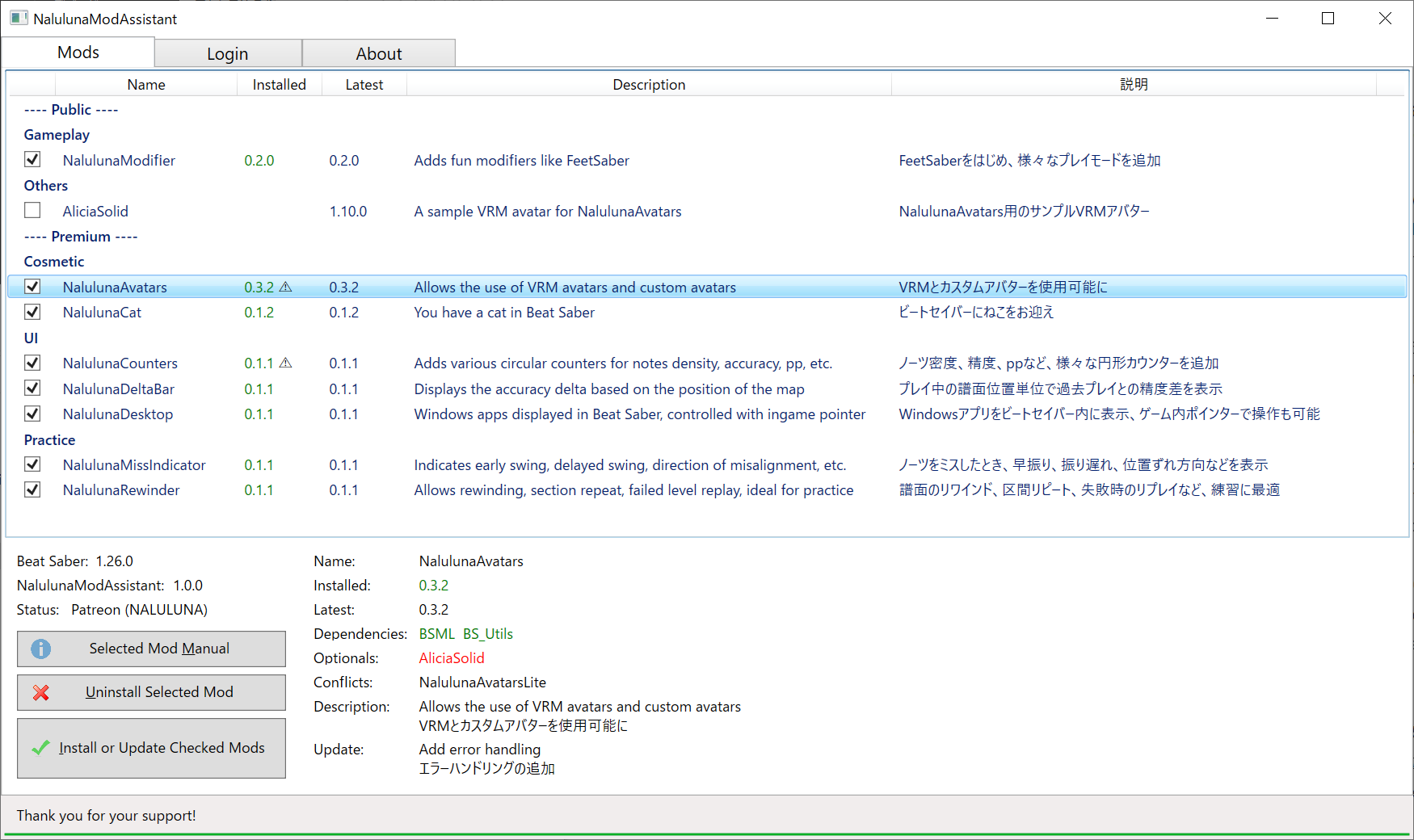
わたしの mod の管理ツールです。mod のインストール、アンインストールや、更新内容の確認が可能です。Private mod のインストールは、支援中の Fanbox または Patreon アカウントでのログインが必要です。
不具合報告は下記の説明をお読みになり、必要な情報を揃えた上でご連絡ください。
https://nalulululuna.fanbox.cc/posts/7257111
* 初期バージョンでウィルスと誤検知される問題がありましたが、最近のバージョンでは今のところ問題ないようです。アップロードに際して、こちらでもチェックを行っており、実際にウィルスは入っておりませんのでご安心ください。
----------------------------------------------------------------------------------------------------
This is a management tool for my mods, allowing you to install and uninstall mods and check for updates. Installation of the private mods requires login with your supporter Fanbox or Patreon account.
If there are any problems, please read the following and contact me with all the necessary information.
https://nalulululuna.fanbox.cc/posts/7257111
* There was a problem with false virus detection in early versions, but there seems to be no problem so far in the newer versions. Don't worry, there is no actual virus in the software. I also check for viruses when uploading.
以下のランタイムが必要です。NalulunaModAssistant が起動しない場合は、下記リンクからダウンロード、インストールを行ってください。
- Windows 10 (64bit) / Windows 11 (64bit)
- .NET 6.0 Desktop Runtime
https://aka.ms/dotnet-core-applaunch?missing_runtime=true&arch=x64&rid=win10-x64&apphost_version=6.0.36&gui=true
- WebView2 Runtime (110.0.1587.57 以降)
https://go.microsoft.com/fwlink/p/?LinkId=2124703
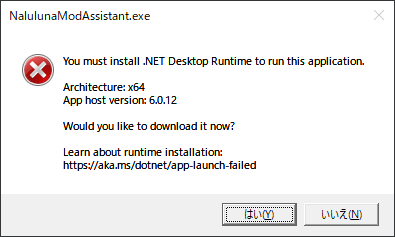
.NET 6.0 ランタイムがない場合、下記のようなメッセージが表示されます。[はい(Y)] を押して、ランタイムのダウンロード、インストールを行ってください。
----------------------------------------------------------------------------------------------------
The following runtimes are required. If NalulunaModAssistant does not start, please download and install them from the links below.
- Windows 10 (64bit) / Windows 11 (64bit)
- .NET 6.0 Desktop Runtime
https://aka.ms/dotnet-core-applaunch?missing_runtime=true&arch=x64&rid=win10-x64&apphost_version=6.0.26&gui=true
- WebView2 Runtime (110.0.1587.57 or later)
https://go.microsoft.com/fwlink/p/?LinkId=2124703
約束: わたしが Fanbox や Patreon で提供しているものは、わたしを応援してくださっている方へのお礼です。mod やデータの再配布を行わないようお願いいたします。
Agreement: What I offer on Fanbox and Patreon is a thank you to those who support me, so please do not redistribute mods or data.
ウィルス、マルウェアの混入がないよう十分にチェックを行っております。
誤検知が出る場合、除外設定を行ってください。
The file is checked to ensure that it is not contaminated with viruses or malware.
If you get false positives, please set up an exclusion setting.
NalulunaModAssistant 1.4.0
ダウンロードした zip ファイルを展開し、NalulunaModAssistant.exe を好きな保存場所に置いて起動してください。Program Files 以下など、書き込み権限のない場所に置いた場合は、正常に動作しない場合があります。
----------------------------------------------------------------------------------------------------
Extract the downloaded zip file, place NalulunaModAssistant.exe in a location of your choice and launch it. If you place the file in a location where you do not have write permission, such as under Program Files, it may not work properly.
以下のファイル/フォルダを削除してください。
- NalulunaModAssistant.exe
- NalulunaModAssistant.config
- NalulunaModAssistant.exe.WebView2
- Logs\NalulunaModAssistant
----------------------------------------------------------------------------------------------------
Remove the following files and directories.
- NalulunaModAssistant.exe
- NalulunaModAssistant.config
- NalulunaModAssistant.exe.WebView2
- Logs\NalulunaModAssistant
バージョンの横に灰色の △ : オプションの mod が入っていません。意図的にオプションの mod を入れていないのであれば問題ありません。その mod を使用する一部機能が動かない場合があります。
バージョンの横に赤色の △ : 必須の mod がないか、同時に使用できない mod が入っています。なんらかの動作不具合が出る可能性が高いです。
バージョンの数字
x.0.0の更新: 大きな機能追加、大きな仕様変更
0.x.0の更新: 機能追加、仕様変更、大きなバグ修正、Beat Saber 更新対応
0.0.xの更新: マイナーチェンジ、バグ修正
----
Gray △ next to version : Optional mods are not installed. If you intentionally did not install optional mods, there is no problem, but if you forgot to install them, please install them as well.
Red △ next to the version : Required mods are missing or mods that cannot be used at the same time exists. This is likely to cause problems.
Version numbers
Update x.0.0: major feature additions, major specification changes
Update 0.x.0: feature additions, specification changes, critical bug fixes, Beat Saber update support
Update 0.0.x: minor changes, bug fixes
----
日本語訳 / Japanese Translation
Selected Mod Manual: 現在選択中の mod の説明を表示します
Uninstall Selected Mod: 現在選択中の mod をアンインストールします。
Install or Update Checked Mods: チェックをつけた mod で、更新可能なものをインストールします。ここは上 2 つのボタンと違い、選択中の mod ではなくチェックをつけた mod すべてに対しての処理になります。
Dependencies: 必須の mod。この mod が入っていないと動きません
Optionals: オプションの mod。なくても mod が動かなくなることはありませんが、一部機能が動かない場合があります
Conflicts: 同時に使用できない mod。mod が無視されるか、動作不具合が発生する可能性が高いです。
Description: 簡単な説明
Update: 最新の更新内容
なるるるるな / NALULUNA
2025-05-18 03:25:23 +0000 UTCYuki Tsumihana
2025-05-17 13:32:19 +0000 UTCなるるるるな / NALULUNA
2025-02-28 21:16:07 +0000 UTCなるるるるな / NALULUNA
2025-02-28 21:05:26 +0000 UTCなるるるるな / NALULUNA
2025-02-28 21:00:28 +0000 UTCFEFELAND
2025-02-26 18:39:34 +0000 UTCdilnx
2025-02-25 20:46:33 +0000 UTCHaNaneko
2025-02-15 12:21:15 +0000 UTCHaNaneko
2025-02-15 12:18:24 +0000 UTCFEFELAND
2025-02-08 20:13:58 +0000 UTCなるるるるな / NALULUNA
2025-02-08 03:26:12 +0000 UTCなるるるるな / NALULUNA
2025-02-08 03:23:08 +0000 UTCFEFELAND
2025-02-07 21:45:42 +0000 UTCHans
2025-01-24 19:10:12 +0000 UTChexen
2024-09-04 10:05:34 +0000 UTCなるるるるな / NALULUNA
2024-09-04 07:14:56 +0000 UTChexen
2024-09-03 16:30:11 +0000 UTCなるるるるな / NALULUNA
2024-08-14 06:16:42 +0000 UTCYI
2024-08-14 02:48:09 +0000 UTCなるるるるな / NALULUNA
2023-11-04 11:34:08 +0000 UTCなるるるるな / NALULUNA
2023-11-04 11:32:18 +0000 UTCNeko-Hangten
2023-11-04 00:45:33 +0000 UTCDietah
2023-07-31 15:38:33 +0000 UTCなるるるるな / NALULUNA
2023-07-24 14:17:07 +0000 UTCなるるるるな / NALULUNA
2023-07-24 14:15:11 +0000 UTCTheBlackParrot
2023-07-21 20:37:03 +0000 UTCなるるるるな / NALULUNA
2023-07-04 18:53:48 +0000 UTCkekenya
2023-07-03 07:12:27 +0000 UTCなるるるるな / NALULUNA
2023-06-30 13:51:58 +0000 UTCkekenya
2023-06-30 04:36:32 +0000 UTCkekenya
2023-06-29 08:38:15 +0000 UTCkekenya
2023-06-29 06:27:38 +0000 UTCなるるるるな / NALULUNA
2023-06-25 09:04:00 +0000 UTCkekenya
2023-06-25 03:40:12 +0000 UTCLoloppe
2023-05-09 22:39:40 +0000 UTCなるるるるな / NALULUNA
2023-05-09 17:05:58 +0000 UTCなるるるるな / NALULUNA
2023-05-08 06:11:09 +0000 UTCなるるるるな / NALULUNA
2023-05-08 06:09:58 +0000 UTCLoloppe
2023-05-07 23:26:07 +0000 UTC刻々帝
2023-05-07 19:57:19 +0000 UTCなるるるるな / NALULUNA
2023-03-01 17:08:58 +0000 UTCティルエ
2023-01-20 00:15:41 +0000 UTCなるるるるな / NALULUNA
2022-11-28 05:25:21 +0000 UTCなるるるるな / NALULUNA
2022-11-28 05:20:48 +0000 UTC安 顏
2022-11-27 22:54:57 +0000 UTCしんぱち
2022-11-24 05:27:38 +0000 UTCなるるるるな / NALULUNA
2022-11-22 23:52:15 +0000 UTCmonakan
2022-11-22 16:26:00 +0000 UTCなるるるるな / NALULUNA
2022-11-22 14:08:15 +0000 UTCなるるるるな / NALULUNA
2022-11-22 14:06:41 +0000 UTCなるるるるな / NALULUNA
2022-11-22 14:03:41 +0000 UTCJAN
2022-11-22 13:14:24 +0000 UTCmic
2022-11-22 10:01:46 +0000 UTC白雪 珠藻
2022-11-22 03:18:57 +0000 UTCなるるるるな / NALULUNA
2022-11-20 15:34:06 +0000 UTC東京にゃんこTokyoCat
2022-11-20 10:04:06 +0000 UTCなるるるるな / NALULUNA
2022-11-20 10:01:44 +0000 UTCBK/Ater = クロ
2022-11-20 09:09:25 +0000 UTCなるるるるな / NALULUNA
2022-11-19 01:03:46 +0000 UTC分解男
2022-11-18 07:42:39 +0000 UTCなるるるるな / NALULUNA
2022-11-15 20:58:25 +0000 UTC分解男
2022-11-15 14:17:06 +0000 UTCなるるるるな / NALULUNA
2022-11-15 03:36:20 +0000 UTCなるるるるな / NALULUNA
2022-11-15 03:33:58 +0000 UTCなるるるるな / NALULUNA
2022-11-15 03:28:01 +0000 UTCLoloppe
2022-11-14 22:23:11 +0000 UTCmonokuma
2022-11-14 11:01:40 +0000 UTCてぃぁ
2022-11-14 10:17:20 +0000 UTCなるるるるな / NALULUNA
2022-11-14 08:36:42 +0000 UTCなるるるるな / NALULUNA
2022-11-14 08:35:52 +0000 UTCLoloppe
2022-11-14 04:33:18 +0000 UTCKanna_Kamui69
2022-11-14 04:17:48 +0000 UTCなるるるるな / NALULUNA
2022-11-14 02:14:17 +0000 UTCLoloppe
2022-11-13 18:28:09 +0000 UTCなるるるるな / NALULUNA
2022-11-13 05:32:35 +0000 UTCLoloppe
2022-11-13 02:31:48 +0000 UTCなるるるるな / NALULUNA
2022-11-12 20:37:59 +0000 UTCLoloppe
2022-11-12 18:47:14 +0000 UTC