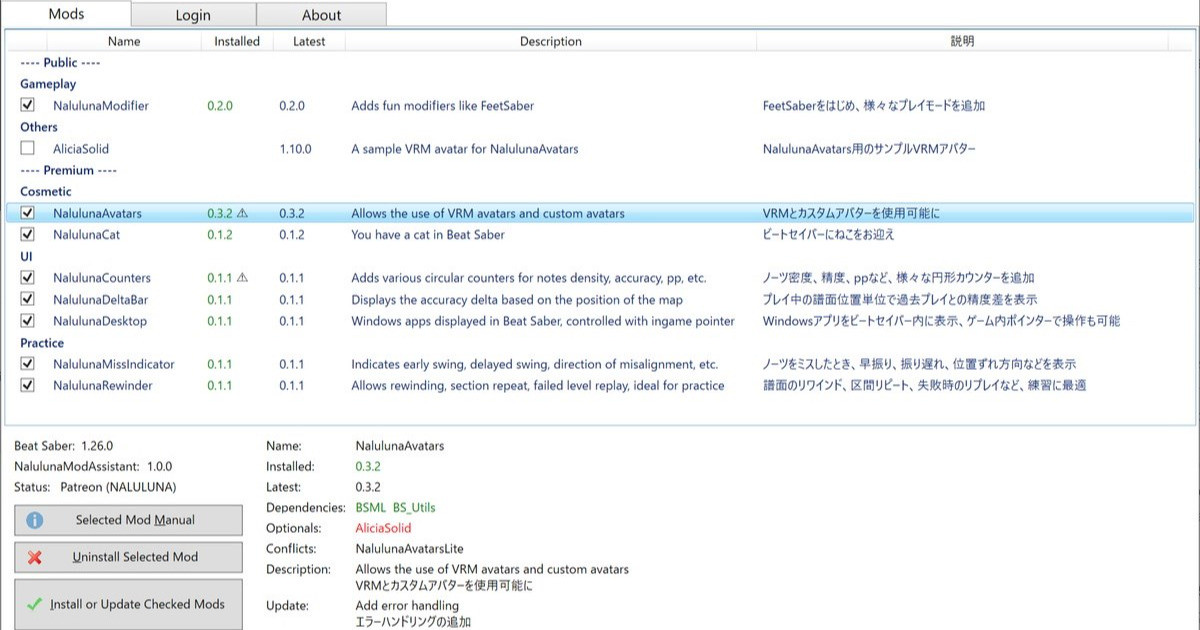
NalulunaModAssistant でインストール可能です。
Available via NalulunaModAssistant.
現在対応しているビートセイバーバージョン: Beat Saber versions currently supported: 1.29.1, 1.34.2, 1.37.1 1.39.1 (ほとんど対応、現在対応作業中 Mostly supported. Work in progress) 1.40.6 (一部対応、現在対応作業中 Partially supported. Work in progress) 1.29.1, 1.34.2, 1.37.1 は、ストアの機能で選択...
ノーツを切るタイミングが早いか遅いかを左右のバーに表示するmodです。譜面には各ノーツに時間が設定されており、セイバーがノーツに当たったときの時間が、その時間より早いか遅いかを表示しています。
無意識にだんだん早振りになってしまうわたしのような人や、一定の速度でセイバーを振り続けることが要求されるストリーム譜面で有用だと思います。
デフォルトの表示設定の場合は、早振りの場合に、赤いバーが上に伸び、振り遅れの場合に紫のバーが下に伸びます。設定でバーの位置、色、方向は変更可能です。
通常は、セイバーと同色ノーツを切ったときのみバーを更新しますが、上記のNalulunaMissIndicator (要0.0.12以降) がインストール、有効にされていて、このmodのExperimentalタブの設定が有効にされている場合は、空振りしたノーツの早振り、振り遅れも認識するようになります。
NalulunaMissIndicator の説明はこちら。
https://nalulululuna.fanbox.cc/posts/2696414
This mod shows whether the note is cut early or late on the left or right bar. Each note in the map has a time, and when the saber hits a note, it indicates whether the timing is earlier or later.
I think this is useful for people like me who unconsciously swing more and more early, or for stream maps that require the saber to be swung continuously at a certain speed.
With the default settings, the red bar extends upward for a early swing, and the purple bar extends downward for a late swing. The position, color, and direction of the bar can be changed in the settings.
Normally, the bars are updated only when you hit a note of the same color as the saber, but if you install and enable NalulunaMissIndicator (requires 0.0.12 or later) and the settings in the Experimental tab of this mod are enabled, the bars will be updated when you miss a note.
For a description of NalulunaMissIndicator
https://nalulululuna.fanbox.cc/posts/2696414
ストリーム譜面での使用例。
Time Shift: 早いか遅いかの判定時間をずらします。0にすると譜面に記録されたノーツ時間が基準となりますが、セイバーの先端でノーツを切る意識だと、ノーツの時間よりわずかに早いタイミングで切っているので、常に赤いバーが上に伸びる(デフォルト表示設定の場合)状態になると思います。Time Shiftを調整することで、自分のタイミングで切っているときはバーが中央に位置するようカスタムできます。
Time Range: バーの上限下限を表す秒数
Appearance: 見た目設定
Position: 位置設定
Realtime Cut Sound: ビートセイバーでは、セイバーがノーツに当たったタイミングは関係なく、譜面に記録されたノーツの時間にカット音が鳴る仕様ですが、これを変更して、セイバーがノーツに当たったときにカット音を鳴らします
Experimental: NalulunaMissIndicator modと連携して、空振りしたノーツの早振り、振り遅れも認識するか
Time Shift: Shifts the time to determine if it is faster or slower. When set to 0, it is based on the note time marked in the map, but if you cut the note at the tip of the saber, you are cutting at a timing slightly earlier than the note time, so the red bar will always be extended upward (in the default display setting). By adjusting Time Shift, you can customize the bar to be centered when you are cutting at your own timing.
Time Range: Seconds for the upper and lower limits of the bar
Appearance: Appearance settings
Position: Position settings
Realtime Cut Sound: Beat Saber is designed to play a cut sound at the note time marked in the map, regardless of when the saber hits the note, but this is changed so that a cut sound is played when the saber hits the note
Experimental: Recognize early and late swing for missed notes using NalulunaMissIndicator mod
0.0.4
- 90/360度譜面を遊んだ後、初期位置がずれる問題を修正
0.0.3
- Realtime Cut Soundの設定を追加 (下記設定参照)
- デフォルトのTime Shiftを-0.02に変更
1. ModAssistant で BeatSaberMarkupLanguage をインストール
(mod環境が構築済みであれば、既に入っていると思います)
2. ダウンロードしたdllファイルを以下に移動*
C:\Program Files (x86)\Steam\steamapps\common\Beat Saber\Plugins
* 上記の記述は、Steam版Beat Saberのデフォルトインストール先の場合なので、
インストール先が異なる場合は適宜読み替えてください。
1. Install BeatSaberMarkupLanguage by ModAssistant
(If your mod environment is already set up, it's probably already in there.)
2. Move the downloaded dll file to the following location*
C:\Program Files (x86)\Steam\steamapps\common\Beat Saber\Plugins
* The above description is for the default installation of Beat Saber for Steam.
If your installation location is different, please change the description accordingly.