So, what am I favoring these days in terms of editing? I'm still not using Photoshop, although, I am trying to seriously make a consorted effort into learning it. I just don't have the time, and damn it, I'M TIRED! Anyway, lately I've been playing around more with Snapseed more than even Face Tune. (Snapseed is available on Android and iPhone devices for FREE!)
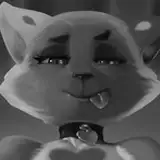
The question I'm receiving more than anything is the shadowing on some of the images like Hanako-San. This is an effect that I have been heavily favoring, and I simply think it gets the point across without adding too much dramatic effect. If you are not familiar with Snapseed's features, they are very easy to understand and have a wide arrangement of tools to make even a simple photo look great.
Here are my tips on how I utilize the most out of Snapseed, but with some helpful tips to get that crisp photo. Often times than not, I have to scrap the photo I'm editing if the lighting isn't just right. I will admit, my friends, you do need adequate lighting, but that's a relatively easy fix!
BUY A RINGLIGHT
I did not believe in purchasing these as I usually connotated them with Instagram influencers and their nonsensical BS about a product that doesn't work. However, I have found that my ring light actually gets me exactly what I'm looking for, without flooding the photo with a bunch of harsh lighting. I bought my ring light on amazon for maybe $20 USD. There are a variety of options that you can choose from, and some have an entire color spectrum. I chose simple lighting just because I'm an old school gal, and I haven't really thought of anything I need pink lighting for (yet).
DRAMA EFFECT IS FRIEND
If you haven't had the chance to go back over my short tutorials on Snapseed, please do. You all know that this is my baby, and I will always defend Snapseed over Photoshop for this one particular effect. The drama effect is a really great filter if you are looking for a very harsh, grungy, grimy horror effect. Using Hanako-San as an example, the harsh filter applied the perfect look mixed with ring light. Adding the red eyes in there, I think, has become my favorite look thus far. I will say that I do prefer the Dark 1 vs Dark 2 (There are 6 effects under the Drama selection) only because I think Dark 2 is TOO much. You do have the choice to knock it down a few notches if you want, and then you can proceed from there.
VIGNETTE
A classic effect, but a useful one, indeed. I mainly use vignette as a way patch up any photos in which my body is not covered in paint, or if I just want to kind of highlight my face without actually highlighting my face. This filter allows you the option to darken or lighten your picture to the preferred lighting of your choice, as well as allowing you to highlight or darken the focal point. I think if you want to experiment with this effect, in my opinion, I would start off with some portraits first. This way you can sort of get a feel for how the background affects the foreground. IT CAN change the look, so please practice first!
This is basically all I have been doing! I don't really do much to my photos. I'm kind of a very lazy, old-school gal from the heyday of Windows 98 and DOS, so in terms of technicality, I think I score a -2 haha! If you have any questions, please feel free to ask away, my friends!
Mother Mantis
2022-02-25 17:53:27 +0000 UTCCory Cowley
2022-02-25 14:56:33 +0000 UTCMKbeck
2022-02-25 00:41:45 +0000 UTC