Composite Icon Fixes
Recently in Discord we discussed an apparently new way that the game designers are repurposing existing spell icon assets: instead of a typical image with a colored background, certain icons have begun appearing with two overlapping images. Darq Side member Maris pointed out a couple of examples that you can see in the August Waypoints newsletter.
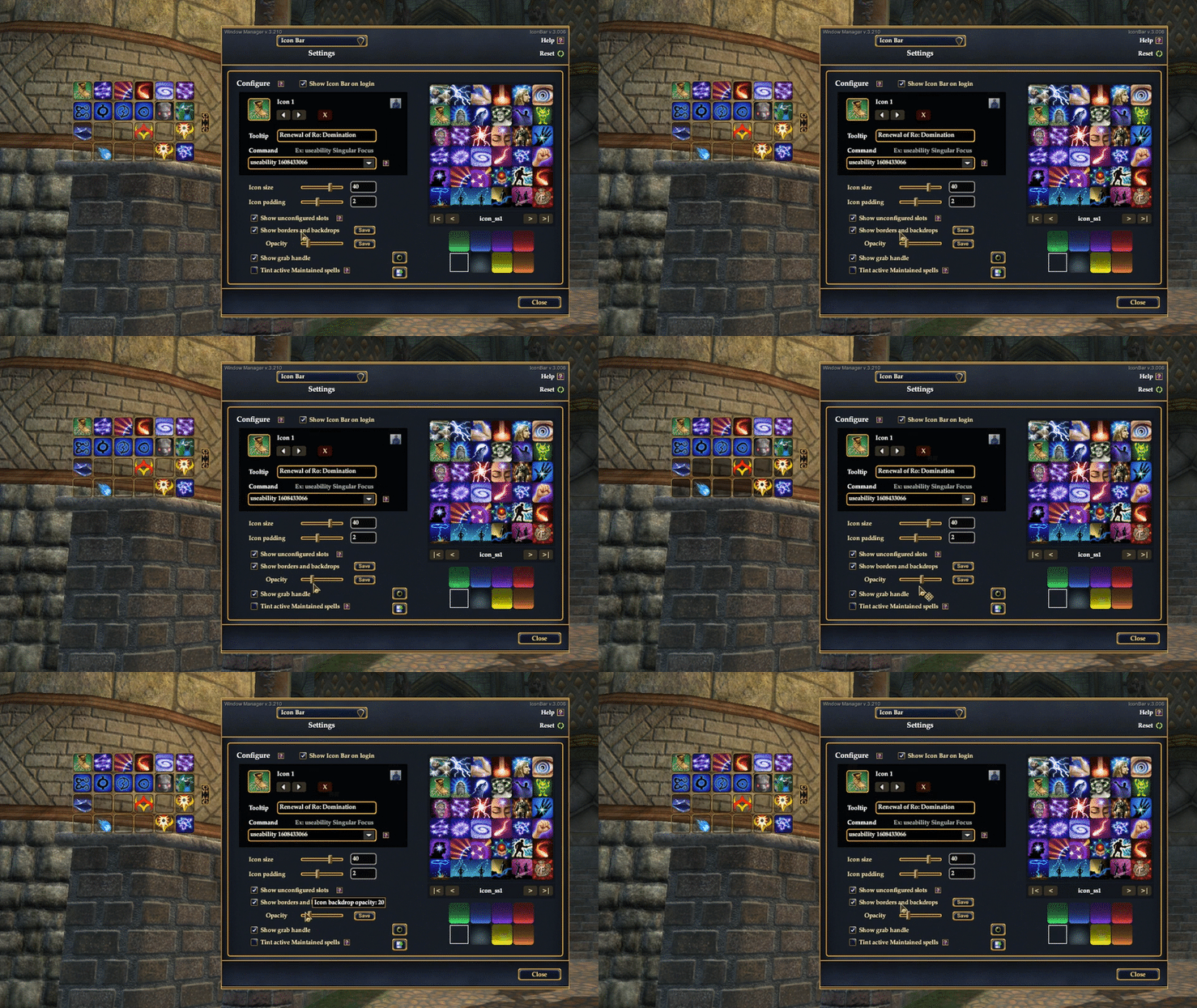
As of right now, it's possible with a little ingenuity to cobble together these composite icons in the utility, although the upcoming utility version has already been reworked to do two new things: A) Spell lookups on the Icon Bar setup page will correctly import composite icons from Census, and B) you can build your own composite icons any time by customizing foreground and background images directly from the UI:

Back in-game, Maris' Icon Bar has a transparent frame and backdrop, and no doubt there are other players who prefer this cleaner look. But without the usual colored backgrounds, these new composite icons are often hard to see.
To correct for this, a new option in the window manager offers configurable shaded areas behind your Icon Bar slots. The "Show borders" setting is now "Show borders and backdrops," with a slidebar to adjust the amount of transparency to your tastes.
A Better Way to Disable the Mercenary Training Reminder
Recently a new mercenary training reminder feature was added to the Character window, but not all players can make use of it. Darq Side member Tim Jones mentioned that he uses a different reminder system for his many alts, and the new feature adds extra clicks to an otherwise simple process.
I gave him a quick fix for the issue, but whenever the Character window gets other updates (which is fairly frequently), Tim will need to reapply the fix. Looking at the Character window long-term, we need a more robust way to disable the feature for members who might find it objectionable. Here's what we came up with. When the reminder dialog appears, click Clear.

The dialog will inform you that the current reminder is cleared, and here you'll have a chance to disable the feature entirely. Click Disable, save the setting, and the default mercenary training system will be restored permanently for all of your characters at once. Easy!

But that's not the end of the story. What happens if you decide you want to restore the reminder? Instead of poking around in your game files, there's a secret built into the Character window that will return the custom training reminder to operation with two clicks.
To the left of the Battalion buff icon is an invisible button (see below). It's very small, but you can find it with your mouse -- watch for the cursor to change when you move over the area. Click that, save the setting, and you're back in business!