Perfect Pole Angle for IK (free Blender addon)
Added 2024-02-09 15:52:55 +0000 UTC
Sets the perfect pole angle for an IK constraint on any 3-bone inverse kinematic chain.
1: Select the pose bone that holds the IK constraint.
2: F3 search & select 'Perfect Pole Angle'. Boom!
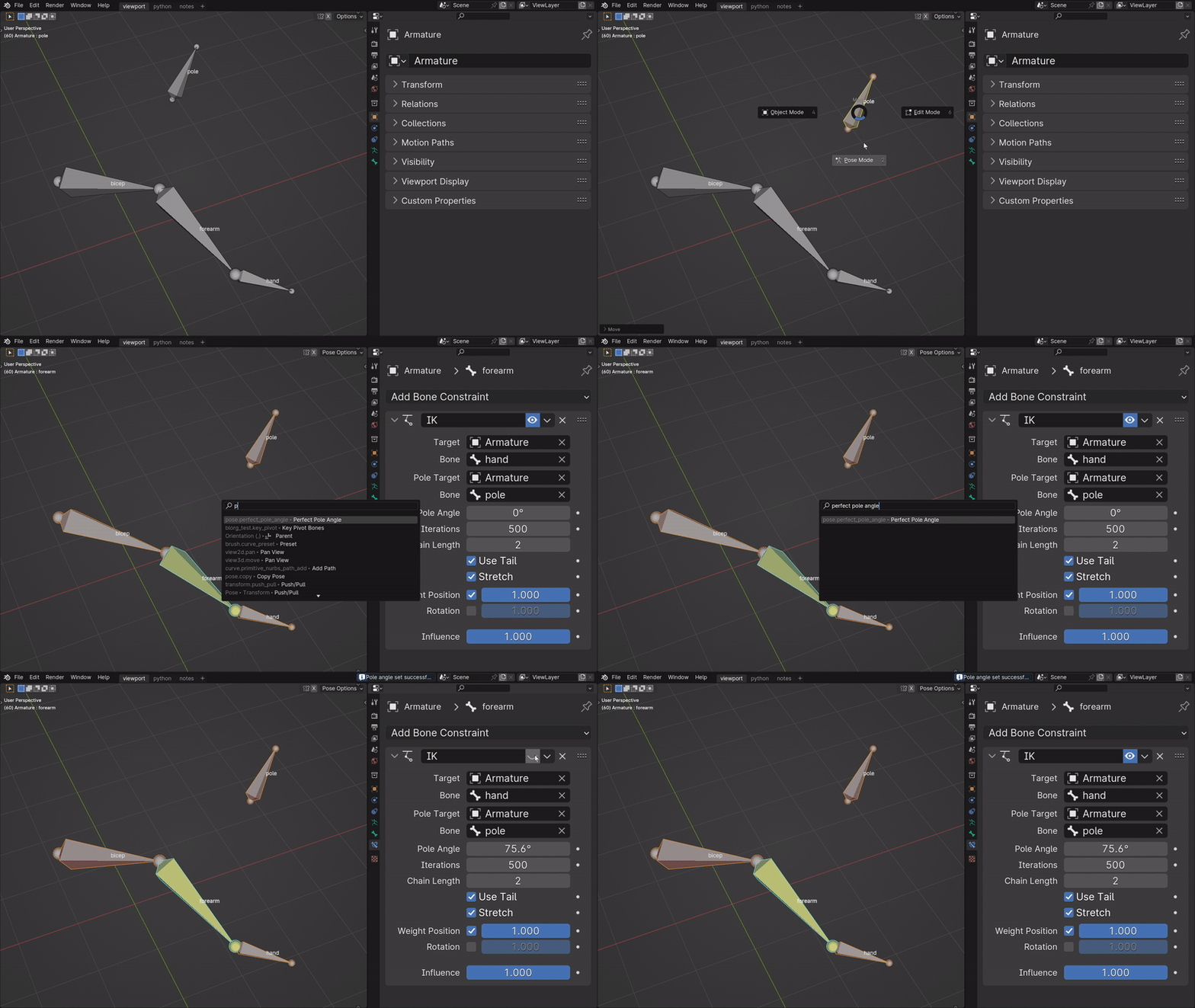
To check for accuracy, make sure your bones are in their rest position, then toggle the IK constraint on and off. The chain shouldn't move a hair! :)
Compatible with Blender 4.0, and should work with some previous versions.

Notes:
-Works with any 3-bone inverse kinematic chain. Not tuned for any other chain length.
-The active pose bone that holds the IK constraint must be connected to a parent.
-The IK constraint needs a defined Pole Sub-Target
-Make sure "Developer Extras" is on under Edit >> Preferences >> Interface >> Display

F3 search for "Perfect Pole Angle"

View3D > Pose > F3 search 'perfect pole angle'
UPDATE LOG:
Version 1.1 (February 9, 2024)
There was a problem getting the accurate calculation when the base bone of the chain was parented to a bone. The new version calculates the pole angle separate of the parent. Problem solved
Version 1.0 (December 8, 2023)
Released to the public.
Tags: Blender rigging, Blender animation, 3D animation, Inverse Kinematics
Please leave a rating :)
If you have any questions or comments, you can e-mail me at slephy@kinematictool.xyz
Installation instructions:
1: Download 'perfect_pole_angle.py'
2: While in Blender, go to Edit > Preferences.
3: On the left of the 'Blender Preferences' window, click the 'Add-ons' button.
4: At the top right, click 'Install' and locate the addon file you just downloaded. Select the file and click 'Install Add-on'.
5: Make sure the addon is checked on. If it is not immediately visible, type 'Perfect Pole Angle' into the Add-ons search bar to locate it inside the Add-ons collection.
6: Make sure "Developer Extras" is checked on inside Edit >> Preferences >> Interface >> Display
How to use:
1: Select the pose bone that holds the IK constraint.
2: F3 search & select 'Perfect Pole Angle'. Boom!
To check for accuracy, make sure your pole bone is in its default location, then toggle the IK constraint on and off. Shouldn't move a hair! :)


Take a look at the Kinematic Tool for Blender
https://youtu.be/DeJoc4iCWQo?si=ZtOtfSzfHxZD7G6G