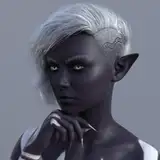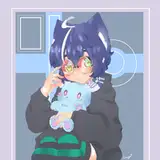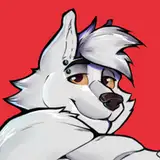
Wyren are an adventurous derg-adjacent species noted for their smol but mighty bite and deep love of everything pineapple. They also think blue is the stinkiest color (but it's ok to be wrong).
The VRChat PC version is ~54k poly using 3 standard materials with 4k textures and is rated 'Medium' when uploaded to VRChat. It has been optimized for full body tracking and features: viseme speaking animations; face rig for MMD worlds; gesture-based expressions with expression lockout; custom menus; sit and lay animations for Desktop users; toggles for the Shirt Pants and Face Mask as well as some body parts (hair, horns, etc); avatar interactions; an alternative version with a fluffy tail; and I've kept the various parts on separate meshes to hopefully make it easy to customize.
The VRC Quest version has all the same features but I've included two versions to choose from: an optimized version without clothes which is just under 15k poly using two materials that is rated 'Medium' when uploaded, and an alternative Quest Version with Clothes which is just under 20k poly and uses 1 additional material that results in it being rated 'Poor' when uploaded. This less optimized version also has physbones on the ears and tail, with an in-game menu option to toggle them off if needed. Both Quest versions use the same textures as the PCVR version.
The ChilloutVR version matches the stats of the VRC PC version above and I've set up a basic controller with toggles and gesture-based face expressions, etc. Please note that the CVR avatar uses Dynamic Bones which must be purchased separately in the Unity Store (the scripts can easily be removed if you do not have/want dynamics).
This avatar is technically a 'beta' as I am still improving and adding things to it with feedback from the community, but it is feature complete and ready to go if you like what you see! Cumulative updates will be published roughly once a month and will not change the existing UV maps (textures made for the current version will work with subsequent versions). I plan to make a female version once the base is done... but, for now, my focus is on incremental improvements :)
Anyone who purchases the avatar during beta will receive access to the final and any alt versions at no additional cost.
Try before you buy - visit the Wyren Avatar World in VRChat or search for 'Wyren' in ChilloutVR to test the latest version!
https://vrchat.com/home/launch?worldId=wrld_b857d0b1-75a5-405d-965a-73d8129c2d59
By purchasing the Wyren Avatar you are agreeing to the above terms. If the above terms restrict or fail to address your intended usage, please contact the creator and see if an exception is possible. Any exceptions will be publicly listed.
Many thanks to my friends for their encouragement and support during the development of this avatar - if it wasn't for you beans I'd have given up a dozen times at least.
BlackStartx' Gesture Manager add-on for testing VRChat menus animations etc within Unity was a godsend!
Aeriiie's MMD Dance World has been an indispensable tool for testing weight painting and checking for clipping.
I would also like to thank Rezillo Ryker for his Rexouium avatar, Nardo for their Nardoragon, and Jin A for the Wickerbeast King as I dearly love the design of these avatars and it was through them that I found inspiration to try and make my own.
And, finally, thanks are due to you for visiting and actually reading what's been written. I'm sure others will find it by accident, but for those who made it this far - here's a little Easter Egg for you: making the Rock'n Roll gesture with both hands causes the Wyren to breath fire (PC only - for now!)
Please see the 'Notes' page linked to on the left if you are new to custom avatars, have technical questions regarding this one, or would like a few pointers on configuring FBT in VRC. My contact info is also on that page if you need help or have any suggestions/requests/feedback. For older versions of the avatar, or to view to update log, see the 'Archive' tab.
Please remember this is a beta release - finding and fixing issues is half the fun!
UnityPackage for VRChat (PC and Quest)
UnityPackage for ChilloutVR (uses Dynamic Bones!)
Substance 3D Painter File (thanks JackalBoi!)(derg base, doesn't include clothing)
Separated or 'exploded' FBX to make your own SSP
Blender Source Files
Additional files
There is currently no official Discord server for this Avatar so your best bet is to send an email to renderawoo(a)gmail.com if help is needed etc. If there's to many emails to manage or if there's enough interest, I will set up a Discord and send the link out via gumroad notification to those who've purchase the avatar.
I am not active on social media - if someone claiming to be me reaches out via twitter etc, be suspicious and ask them to put an 'x' here ___ to prove it's me. If this request confuses them, report for impersonation.
I did set up a VRChat Group (search for 'Wyren', group name of 'Wyren Collective') which may become useful in the future - you're welcome to join early!
The VRC Unity Package was set up using Unity 2022.3.6f1 and the 'VRChat Creator Companion' (aka the 'VCC') which should eliminate the need to worry about having the correct SDK versions etc - but please let me know if you have any issues!
If you are using VRC Fury and get a popup asking if you want it to fix issues with the avatar (write default on avatar) I have found no issues with allowing it to apply it's 'fix' to the avatar. This should only happen once. If you do encounter an issue with this please let me know!
The ChilloutVR Unity Package was set up using Unity 2021.3.23f1 and CCK 3.7 - again, if any issues please let me know! Make sure you have dynamic bones imported before importing the avatar itself or you'll end up with missing scrips (the CCK will offer to remove all missing scrips if you do not want dynamics).
I typically update the avatar every month or so; when this happens you'll get an email with a list of changes and improvements that have been made to it. If the version you downloaded ends with a letter (0.6.3b) this indicates that it is a 'patched' version of the previous update which includes minor improvements or bug fixes, the full details of which will be included in the next update email. This allows me to keep the version available for download up to date without spamming users every time I adjust a few pixels etc. A Change Log and archive of previous versions can be found on the 'Archive' page linked to on the upper-left panel of this page.
To configure this or any other avatar for optimal 6 point 'Full Body Tracking' or FBT experience, open the quick menu in game, click the 'settings' tab, and find the 'Tracking & IK' area. In the upper-right part of this area click the button to 'measure your height' while standing straight with your feet facing forward and only slightly apart. Leave the height set to whatever the game generates (usually it doesn't match your IRL height). I recommend having 'Avatar Measurement' set to 'Arm Span' and 'FBT Spine Mode' set to 'Lock Head'; verify these are set correctly then click the FBT Calibration button and perform the calibration while again standing straight with your feet facing forward and only slightly apart - arms out, palm down. (You should only need to measure your height once per session unless you fully remove your headset, that step can be skipped when doing a quick re-cal)
Use a mirror and check how the avatar moves with your body, paying particular attention to the arms: place your arms at your sides with your palms facing inwards and note if the elbows are overly bent or the arms get 'locked' (hard to describe, but the arms will 'snap-straight' before your irl arms are fully straightened out). Raise yours arms into the classic 'T' pose with the palms facing down and again note if the elbows are overly bent or the arms are 'locked'. You want the arms to stay slightly bent and not 'lock' unless you really stretch them out - this makes for a more natural appearance.
If you find the arms are 'locking' before they should or the elbows are staying too bent, navigate to the settings menu (from the quick menu click the little 'maximize' button next to the power one), select 'Tracking & IK' on the left side, and scroll down until you find 'Arm vs Height Ratio' which is right above the 'Eye Tracking' section. Make small adjustments to this ratio and test the results in a mirror until you are happy with how the arms track your IRL movement.
If you find your avatar is floating above the ground slightly after measuring your height, try increasing your height by 1 inch; this can help correct for inaccurate floor calibration. You may or may not need to adjust the arms ratio afterwards.
If your writs are slightly angled down when you they are held straight irl, try making small adjustment to the 'Wrist Angle' above the 'Arm vs Height Ratio' to adjust the 'resting angle' of your wrists.
To load the pre-configured avatars, once you have imported the Wyren UnityPackage into your Project please locate and open 'Wyren Avatar Scene' within the 'Assets' folder.
If you see the error 'MonoScript is registered as both Editor and Runtime script!' in your Unity Console after importing the UnityPackage and opening the scene or clicking around, clear it by saving closing and re-opening the project. Should only occur once after importing. (You will likely see a few other warnings in the console after first importing the project - it is OK to clear and ignore them, same as above)
If emissions on the avatars do not load when you first import the project, manually force Unity to load the materials by navigating to the 'Materials' folder and clicking on each material within it to fully load them into your scene. So far I've only seen this happen when using an older version of Unity (2019 etc) and the bug is not well understood.
The avatar's face mask is hidden in Unity by default - if you wish to see it in the Unity Editor or apply a new material to it, for both the PC version and the Quest version, expand the avatar hierarchy on the left by clicking the little triangle next to the name, select the 'Body' item, then on the right under the inspector tab click the little triangle next to 'BlendShapes'; under the blendshapes heading, slide the item 'HideMask' over to 0 and you should see the facemask appear on your avatar. Remember to put this back to 100 before uploading or you'll break the toggle ingame. The Shoes can be viewed on PC this was as well - locate the blendshape 'ShoeHide' on the body.
The avatar's sunglasses, shirt, etc, are hidden in Unity by default - if you wish the see them in the Unity Editor, expand the avatar hierarchy on the left by clicking the little triangle next to the name, select the 'sunglasses' item, then on the right under the inspector tab click the little checkbox at the top to show the asset. Remember to uncheck this before uploading or you'll break the toggle animation ingame. For the Quest version, click on the 'Clothes' object and on the right side of the screen locate the 'HideShirt' etc blendshapes. Remember to return these to their default setting before uploading you avatar or you may break the animation toggles ingame.
The clothing items on this avatar makes use of several blendshapes on the body named 'pants' 'shirt' etc to help prevent clipping - if you toggle the avatar's clothing on in Unity, be aware some clipping may appear in the editor which will not appear ingame. If you change any blendshapes to 'fix' this in unity, please remember to set them back to the original values before uploading your avatar or there may be some minor clipping ingame.
Unless you are an advanced user, it is recommended that you take care to copy the texture importation settings from the defaults (resolution, compression, quality, etc).
I made separate textures/materials for PC and Quest to simplify the upload process - the underlying textures are identical, only the material type and settings are different. If you use different importation settings than the ones I set up, your avatar may appear blurry or be ranked differently.
If you are using Gesture Manager 3.9.0 in Unity and your avatar gets stuck in the demo pose instead of standing, go to the debug tab while Gesture Manager is running and manually toggle the parameter 'Wait' on and back off again. (this issue has been fixed with Gesture Manager 3.9.1)
If you upload your avi first to Windows, then change the build target to Android and get a popup saying that the 'latest build file size is to large' or something like that - fix this by switching back to windows and from the avatar upload panel select the Quest version and click 'build and test'. This will update the 'latest build file size' in Unity and allow the model to be uploaded to Quest once you switch back to Android.
If you see two warnings when uploading relating 'Write Defaults', these can safely be ignored for now.
If you are exclusively a PC user but will be uploading the Quest version for cross-platform compatibility, there is a special feature built into the Quest animation controller which can be used to toggle it's shirt asset on when either the shirt or hoodie are enabled on PC. To use this feature, browse to the /Assets/Avatar/Controllers/Quest folder in Unity and double-click on 'Wyren FX v2 Quest'. This should open a new window called 'Animator'. Under the 'Layers' tab in this window, click the little gear next to 'Hoodie Remote (see note)' and slide the 'Weight' all the way to 1. It is important that you leave this layer's weight set to 0 if you are using the avatar in Quest VRC (meaning stand-alone Quest mode) as this controller modification may stop the in-game menu toggle button from working correctly.
If you have issues opening the Blender files, verify you are using version 3.6.5 or newer and try disabling 'Load UI' under Preferences>'Save and Load'.
The SSP file provided on the content page features a commissioned texture from the artist JackalBoi (Discord: jackalboi). The default textures were made by me using GIMP (a free PhotoShop alternative which you can download here) and the source files for these are included within the UnityPackage should you wish to use or modify one rather than starting from scratch.
The original design/concept for what became the Wyren was actually a mouse avatar called 'Maus', and making it was the first time I had ever used Blender to model something. After ~9 months of struggling, I gave up because it looked horrible and I didn't know how to make it better. About half a year later when the plague locked down my city and I was unable to visit family during the Holidays, I found escapism in trying to make the avatar again - but this time I revised parts of the design to be closer to my OC which is a canine-dragon hybrid.
The name 'Wyren' originated as a joke because everyone around me kept asking 'why, Ren?' when I started working the avatar for a 2nd time. Being that the name is similar to Wyvern, a type of bipedal dragon, and the avatar now being dragon-adjacent - it fit, and it stuck.
The name Wyren is a 'noncount noun' due to quirks of the English language, meaning it has no plural form. It would be incorrect to say 'five Wyrens walking by' in the same way it would be to say 'five mooses walking by': the correct phrase would just be 'five Wyren walking by'.
The Wyren avatar was granted a booth in the Dealer's Den at Furality Umbra, roughly 5 months after the beta was first uploaded to Gumroad.
Early versions of the avatar have been ripped off and uploaded to piracy websites multiple times - in response I decided to always make the Wyren, or at least some version of it, available for free.
The joke about 'Wyren thinking blue is a stinky color' stems from a friend's OC which has blue beans. He stimky, my OC's yellow beans are superior!
Please remember that this is a beta release - finding and fixing issues is half the fun! If you have any problems or suggestions please don't hesitate to reach out via the above email!