ABSENT LOG Dev Update 9/15/2024
Added 2024-09-16 03:18:59 +0000 UTC
This month we started taking a hard look at one of the mechanics we discussed early on when we first started the project: zero-G, space walk sections, as well as a new room for our first opening level, which is nearing its level layout completion!
Gravity is something that plays a significant part in how some of our game play systems will be structured, and is also something we wanted to implement into how we are handling our level flow and storytelling. Being that the game takes place on a derelict spacecraft, having some sections where you are traversing across the hull or through breaches on the exterior of the ship was a key cinematic and level design point we really wanted to push. At first we had anticipated that due to our lack of technical ability and knowledge at the time, zero-G sections would operate on a magnetic lock system, akin to the original Dead Space, where orientation of character movement would change depending on the wall or surface you were on. This wasn't a bad method, it clearly works, but it isn't a very robust and impactful way to present zero-G. Another method was to set the gravity scale to a very low number, to “fake” zero-G, akin to low gravity maps in most games would allow you to make long space hops and jumps, but the world was still restricted to a single X axis movement.
When we started earlier in this month with our zero-G mechanics, we found a potential solution for this while working on the ladder-climbing system.
In order for a player character to move upwards they have to have a flying movement component set. With climbing, you could restrict this to a single axis, (in this case, the Z axis for direct upwards/downwards movement). Naturally we came to the conclusion to merge the world gravity settings with the player movement mode settings. This seemed like an obvious approach, but for whatever reason it had not previously occurred to us.
Once those settings were established, we created an entirely new dynamic function that changes at runtime to switch TW's movement, acceleration/deceleration, weapon handling, and world sound setting to be more accurate to a realized vacuum or zero-G scenario.
From there we created an entirely new set of animations for TW, sounds, effects, custom variables and camera settings to accommodate the transitions.
This new mechanic ended up taking up the bulk of our dev cycle this month as it required a lot of moving parts, testing, and discussion in order to function properly. We are very pleased with the results so far, one particular challenge that seems to be beyond our scope currently to solve is full 6DOF (six degrees of freedom) and the inevitable gimbal lock.
WHAT IS 6DOF AND GIMBAL LOCK, HOW IS IT RELEVANT TO ZERO G MECHANICS?
(Credit: Renishaw https://www.youtube.com/watch?app=desktop&v=LHzkwt513q0 )
6DOF, or Six Degrees Of Freedom, refers to a completely unrestricted rotation and directional movement of an object within a world space. Essentially, a player object or character can rotate and move along the X,Y, and Z axis with no restraint based on the world rotation, which is usually set to the Z axis up. If you ever played Descent, Forsaken, or the zero-G sections in Dead Space 2,3 the Remake or in Prey, you've experienced 6DOF in action. In the context of zero-G, there aren't any real rules pertaining to the orientation of an object as there is no real “world reference” to contextualize it with. So naturally, you could rotate and move in any direction in such a scenario. For games, and any kind of computer simulation, it has to have a set world rotation. Utilizing 6DOF would be the most ideal solution for a fully realized zero-G mechanic.
The way most games solve this problem is by utilizing Quaternion Calculations, which is also referred to sometimes as 4 axis rotations(W,X,Y,Z). Your W axis refers to the world rotation, and the XYZ refers to the object local rotations. With all 4 rotations, you can avoid the dreaded Gimbal Lock.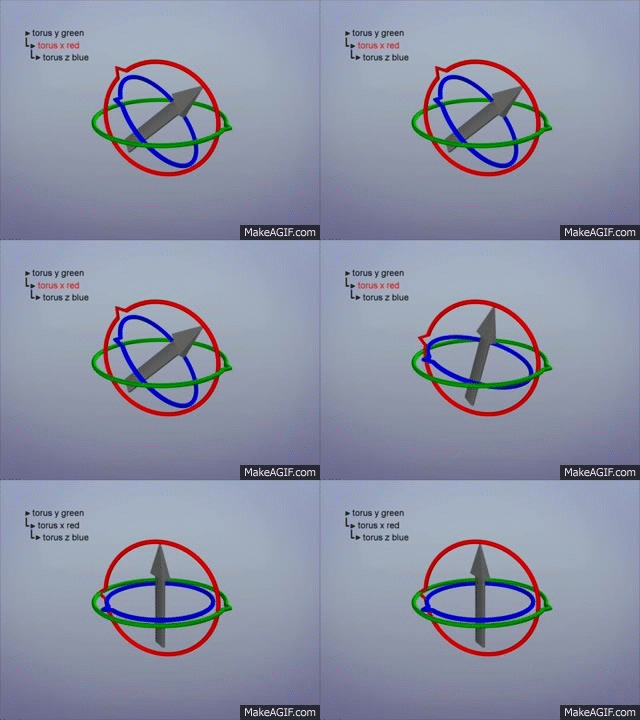
(Credit: GuerillaCG https://www.youtube.com/watch?v=zc8b2Jo7mno )
Gimbal lock refers to when one axis rotation smashes into another one, essentially locking them at 90 degrees. Depending on how a project has player movement and camera functions set up, this causes a number of game breaking problems, such as the controls “flipping” when rotation happens below the world horizon line, Desync of player movement to the camera rotation, and locking camera rotations at a pure 90 Degrees up and down.
We did a lot of research and testing to solve this, and UE4 does not support quaternion calculations out of the box, so C++ trickery was required to get them to work.
We managed to get 6DOF working for the player character movement and player character, but the player controls and camera were still suffering from gimbal lock. Potential fixes we found ended up being dead ends, as they would require entire refactoring and rewriting of the player camera and character movement functions to work, and would have resulted in us losing a massive amount of work and refinement on getting our current movement and camera functions feeling just right.
We may re approach this at some point but it ended up being a significant technical bottleneck.
That being said, we are still quite pleased and proud with our current zero-G system, and have carefully refined animations, movement mechanics, physics, and effects to help sell the idea, despite not having full 6DOF functionality. We believe that it is strong enough currently that it will be a valuable and impactful addition to ALOG’s core mechanics, especially when other levels are built and we can start creating puzzles and scenarios based around our zero-G mechanics.
((!) IMPORTANT (!) (!) IMPORTANT (!) (!) IMPORTANT (!) (!) IMPORTANT (!)
(Unfortunately Patreon doesn't allow video embedding directly so click the you-tube link below to view, be sure to watch at full 1080p!)
https://youtu.be/AW7rbRR7Ilo
(!) IMPORTANT (!) (!) IMPORTANT (!) (!) IMPORTANT (!) (!) IMPORTANT (!)
Another item in the works, is the assets for our space sky box. When we were discussing the setting for the project, we wanted to include a planet that "looms" ominously within the skybox, an almost oppressive presence that is pervasive throughout the campaign. One example we had specifically mentioned to each other was a short hypothetical demonstrative animation, which replaced the moon in Earth's sky with true scaled planets of our Solar system. When the video showcased Jupiter we had both mentioned a strong feeling of terror at the sheer scale, that left a strong impression on us. we wanted to replicate this feeling with the only skybox that exists within the game.
Setting up the assets was fairly straightforward. For a gas giant we took the approach of creating procedural shader within blender applied to a subdivided sphere. we created shader parameters to have variation and noise within the planet's natural clouds and atmospheric make up. Then we created a transmission effect to showcase light bleeding into the atmosphere. from there we added a sun light source and exported a transparent PNG of the planet with the set shading, and then added it as an overlaid texture within UE's sky sphere system. the results so far are very pleasing, and definitely are starting to get the desired effect, but there is still more work to properly line up the sun and planet position within the skybox UVs, as well as further refine the general appearance of the planet and skybox.
(Ref video: https://www.youtube.com/watch?v=jQRbxjskrPc&t=5s )


PROGRESS ON THE INTRODUCTORY LEVEL (TW & HUEY’S SHIP)
For our next little update, we wanted to show more of TW and Huey’s ship. We are in the final stages of building and texturing the rooms and with this level in particular it's a bit more challenging as each room needs to have a bespoke unique approach to each one given the smaller scale of this ship. A room almost takes the role of an entire deck, but all consolidated within a singular level, so the idea is that a room designated as engineering, should be fully designed to fit the purpose of that deck, cabins and lounge areas should be more comfy and softer, Utility areas should be more rugged, etc…
While we believe we have accurately represented this idea with each room, it does take more time to carefully plan it out. The next item on our list was getting the Lounge area up to snuff.
The overall feeling of the ship we wanted to achieve was almost a ruggedized, large, space RV that had enough utility and comfort that it could be realized as a completely self-sufficient and livable space. We wanted to add a lounge room that maybe didn't offer much in terms of interact-able elements or game play mechanics, but would help really push this idea. TW and Huey make a life here on this ship, and they live that life together. so we carefully designed this area to have a very comfy, warm atmosphere, akin to snuggling up to watch home movies, crash on the couch (or padded 70’s style pit lounge). The room comes complete with a curved monitor for viewing, a cushioned flooring area, small bar like eating/drinking areas for guests, as a modest size for comfort.
The final sections needed to be completed are the Bridge, and the Observation deck, which we plan on tackling next. Once we are complete with all these, we can do an optimization pass, and start building the interactive elements and implement the “level” flow for game play.