XaiJu
yiffalicious
yiffalicious

patreon


Important notice!

We detected a bug in our SDF generation process (character collision system), causing some SDFs to end up incorrect (especially the pelvis).
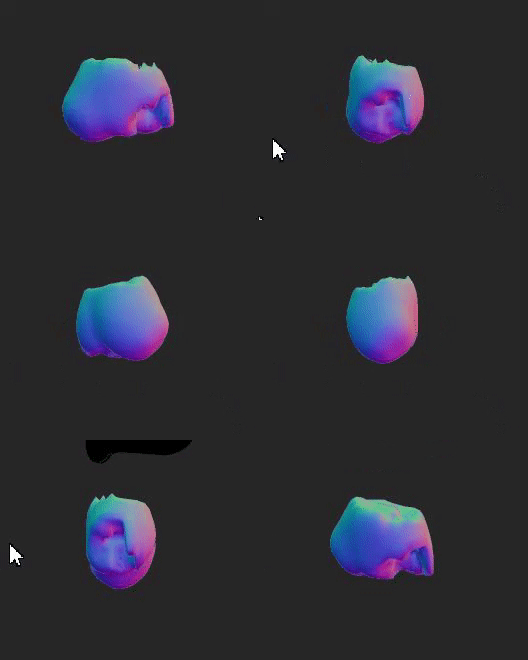
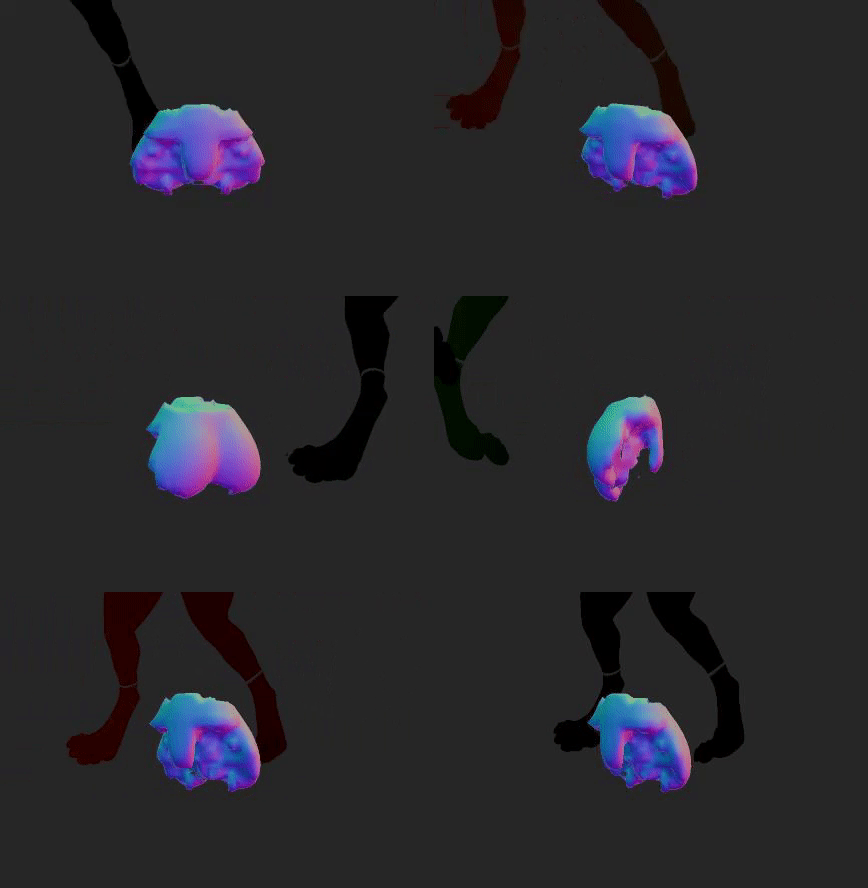
(Examples of incorrect SDFs for pelvis area.)

SDFs are a major part of handling soft bodies, hand placement and collisions, so a faulty SDF will produce undesirable results.

This issue is now fixed for the next release.
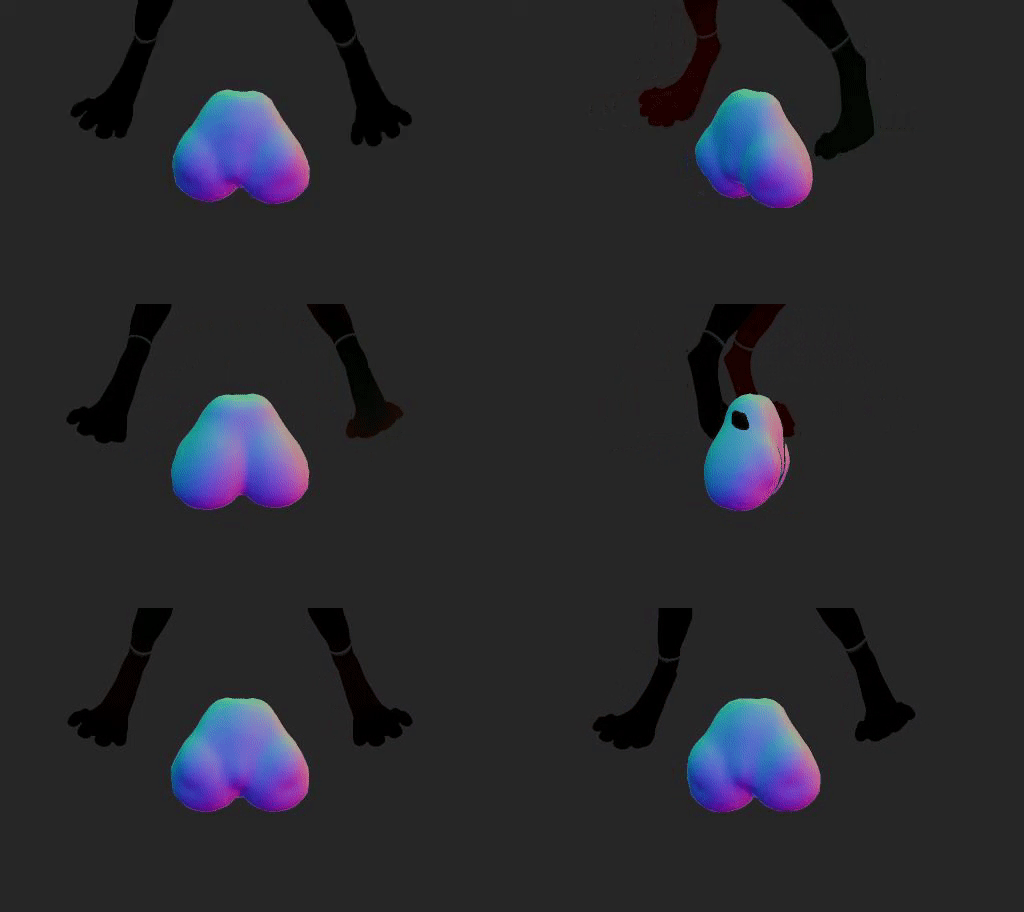
(Fixed SDF for pelvis area.)

However, since SDFs are generated at export time, this means you will have to re-export your characters in order to fix this problem. Furthermore, you will have to replace previous characters with these newly exported ones in order to fix any previous interactions that you have made.

Please follow this guide how to replace characters in an interaction:

How to replace characters in an interaction

Theory

Each character file has a unique name based off its contents (a "hash"). The characters are stored in:

%appdata%/FurryVNE/Cloud/Interaction/Characters

An interaction references the hashes used, and will try to load the characters they represent. So in other words, in order to make an interaction load a different character, we can simply replace the files which the hashes represent! We just need to find their hashes.

Guide

1. Open your interaction.

2. Open the manifest (Debug > Manifest).

3. Copy the character hashes in the manifest.

4. In character builder, export your characters again, to make them fixed.

5. Rename the exported .yl2fc files to the hash name (from step 3) + the extension ".fvne_compiled_character".

(I.e., for an exported character "my_character.yl2fc", you'd rename it to "<hash from step 3>.fvne_compiled_character", e.g. "6243f29e28811c15b61dbe38269ab2f36b19b7827b89ca7f68dd22ebbf078f81.fvne_compiled_character".)

6. Copy this newly renamed file to %appdata%/FurryVNE/Cloud/Interaction/Characters, replacing the previous character.

Final words

We intend to make this process easier in the future so you can replace characters directly in FVNE through the UI.

All the best.

- odes

Important notice!

Comments

Yea I had a copy of the original FurryVNE folder and it had the character yl2cs in it so I should be good to export them again. Thanks again.

Lazarus

Great, thanks for keeping me updated! Sorry for the inconvenience. This whole process is only temporary. It will get a lot easier in the future.

FurryVNE Team

Alright thank you, I managed to find the yl2c for my characters.

Lazarus

You need to load the source yl2c file for the character project. Usually they're stored in %appdata%/FurryVNE/Characters, although you could have saved it elsewhere. It's hard for us to know where you saved your character. If you loaded from the cloud you can just load that character again and export it.

FurryVNE Team

I just said I cant because I cant even load the character into the character builder at all, thats what I have been saying. The yl2fc file is there but I can't load it in either version.

Lazarus

Then do that again in this newer version.

FurryVNE Team

I just used the UI and exported the character for interactions.

Lazarus

How did you export them the first time?

FurryVNE Team

I dont understand that part then, how am I supposed to export them if I cant load them in the first place? I don't seem to have a yl2c for them only yl2fc unless the yl2c files are for interactions?

Lazarus

You need to load the yl2c file for those characters, not yl2fc.

FurryVNE Team

Thats the problem, I cant export them cause I cant even load the character into the builder in the first place despite the character file existing in my game folder.

Lazarus

You need to export the characters in the version you're trying to load them in, then change their names to the hashes and place in the correct folder. https://guide.furryvne.com/home/Interactions_List/Replace_Character To export a character you need the source character file (.yl2c, not yl2fc).

FurryVNE Team

So now that I have acquired that hash what do I do now? I cant even load my character into character editor at all on either version,its like they dont exist cause the file is there in my game folder but it will not show when I try to load it in.

Lazarus

There is a last resort into finding character hashes. Please follow this instruction: https://gyazo.com/5f444a9928fe42cded008cc248c1f041 In case you don't have 7-zip, you can download it from: https://7-zip.org/ Let me know if you need any more help. All the best. - odes

FurryVNE Team

Hey actually I am still having a problem of not loading my characters, it keeps telling me that one or more of the characters are not found in the cache but I can't load them into character editor still or even see them, yet I can see their files outside of the game when trying to load. I redownloaded the previous version to get the hashes but it wont even let me load the interaction or characters, even though they are saved as YL2FC files.
Lazarus

You definitely don't have to redo, but moving things over requires a few steps. Will definitely make that easier in the future. All the best. - odes

FurryVNE Team

I just read that in the recent post thank you again though! I was worried I would have to redo my characters again.

Lazarus

Can you share the characters and interaction where this happens? Or share a recording? If you're trying to load an older interactions referencing older characters, note you will have to find out the characters' hashes in the previous build first. The previous build is linked here: https://www.patreon.com/posts/furryvne-build-98964956 ("You can find it here".)

FurryVNE Team

So what do you do if your manifests dont show up at all in your interaction? None of my saved characters either are showing up in character builder either when trying to load them

Lazarus

You can try reaching us through Patreon DMs or write something in the discord channel. Discord is linked in the app (Character builder > Help > Discord). All the best. - odes

FurryVNE Team

As Mobius Scarf pointed out, it's a known bug. Hope to have a fix for it in the near future. All the best. - odes

FurryVNE Team

This is a known bug, so I've gone ahead and added your images to the thread in the fan discord for ya.

Mobius Scarf

I have a problem when creating an animation that I can't solve, namely, when two characters are in interaction mode assigned to "Coupling", the character assigned to "Orifice" has an infinitely large hitbox which "above" a certain level hides the penis of the other character, significantly limiting the positions and possibilities of the editor. I don't know, is there a solution to this problem that I haven't found yet or is it just (I hope) a temporary limitation resulting from the early phase of the project? ;p https://drive.google.com/drive/folders/1snhcHMOPRzhyAJl7WQ3fDhKZTSCiuHgK Despite everything, the potential that VNE has is so huge right now and I didn't expect animation editor to be as developed as it is. You can see a lot of work put into it and the frequency of recent updates to ensure the best possible experience is amazing Good job guys, keep it up! :D

Husky

You can send messages directly to the devs through Patreon if you'd like to report a bug. We could also probably help you out over on the fan discord. Twitter DMs are probably not a great way to reach out to the devs.

Mobius Scarf

Hey! Ive made a great interaction in furryvne, but im seeing a bug maybe? I don't honestly know why its happening, i did send a private message to Dogson in twitter, but he hasn't seen it yet. Mind checking it? Or maybe i could get an email or some kind of contact to get in touch with you?

Stoney

Noted.

FurryVNE Team

Currently not possible.

FurryVNE Team

I noticed the use of SHA256 when 2024-20-11 released and experimented with swapping. It's cool to learn that a UI feature for that is in the works. Additionally, not a big deal but when toggle show colliders is clicked with a existing character in the scene and then adding a new character, clicking toggle show colliders again enables them for the new character while disabling them for the previous one. toggle show colliders alternates this behavior.

Taithrah

So, uh, haven't been keeping up with this for a while, just wanted to ask, has the export feature been updated to include the armature when we want to put the models into a different 3d program like Blender? :>

Aslati

Hey there Lone Wolf Survivor, You can join the discord community at: https://discord.com/invite/ZGQWH3q I'm sure people there will be happy to help you! Also, we have a guide here: https://guide.furryvne.com/ All the best. - odes

FurryVNE Team

I have Autism, so I might need help learning your system a bit. So, you have my email if you want to help me when I get around to it. I can DM my Discord info if that's faster to, I don't mind either one. I just might need help understanding your system when I am able to install it?

Lone Wolf Survivor


More Creators