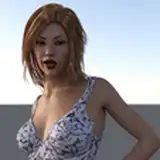
Have been looking forward to this one for a while and while it took a ton of work and learning, I think this ended up being my best done look yet.
As I was extracting her from the game, I noticed she has a ton of intricate jewelry that's already rigged, I decided to make use of the chance and as a result this look uses CUA as clothing for a fair bit of the items.
Not only this allows them to stay as a high quality mesh but they're also rigged!


The earrings, bracelets, knee rings, upper bracelets, mostly everything delicate/an accessory is rigged as a CUA.
They won't jiggle a ton (kinda hard to see them through GIF format) but they'll move enough to be quite noticeable but not enough to look off.
This look contains:
SF3 Elena outfit
SF6 Elena outfit
2 rigged hair CUAs, her SF3 hair and the yee yee ass SF6 haircut
Tons of CUAs as clothing, grand majority are fully rigged
Full diffuse, normal, spec and gloss textures
Elena morph
Hair items including eyebrows, eyelash details and some pubes I made as an extra
IMPORTANT:
It's absolutely NECESSARY that you download the dependencies needed for the CUA clothing; Stopper clothing manager plugin and Skynet fork of CUA clothing:
https://hub.virtamate.com/resources/clothing-plugin-manager.37633/
https://hub.virtamate.com/resources/stoppers-cua-clothing-alt.57072/
1) Regarding CUA clothing:
While I changed the physics of the rig for each one, it's still CUA clothing and due to VAM limitations it WILL clip or not move accordingly.
But unlike regular clothing, CUA clothing has a lot of advantages, here's several solutions;
1.a) Use one of the CUA clothing holding/glue plugins:
https://hub.virtamate.com/resources/cua-superglue-hold-version.29053/
1.b) Use BoneControl plugin (specially for animations):
https://hub.virtamate.com/resources/bone-control.56170/
1.c) Move/resize them directly through the clothing plugin controls (plugin tab in clothing item > second/third plugin controls)
In addition, you can also save and load presets for these CUA clothing items using the first plugin or add your own favorite plugins to each with the click of a button to recolor them, collider control, etc.
2) Regarding morphs:
The base morph is pretty much a 1:1 of her SF6 model (just not as tall as usual), since SF is very stylized and Elena is very tall and lanky she does have some wonky proportions, particularly once scaled to vam regular base look so she's usable in scenes.
I've made several changes using VAM built in morphs to both make her work better with most scenes and some personal touches, but if you DO want only the base SF6 morph you can simply zero/edit these morphs and make her taller.
I would recommend not removing the eye morphs or just change them for similar ones, the base game model eyes are different than how you see them in game as they increase the size/move them a LOT through animation so there was some adjustment needed to make them look better here.
This look uses Toussaint eye shadow:
https://hub.virtamate.com/resources/cua-hair-colliders-as-clothing-item.54202/
Kemenate morphs:
https://hub.virtamate.com/resources/unisex-morphs.213/
Please make sure to use CUA manager for the hair assets and in this case I really recommend one of the glue/stick on plugins above or your particular favorite.
Apologies for rendering both looks in one scene, normally I would've just done a button to toggle between them but CUA clothing packaging is a real pain in the ass and refused to play ball, at this point I've spent so much time and effort on this port that I just can't put even more trying to force this thing to comply, so I did a less demanding lighting on the sample scene.
As always, please reach out if you have any problems.