FurryVNE Build 2024-07-07
Added 2024-07-07 19:25:45 +0000 UTCHi all,
New build for you.
Noticed an issue with not all temp files being removed during character export. This has now been fixed.
This is likely the last build before cloud interactions goes live.
Release notes
>>> CLICK HERE TO READ THE RELEASE NOTES <<<
>>> CLICK HERE TO DOWNLOAD <<< (for patrons)
Download instructions
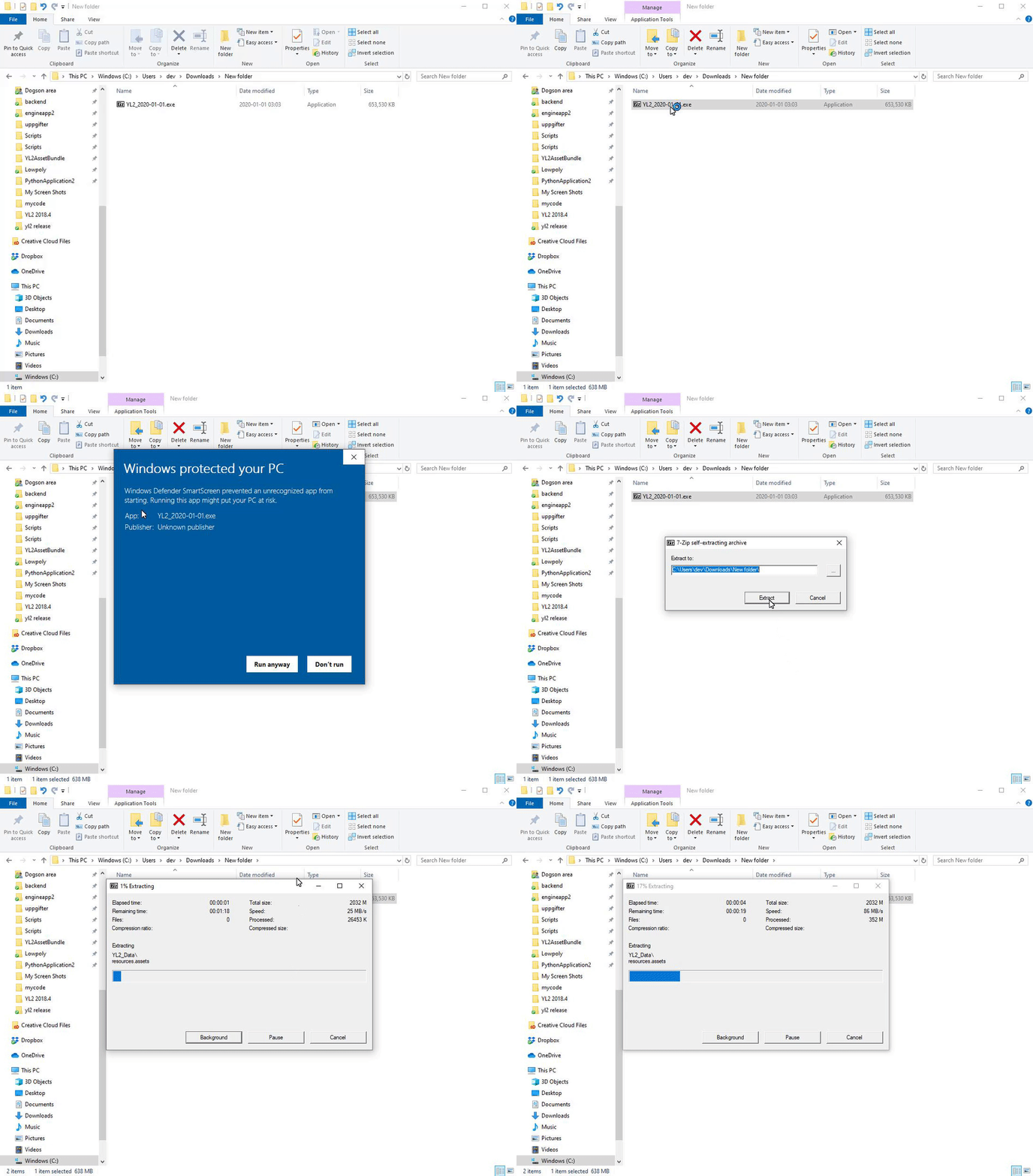
The app comes in a self-extracting archive. You can either run the exe to let it extract itself, or extract it with 7-zip if that makes you feel better.
Windows doesn't seem to like unknown EXEs, so it may block you from running the self-extractor. To unblock it, simply follow these instructions:
All the best.
- FurryVNE Team
Comments
Alright so apparently its Bitdefender firewall blocking the port. Gonna see if i can add it to the exception list.
Warnd
2024-07-15 13:25:31 +0000 UTCVERY strange error. You are able to access the site through the browser, but when making the programmatic request to server (curl), then your computer won't even connect! It's not a server issue, it is a client issue. Things you can try: 1. Use a Different DNS Server Sometimes, DNS issues can cause connectivity problems. You can try using a different DNS server, such as Google DNS (8.8.8.8) or Cloudflare DNS (1.1.1.1). https://www.hellotech.com/guide/for/how-to-change-dns-server-windows-mac 2. Check Port and Firewall Settings Ensure that port 443 (HTTPS) is open and not blocked by any firewall or network security settings on your computer or network. 3. Try using VPN Some countries have national firewalls, preventing certain connections from being made. You can try using a VPN to circumvent this. 4. Check hosts In Windows 10 the hosts file is located at C:\Windows\System32\Drivers\etc\hosts. Right click on Notepad in your start menu and select “Run as Administrator”. This is crucial to ensure you can make the required changes to the file. Check if there is any entry for yl2-cloud.appspot.com and remove that line if there is. Please let us know if you find out anything more! And if you don't we'd be happy to offer a refund. Very sad if it won't work due to local network issue! All the best. - odes
FurryVNE Team
2024-07-15 06:03:38 +0000 UTChttps://pastebin.com./wb85sGR1 Think i did this right.
Warnd
2024-07-14 21:39:35 +0000 UTCCan you share the Player.log with us so we can take a look at the code? In order to get it, please follow these steps: 1. Cause the unsuccessful log in 2. Press WinKey + R. 3. Paste the string "%USERPROFILE%\AppData\LocalLow\FurryVNE Team\FurryVNE\Player.log" This will open text editor with the file. 4. Copy all contents and paste at https://pastebin.com. 5. Send us the link. Video tutorial: https://gyazo.com/285f4e68f11d3826b1c9166ced680b57 Thank you. All the best.
Blacky
2024-07-14 21:16:13 +0000 UTCDeleted all files including the cache and then redownloaded. Still getting an invalid server response.
Warnd
2024-07-14 12:59:11 +0000 UTCHi there Warnd! It may be that you got a faulty version! We accidentally uploaded a non functioning version a while ago. You can try downloading FurryVNE again to get the correct version! Also, try clearing cache. WinKey + R, "%appdata%/FurryVNE" and remove the cache folder. Let us know if this helps. All the best. - odes
FurryVNE Team
2024-07-14 05:09:32 +0000 UTCNo matter how many times i log in I just end up with an invalid server response. Is there anything i can do about this?
Warnd
2024-07-13 21:48:41 +0000 UTCHa, that was indeed it. Weird, I was sure it worked previously with the same version. Thanks.
Hans Petersen
2024-07-13 17:56:20 +0000 UTCYou may have downloaded a version in between versions that we had to take down! That version was faulty. Try downloading again to get the newest one! Also, clear the cache. WinKey + R, "%appdata%/FurryVNE" and remove the cache folder.
FurryVNE Team
2024-07-13 10:48:21 +0000 UTCHey, not sure where to ask this. The app in the most recent version suddenly started to crash/freeze when trying to load any character (even premade ones or some downloaded from the cloud) into an interaction scene or if trying to load an interaction with a character already present. The only thing that changed is that I upgraded my RAM from 16 to 64 GB. The app worked fine before that. Is there some file or something I have to delete because it is somehow allocating things wrong or something? I already deleted the entire install and roaming folders to no avail. I can also send you a crash dump if you like (and tell me where :D).
Hans Petersen
2024-07-13 08:47:07 +0000 UTCNeat. I'm a bit late, but this dropped on my birthday. :D
BadOmen113
2024-07-08 22:22:17 +0000 UTC