Hello coomboys and coomgirls. I'm afraid today's post does not come with a build, but it does come with a way to extract just a little bit more customizability from the current version of the game.
In the new designer menu you will most likely have seen several new options that allow you to choose a texture, namely: Pupil overlay, eyebrow style, eyelash style, and eyeshadow*. The hyper-observant among you may also have noticed that the game now creates a new "Textures" folder in the game content directory (the same place where addons are stored). Appropriately named image files placed in this directory are automatically loaded at runtime and added as options for you to choose from the designer menu! Let's give it a go to see how it works.
Each texture needs to be laid out in a certain way so that it maps onto HD-chan's material correctly in-game. To help you with this (and image naming), I have uploaded some guide images here.
Let's start with probably the simplest example, a pupil overlay. The heart image at the above link is the same texture used in-game. The size of the texture you choose doesn't really matter (don't make it too big though), just make sure it's a square. Also important to remember is that pupil overlay textures are applied additively, which means that black parts of the texture will end up being invisible. For demonstration's sake I've just used a fire emoji for this one. Saving it with an appropriate name (the same format as the guide images), we can now see it as an option in-game!

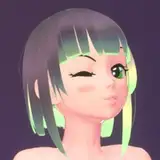
Next let's try an eyeshadow texture. To be honest the eyeshadow texture is actually mapped to the whole face, so anything we want applied to the face could be put in here for now (in future more options for different textures attributes will be added). Let's say we like D.Va from Overwatch's pink whisker things and try and recreate them with an eyeshadow texture.

Creating texture's for HD-chan's face requires slightly more thought because we have to be careful where we position things on the texture so that they appear in the right place on the 3D model. HD-chan's face overlay textures use an orthographic projection, meaning that the texture is laid over the model completely flat, and the closer to the edges of HD-chan's face you go, the more things will start to get stretched out as they wrap around the sides of the model**. Thankfully this is a pretty simple example so I think we'll be okay. Save the image the same as before (make sure to hide the guide layer) and let's check the results.

Not bad!
Making 3D addons for HYPERDEEP is relatively complicated, so I hope as development continues that I can add more opportunities for people to customize the game in a simpler way using 2D textures.
*Tan style is also a texture attribute but for reasons too boring and complicated to get into here is handled differently internally. If you want to see a particular tan style added to the game let me know in the requests channel on discord.
**There is currently a small bug where textures also get applied to the back of HD-chan's head, which will be fixed soon.