FurryVNE Build 2024-03-12
Added 2024-03-12 19:54:33 +0000 UTCHi all!
New build for you. Many important bug fixes as well as workflow improvements.
We reckon this kind of work will continue throughout the month (fixing bugs and making improvements). Maybe next month we'll start implementing cloud for interactions (with a planned release sometime during the summer, if all things go according to plan).
>>> CLICK HERE TO READ THE RELEASE NOTES <<<
>>> CLICK HERE TO DOWNLOAD <<< (for patrons)
Download instructions
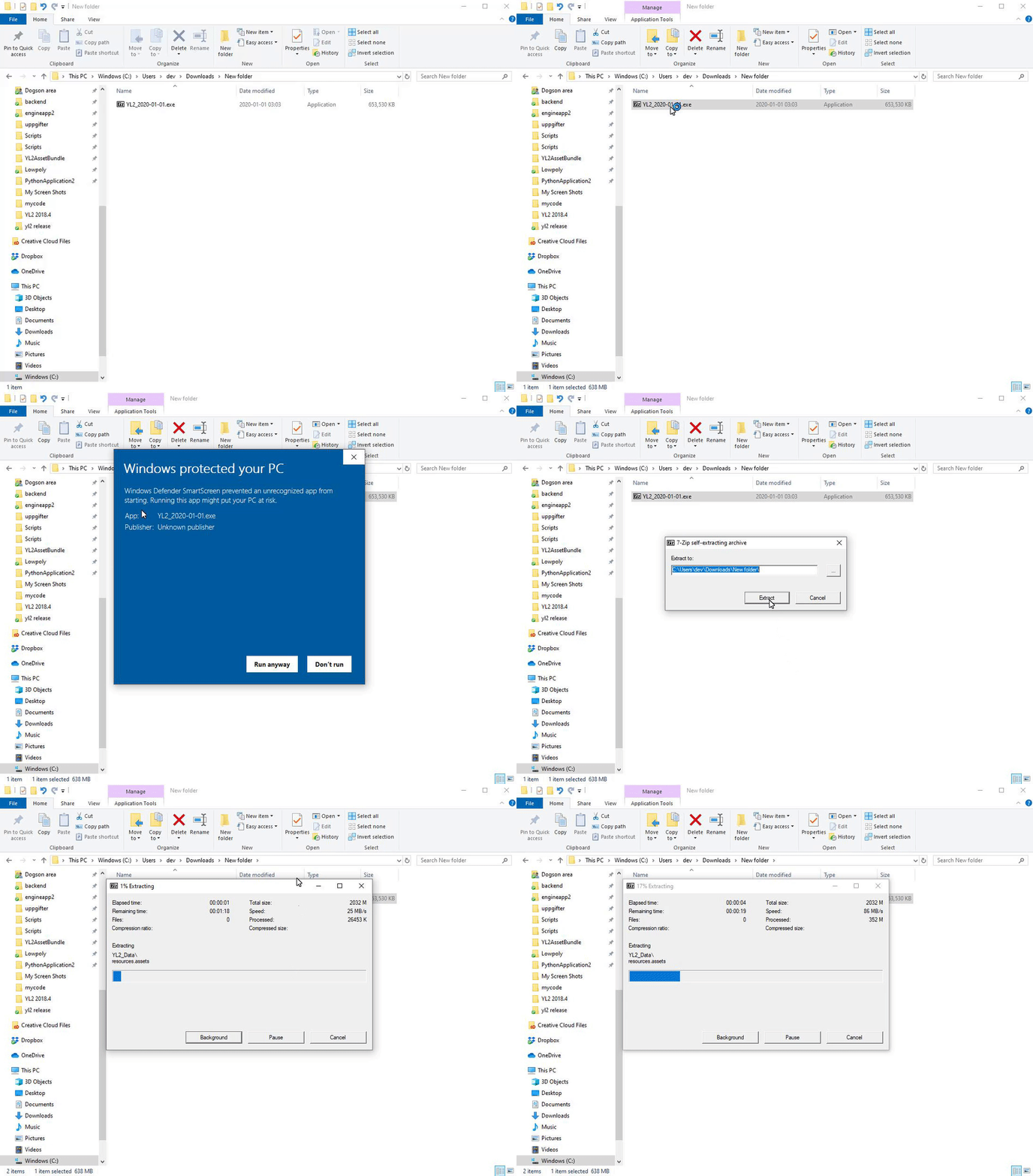
The app comes in a self-extracting archive. You can either run the exe to let it extract itself, or extract it with 7-zip if that makes you feel better.
Windows doesn't seem to like unknown EXEs, so it may block you from running the self-extractor. To unblock it, simply follow these instructions:
All the best.
- FurryVNE Team
Comments
You can't add bones - they have to already exist within the asset prior to importing it. We have added bones to all our provided assets, but if you make your own you'll have to set it up yourself in Blender.
FurryVNE Team
2024-03-19 07:22:54 +0000 UTCIs there a way to add bones/chains to a part when you enable physics? I've seen some characters on the cloud that have extra chains but cant seem to figure out how to add my own.
durzac
2024-03-19 05:46:26 +0000 UTCMake sure you extracted all contents from the archive! (The "External" folder and its contents are required). Still doesn't work? Share your Player. Log (located in %USERPROFILE%\AppData\LocalLow\FurryVNE Team\FurryVNE). Cause the issue, then send us the log! Does this happen for all characters or just that single one? Can you share the character too? All the best. - odes
FurryVNE Team
2024-03-15 20:43:18 +0000 UTCHello! When exporting a character for interaction, I get stuck at the first file. Is there any way to worl around this?
AXI5 Productions
2024-03-15 18:58:32 +0000 UTC