XaiJu
yiffalicious

yiffalicious

patreon


yiffalicious posts

FurryVNE Build 2024-06-19

Hi all,

I apologize for posting a new build, but we have just discovered a critical bug affecting validation in the live build. Essentially, when we create a build, a specific file tied to that build is uploaded to the server. This file is essential for validation. Unfortunately, due to a bug, the internal build number was not incremented, causing this file to be overwritten when new (internal) builds were made. As a result, the live build fails to validate.

In case you wonder why this hasn't happened before - previously, the internal build number was incremented under certain conditions, which were always met. However, recent changes have caused these conditions not to be met anymore (which is fine), but it left the build number unchanged (which is not fine).

We have fixed this bug so the build number will always increment, but we need to post a new build to restore proper functionality.

Sorry for the inconvenience.

Release notes

>>> CLICK HERE TO READ THE RELEASE NOTES <<<

>>> CLICK HERE TO DOWNLOAD <<< (for patrons)

Download instructions

The app comes in a self-extracting archive. You can either run the exe to let it extract itself, or extract it with 7-zip if that makes you feel better.

Windows doesn't seem to like unknown EXEs, so it may block you from running the self-extractor. To unblock it, simply follow these instructions:

All the best.

- FurryVNE Team

View Post

FurryVNE Build 2024-06-15

Hi all!

New build for you.

Some improvements and some bug fixes. See the release notes.

Other news

Still working on the cloud component for interactions. The cloud component is divided into 34 tasks. We're done with 24 of them.

Release notes

>>> CLICK HERE TO READ THE RELEASE NOTES <<<

>>> CLICK HERE TO DOWNLOAD <<< (for patrons)

Download instructions

The app comes in a self-extracting archive. You can either run the exe to let it extract itself, or extract it with 7-zip if that makes you feel better.

Windows doesn't seem to like unknown EXEs, so it may block you from running the self-extractor. To unblock it, simply follow these instructions:

All the best.

- FurryVNE Team

View Post

FurryVNE Build 2024-06-07

Hi all!

New build for you.

New anti shaft-clipping tech and some bug fixes.

>>> CLICK HERE TO READ THE RELEASE NOTES <<<

>>> CLICK HERE TO DOWNLOAD <<< (for patrons)

Interaction examples

We wanted to get this build out asap, so we'll post updated interaction examples later.

Download instructions

The app comes in a self-extracting archive. You can either run the exe to let it extract itself, or extract it with 7-zip if that makes you feel better.

Windows doesn't seem to like unknown EXEs, so it may block you from running the self-extractor. To unblock it, simply follow these instructions:

All the best.

- FurryVNE Team

View Post

Example interactions + News

Example interactions

Latest:

https://storage.googleapis.com/furryvne-downloads/Sample-Interactions-31-05-24.rar

Original post:

https://www.patreon.com/posts/97742602

News

We're still implementing cloud for interactions. I've sent more hours hunting bugs this month than anticipated (not related to cloud), but I still consider us to be on schedule for a cloud interactions release during the summer. Rough estimate is that we're about 60% done.

All the best.

- odes

View Post

FurryVNE Build 2024-05-31

Hi all!

New build for you.

New body type "bt_f_curvy", new features, additions, changes and bugfixes! See release notes for full list.

>>> CLICK HERE TO READ THE RELEASE NOTES <<<

>>> CLICK HERE TO DOWNLOAD <<< (for patrons)

Interaction examples

We wanted to get this build out asap, so we'll post updated interaction examples later.

Download instructions

The app comes in a self-extracting archive. You can either run the exe to let it extract itself, or extract it with 7-zip if that makes you feel better.

Windows doesn't seem to like unknown EXEs, so it may block you from running the self-extractor. To unblock it, simply follow these instructions:

All the best.

- FurryVNE Team


View Post

Upgrading old YL Characters

Here's a couple of screenshots of some upgrading going on for the OG characters from YL1.

Bunny.. now has a name! -reintroducing Maple. We're probably going to give the others remaning unnamed characters names in due time.

Blacky is our designated tailor and they did a real great job giving clothes to Maple. Maya is also going to get some drip later on as we have descided to make our new bt_f_curvy her default body as she's more reminiscencet of how she used to look back in the old YL days.

We hope you like them!

- Dogson & Blacky

View Post

Introducing bt_f_curvy

Edit: Thank you THe GERio for pointing out the feet, it has now been fixed and I need to check up my unity project export. - Dogson

Hello, Dogson here with a couple of quick WIP screen of the next body type which is bt_f_curvy, a voluptuous shape for your characters and scenarious you'd like to have play out in interactions!

The release containing this body type and other improvements is scheduled to the start of next week as of now.

 There will be more post so follow as we show updates on our OG characters so stay tuned.

- Dogson

View Post

Updated interaction examples

Here's an updated archive with interaction examples:

https://storage.googleapis.com/furryvne-downloads/Interaction-Samples%202024-05-06.rar

Instructions

Put the character hash files in %appdata%\FurryVNE\Cloud\Interaction\Characters, then load the interaction.

Previous discussion

https://www.patreon.com/posts/97742602

View Post

Character restrictions

Given potential future implementation with putting user configured restrictions on characters, what options do you agree with below? (Multi-choice OK.)

Allow editing and use

No restrictions (as it is for all characters currently).

Restrict editing but allow use

Character would be publicly uploaded and displayed, but you wouldn't be allowed to download and edit them (make derivatives), unless author has given you specific rights to use them (through a system on the site). Others would still be able to use your character in interactions though without requiring permission.

Restrict editing and use

Character would be publicly uploaded and displayed, but you wouldn't be allowed to download and edit them (make derivatives), unless author has given you specific rights to use them (through a system on the site). Furthermore, you would only be able to use the character if you had acquired the required privileges.

People could still experiencing your character in any interactions made by you (or anyone else with the required privileges).

Unlisted private character

Character is not publicly visible, and cannot be edited or used in interactions, unless author has given you specific rights to use them (through a system on the site).

People could still experiencing your character in any interactions made by you (or anyone else with the required privileges).

View Post

Problem with character exports?

Hi all!

Do you have issues with exporting characters for interactions?

We are aware some users had issues in the past. A few releases ago, we made some changes, hoping they'd fix the issues. We haven't really heard much since then, so that's why we're asking.

If you still do have issues, can you please send us your Player.log after trying to export a character?

Player.log is located at "%USERPROFILE%\AppData\LocalLow\FurryVNE Team\FurryVNE\Player.log" (press WinKey + R and paste that string). You can copy its contents and upload to pastebin, and then send us the link.

Thank you.

All the best.

- odes

View Post

FurryVNE Build 2024-05-03

Hi all!

New build for you.

New spine stiffness slider and many important bug fixes!

>>> CLICK HERE TO READ THE RELEASE NOTES <<<

>>> CLICK HERE TO DOWNLOAD <<< (for patrons)

Interaction examples

We wanted to get this build out asap, so we'll post updated interaction examples later.

Download instructions

The app comes in a self-extracting archive. You can either run the exe to let it extract itself, or extract it with 7-zip if that makes you feel better.

Windows doesn't seem to like unknown EXEs, so it may block you from running the self-extractor. To unblock it, simply follow these instructions:

All the best.

- FurryVNE Team

View Post

Updated interaction examples

Here's an updated archive with interaction examples:

https://storage.googleapis.com/furryvne-downloads/InteractionsExamples04222024.7z

Instructions

Put the character hash files in %appdata%\FurryVNE\Cloud\Interaction\Characters, then load the interaction.

Previous discussion

https://www.patreon.com/posts/97742602

View Post

FurryVNE Build 2024-04-22

Hi all!

New build for you.

Some important bug fixes as well as new asset preview improvement!

>>> CLICK HERE TO READ THE RELEASE NOTES <<<

>>> CLICK HERE TO DOWNLOAD <<< (for patrons)

Interaction examples

We wanted to get this build out asap, so we'll post updated interaction examples later.

Download instructions

The app comes in a self-extracting archive. You can either run the exe to let it extract itself, or extract it with 7-zip if that makes you feel better.

Windows doesn't seem to like unknown EXEs, so it may block you from running the self-extractor. To unblock it, simply follow these instructions:

All the best.

- FurryVNE Team

View Post

FurryVNE Build 2024-04-16

Hi all!

New build for you.

Some bug fixes. We really wanna start working on interaction for cloud, so wanted to get this out of the way.

>>> CLICK HERE TO READ THE RELEASE NOTES <<<

>>> CLICK HERE TO DOWNLOAD <<< (for patrons)

Interaction examples

https://www.patreon.com/posts/example-97742602

Download instructions

The app comes in a self-extracting archive. You can either run the exe to let it extract itself, or extract it with 7-zip if that makes you feel better.

Windows doesn't seem to like unknown EXEs, so it may block you from running the self-extractor. To unblock it, simply follow these instructions:

All the best.

- FurryVNE Team

View Post

FurryVNE Build 2024-04-12

Hi all!

New build for you. New features as well as many important bug fixes. See the release notes for details.

After this release, we will begin implementing the long anticipated cloud component for interactions. This work will take a while, so we may not have more builds for a while, although we may release a content build at some point during the cloud interaction implementation phase.

>>> CLICK HERE TO READ THE RELEASE NOTES <<<

>>> CLICK HERE TO DOWNLOAD <<< (for patrons)

Updated interaction examples

Here's an updated archive with interaction examples.

New animation inside Crakets examples showcasing the usage of the newly implemented force direction override tech.

Additional scenes on Blacky's Rockroom scene showcasing mouth point IK usage.

https://storage.googleapis.com/furryvne-downloads/13.04.24_Interaction_examples.rar

Download instructions

The app comes in a self-extracting archive. You can either run the exe to let it extract itself, or extract it with 7-zip if that makes you feel better.

Windows doesn't seem to like unknown EXEs, so it may block you from running the self-extractor. To unblock it, simply follow these instructions:

All the best.

- FurryVNE Team

View Post

Timeline zooming vs Cloud priority

Should I implement timeline zooming before cloud for interactions?

View Post

FurryVNE Build 2024-03-24

Hi all!

This new build greatly enhances shaft and orifice dynamics in terms of performance and quality. Also several important bugfixes. See release notes for details.

>>> CLICK HERE TO READ THE RELEASE NOTES <<< 

>>> CLICK HERE TO DOWNLOAD <<< (for patrons)

Requires re-export

As per usual with major changes, you are required to re-export characters for interactions.

To update existing interactions, please follow the guide:

https://guide.furryvne.com/home/Interactions_List/Replace_Character

Updated example interactions

You can find the updated interaction examples package here:

https://storage.googleapis.com/furryvne-downloads/Interaction-Example-Bundle-24.03.2024.zip

Download instructions

The app comes in a self-extracting archive. You can either run the exe to let it extract itself, or extract it with 7-zip if that makes you feel better.

Windows doesn't seem to like unknown EXEs, so it may block you from running the self-extractor. To unblock it, simply follow these instructions:

All the best.

- FurryVNE Team


View Post

FurryVNE Build 2024-03-12

Hi all!

New build for you. Many important bug fixes as well as workflow improvements.

We reckon this kind of work will continue throughout the month (fixing bugs and making improvements). Maybe next month we'll start implementing cloud for interactions (with a planned release sometime during the summer, if all things go according to plan).

>>> CLICK HERE TO READ THE RELEASE NOTES <<< 

>>> CLICK HERE TO DOWNLOAD <<< (for patrons)

Download instructions

The app comes in a self-extracting archive. You can either run the exe to let it extract itself, or extract it with 7-zip if that makes you feel better.

Windows doesn't seem to like unknown EXEs, so it may block you from running the self-extractor. To unblock it, simply follow these instructions:

All the best.

- FurryVNE Team

View Post

FurryVNE Build 2024-03-05

Hi all!

New build for you. Time markers and some bug fixes.

Usually I'd wait and buffer some more fixes, but since people really seem to want to get their hands on time markers we're releasing this immediately.

>>> CLICK HERE TO READ THE RELEASE NOTES <<< 

>>> CLICK HERE TO DOWNLOAD <<< (for patrons)

Download instructions

The app comes in a self-extracting archive. You can either run the exe to let it extract itself, or extract it with 7-zip if that makes you feel better.

Windows doesn't seem to like unknown EXEs, so it may block you from running the self-extractor. To unblock it, simply follow these instructions:

All the best.

- FurryVNE Team

View Post

Time markers

We have now implemented time markers for the timeline in interactions. Furthermore, you can use right Ctrl while dragging keyframes to snap to increments of time.

View Post

FurryVNE Build 2024-02-27

Hi all!

New build for you. This one fixes multiple issues (several of which were major), in addition to improving workflow in interactions. See the patch notes for full details.

>>> CLICK HERE TO READ THE RELEASE NOTES <<< 

>>> CLICK HERE TO DOWNLOAD <<< (for patrons)

Download instructions

The app comes in a self-extracting archive. You can either run the exe to let it extract itself, or extract it with 7-zip if that makes you feel better.

Windows doesn't seem to like unknown EXEs, so it may block you from running the self-extractor. To unblock it, simply follow these instructions:

All the best.

- FurryVNE Team

View Post

Improvements to workflow

The next build of FurryVNE introduces several new improvements to workflow in interactions, in addition to fixing multiple bugs (some of which were severe).

Step creation changes

Previously if you wanted to create a step, you had two options. Either you could click the "+" sign to create a "blank" step (although this blank step would automatically create keyframes for some properties of whatever value they happened to have at the time of step creation). Or, you could simply duplicate the previous step.

Neither of these options were great for the majority of use cases, as usually you'd like the next step to continue from the previous one, but be different in some regards.

Therefore, we have now introduced two new options when creating a new Step.

Create as initialized

This will take the last keyframe for each property from the previous step (from the stack of timelines) and insert them into the default timeline of the newly created step, thus making sure it has the values of the previous step's end.

Duplicate as initialized

This works similarly to the currently implemented duplicate command, with the addition that it overwrites the default timeline with the previous step's last keyframes.

---

In addition to these commands, we have also implemented two new commands when right-clicking on steps:

Initialize with previous step's properties (copy last keyframes, missing properties only)

This command will find properties that had values set in the previous step, but that don't have any values in the default timeline of the current step. Then, it will take the last keyframe of those properties and insert into the default timeline, thus making it sync with the previous step's end.

Initialize with previous step's properties (copy last keyframes, overwrite)

Same as above, with the modification that it simply takes all properties from the previous step and copies their last keyframes into the default timeline of the current step, overwriting any existing values.

Improvements to timeline

We have made several timelines and keyframe editing.

Vastly improved bulk editing performance

Deleting or merging multiple keyframes is now much, much faster. (Also the undo of those.)

Shortcuts

You can now press "X" or "Delete" to delete selected keyframes while the mouse cursor is in the timeline view.

You can also press middle mouse button to create a new keyframe at the location of the mouse cursor.

Other changes

Properties in the timeline view are now always ordered by name in a consistent manner.

Interpolation of node states has also received improvements to create more consistent results when switching between different modes (world, local, snapped to surface).

Bug fixes

We have fixed multiple bugs, some of which were severe. More details in the future release notes.

---

We hope you will find these improvements useful. We intend to publish the new build in the coming day or so.

All the best.

- odes

View Post

FurryVNE Build 2024-02-21

Hi all!

New build for you.

>>> CLICK HERE TO READ THE RELEASE NOTES <<< 

>>> CLICK HERE TO DOWNLOAD <<< (for patrons)

IMPORTANT - PLEASE READ!!

Due to an error with previous exports, you are required to re-export your characters for interactions. Please follow the following guide how to replace previous characters in interactions:

How to replace previous characters 

In case you need to re-download the previous build (in order to open a previous interaction to find out the character hashes), you can find it here.

Also, here's a link to the interactions sample package with updated characters:

Link to updated interactions 

Download instructions

The app comes in a self-extracting archive. You can either run the exe to let it extract itself, or extract it with 7-zip if that makes you feel better.

Windows doesn't seem to like unknown EXEs, so it may block you from running the self-extractor. To unblock it, simply follow these instructions:

All the best.

- FurryVNE Team

View Post

Important notice!

We detected a bug in our SDF generation process (character collision system), causing some SDFs to end up incorrect (especially the pelvis).
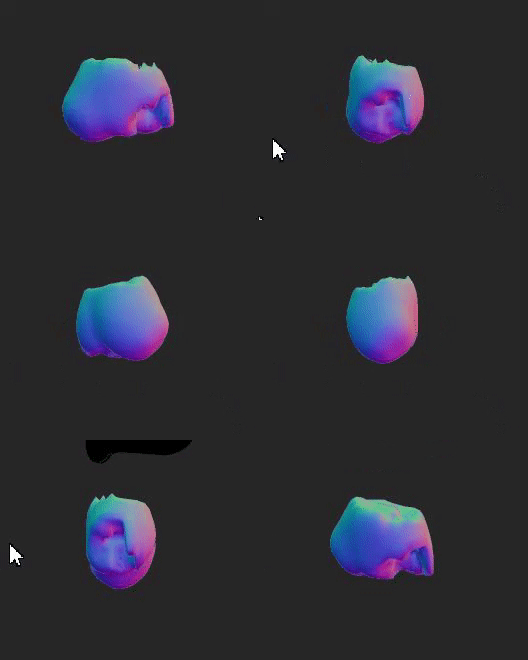
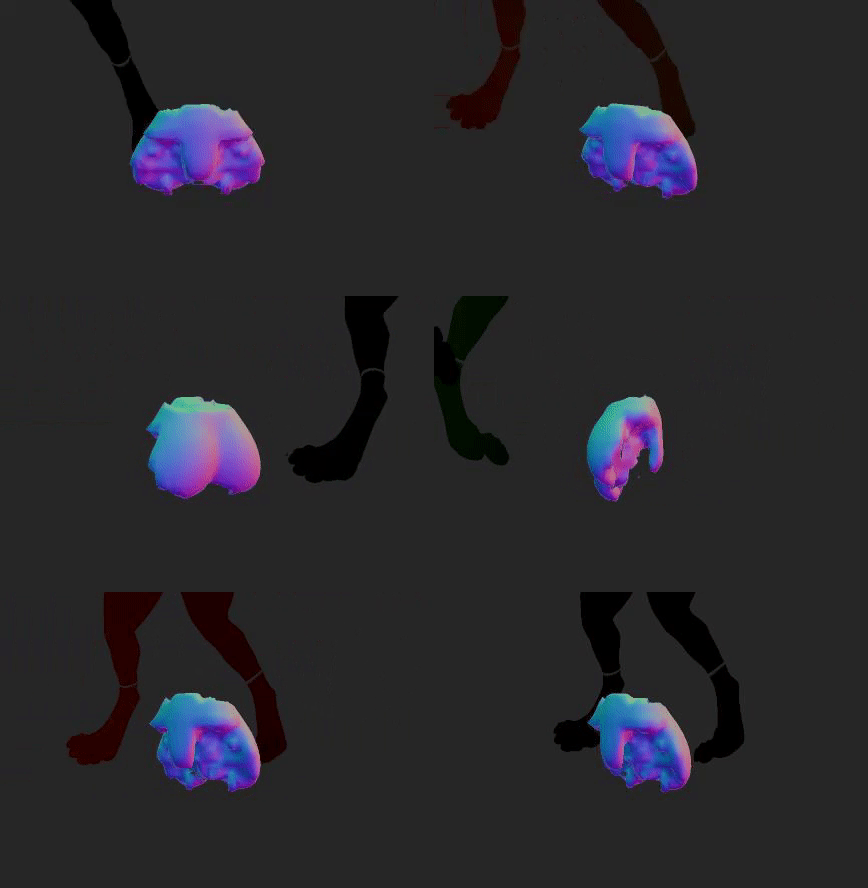
(Examples of incorrect SDFs for pelvis area.)

SDFs are a major part of handling soft bodies, hand placement and collisions, so a faulty SDF will produce undesirable results.

This issue is now fixed for the next release.

(Fixed SDF for pelvis area.)

However, since SDFs are generated at export time, this means you will have to re-export your characters in order to fix this problem. Furthermore, you will have to replace previous characters with these newly exported ones in order to fix any previous interactions that you have made.

Please follow this guide how to replace characters in an interaction:

How to replace characters in an interaction

Theory

Each character file has a unique name based off its contents (a "hash"). The characters are stored in:

%appdata%/FurryVNE/Cloud/Interaction/Characters

An interaction references the hashes used, and will try to load the characters they represent. So in other words, in order to make an interaction load a different character, we can simply replace the files which the hashes represent! We just need to find their hashes.

Guide

1. Open your interaction.

2. Open the manifest (Debug > Manifest).

3. Copy the character hashes in the manifest.

4. In character builder, export your characters again, to make them fixed.

5. Rename the exported .yl2fc files to the hash name (from step 3) + the extension ".fvne_compiled_character".

(I.e., for an exported character "my_character.yl2fc", you'd rename it to "<hash from step 3>.fvne_compiled_character", e.g. "6243f29e28811c15b61dbe38269ab2f36b19b7827b89ca7f68dd22ebbf078f81.fvne_compiled_character".)

6. Copy this newly renamed file to %appdata%/FurryVNE/Cloud/Interaction/Characters, replacing the previous character.

Final words

We intend to make this process easier in the future so you can replace characters directly in FVNE through the UI.

All the best.

- odes

View Post

FurryVNE Build 2024-02-11

Hi all!

New build for you.

>>> CLICK HERE TO READ THE RELEASE NOTES <<< 

>>> CLICK HERE TO DOWNLOAD <<< (for patrons)

Download instructions

The app comes in a self-extracting archive. You can either run the exe to let it extract itself, or extract it with 7-zip if that makes you feel better.

Windows doesn't seem to like unknown EXEs, so it may block you from running the self-extractor. To unblock it, simply follow these instructions:

All the best.

- FurryVNE Team

View Post

Sub-part bug

Hi all,

Writing to let you know that a fix we recently released is causing issues with previous characters:
Previously, parts were organized in this fashion:
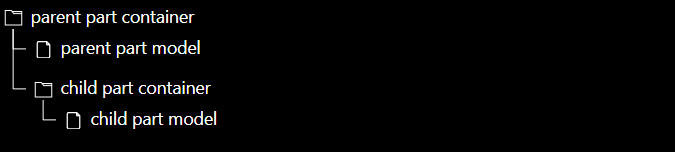
In latest release, they were however organized like this:


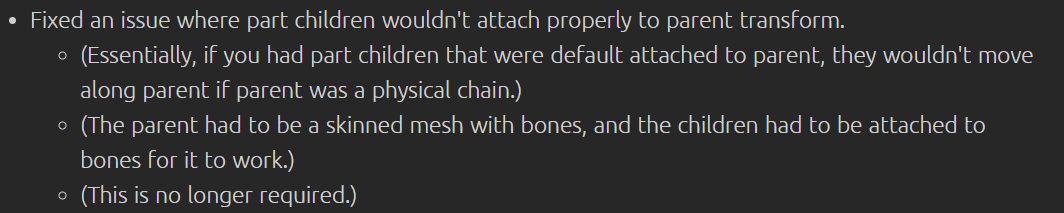
The reason for this change was because if the parent model was physically simulated, then the parent model would change its transform while the children would be unaffected, which is undesireable.

However, since the parent part model most likely has a different coordinate system than the container, it means that child models would orient themselves differently upon load in the newest build as compared to the previous one.

For this reason, we will change back to how it worked in the old way.

Getting parts to behave in the new way is still possible in the old way. You just have to set them to a specific bone:

Or you can surface snap (ctrl + click) or bone snap (shift + click).

All the best.

- odes


EDIT:


SO TO CLARIFY!

If you set the parent manually or if you use snap to bones or snap to surface, you are gucci regardless (in both systems). This post is only in regards to what happens when sub part doesn't have transform parent defined (other than being part of a parent part, which isn't the same thing).

View Post

FurryVNE Build 2024-02-09

Hi all!

New build for you.

>>> CLICK HERE TO READ THE RELEASE NOTES <<< 

>>> CLICK HERE TO DOWNLOAD <<< (for patrons)

Download instructions

The app comes in a self-extracting archive. You can either run the exe to let it extract itself, or extract it with 7-zip if that makes you feel better.

Windows doesn't seem to like unknown EXEs, so it may block you from running the self-extractor. To unblock it, simply follow these instructions:

All the best.

- FurryVNE Team

View Post

Poll

I'll at least be spending this week on fixing bugs and some other issues, but what about after that? Do you want cloud asap, or should I spend some time improving interaction editing?

Just a guiding poll, curious what the community wants.

- odes

View Post

Problems & potential solutions

We've compiled a small list of problems that some people have been running into and some things you can try in case it has happened to you.

Can't export character

Make sure you extracted all the files and folders, and (if you moved them) that all items we're copied.

We've had several users not include the "External" folder after extract/copy. This folder and its contents are required in order to export characters.

Note, this is not a solution for everyone or every character. Some character simply cannot be exported properly atm.

If you are able to export characters in general, but have found some that are not possible to export, please let us know the characters!

Can't load example interactions

Make a backup copy of:

%appdata%/FurryVNE

Then remove:

%appdata%/FurryVNE

Start the app, pass the authentication and click "Interactions".

Now, copy the ".fvne_compiled_character" files from the example folder to %appdata%/FurryVNE/Cloud/Interaction/Characters.

After you've done this, you should be able to load the ".fvne_ic" files (interaction).

Can't login

Make a backup copy of:

%appdata%/FurryVNE

Then remove:

%appdata%/FurryVNE

Extreme slowdowns near beds

We've noticed an issue with potential extreme slowdowns happening when placing character near or on beds. The issue is exacerbated the larger the character is. We are currently working on rectifying this issue.

(The issue is due to Unity being extremely inefficient in resolving collisions with non-convex mesh colliders. We're currently trying to implement custom SDF collision for environment, but this will take a while to implement.)

All the best.

- FurryVNE Team

View Post

Craket made a quick start guide for interactions

If you want to make your own interactions, here's a quick start guide Craket made:

https://guide.furryvne.com/home/Interactions_List/Quick_Start

If you want to use someone else's interactions, we recommend you check out this link:

https://www.patreon.com/posts/example-97742602

AND READ THE README.TXT inside the zip file.

All the best.

- odes

View Post